

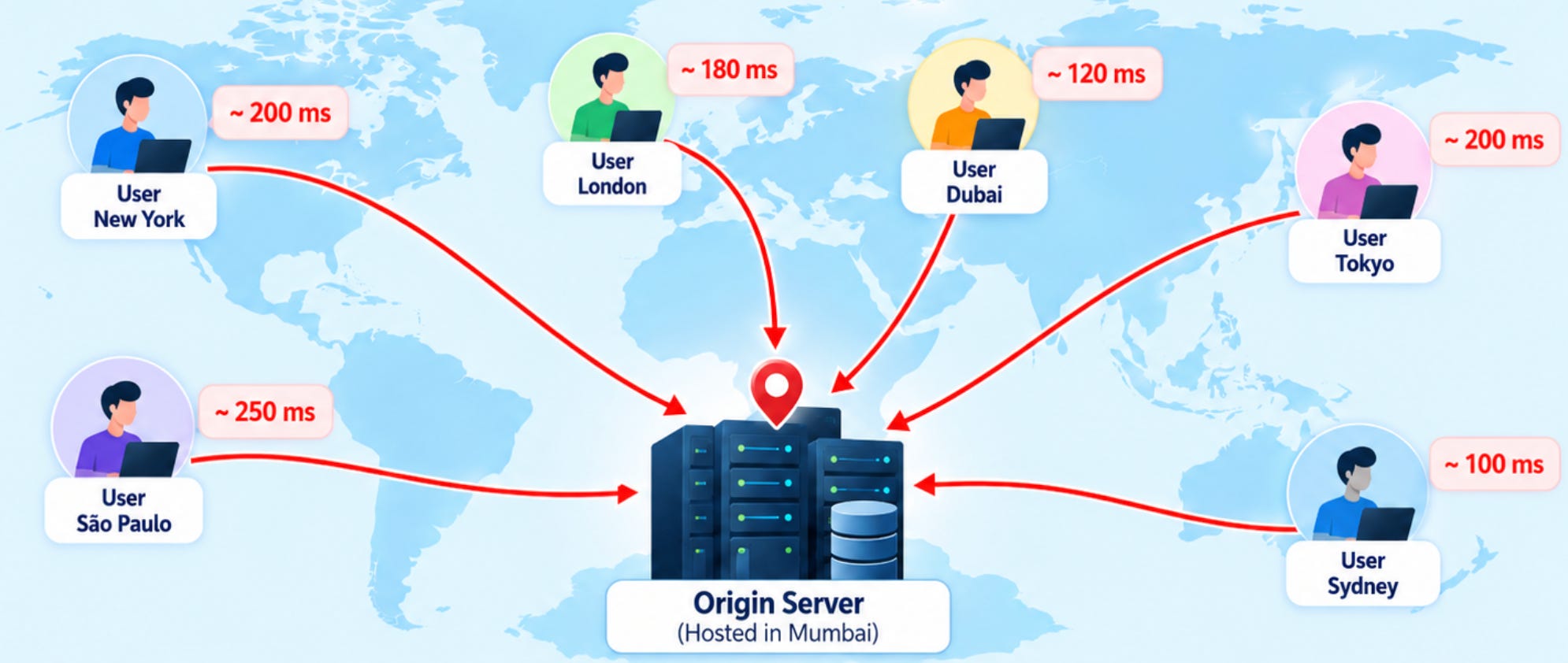
Imagine you have built a web application hosted on a server in Mumbai.
Initially, everything works perfectly.
Then your application starts getting users from:
Mumbai
London
New York
Singapore
Sydney
Now every user request has to travel back to your origin server.
As traffic increases, your server starts experiencing:
Higher latency
Increased bandwidth consumption
More CPU and network pressure
Slower response times
Increased infrastructure costs
Potential downtime
So, how do large-scale applications deliver content quickly to users around the world?
The answer is CDN - Content Delivery Network.
🗣️ What Is a CDN?
A Content Delivery Network is a geographically distributed network of servers that delivers content from locations closer to users.
Instead of every user requesting content directly from your origin server:
a CDN places edge servers between users and your origin:
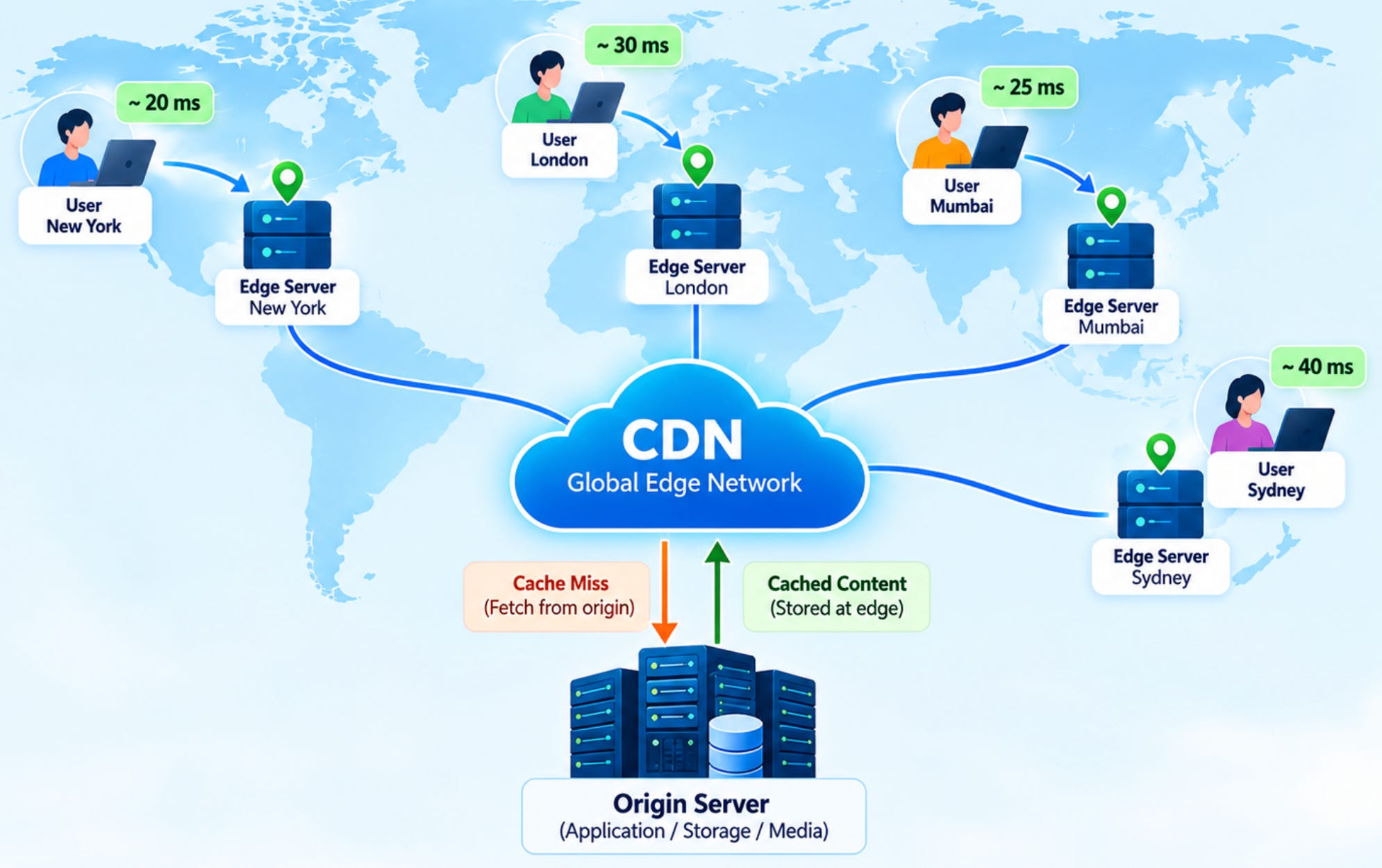
The CDN stores frequently requested content at these edge locations.
When a user requests content, the CDN tries to serve it from the closest suitable edge location.
The core idea is simple:
Bring content closer to the user.
🤔 Why Do We Need a CDN?
Let’s take a simple example.
Your application is hosted in Mumbai.
A user in Mumbai might have relatively low network latency:
Mumbai User
     |
     | Shorter distance
     v
Mumbai Server
But a user in New York has to communicate with infrastructure thousands of kilometers away:
New York User
     |
     | Long network distance
     v
Mumbai Server
Now imagine millions of requests.
Your origin server has to repeatedly send the same files:
app.js
style.css
logo.png
product-image.jpg
font.woff2
video.mp4
Most of these files don’t change frequently.
So instead of making the origin serve the same content repeatedly, a CDN can cache that content closer to users.
🤖 How Does a CDN Work?
Let’s take an image:
https://example.com/images/product-101.jpgA user requests the image.
The request reaches the CDN.
The CDN checks:
“Do I already have this file in my cache?”
There are two possibilities.
🟢 Cache Hit
The content already exists at the edge.
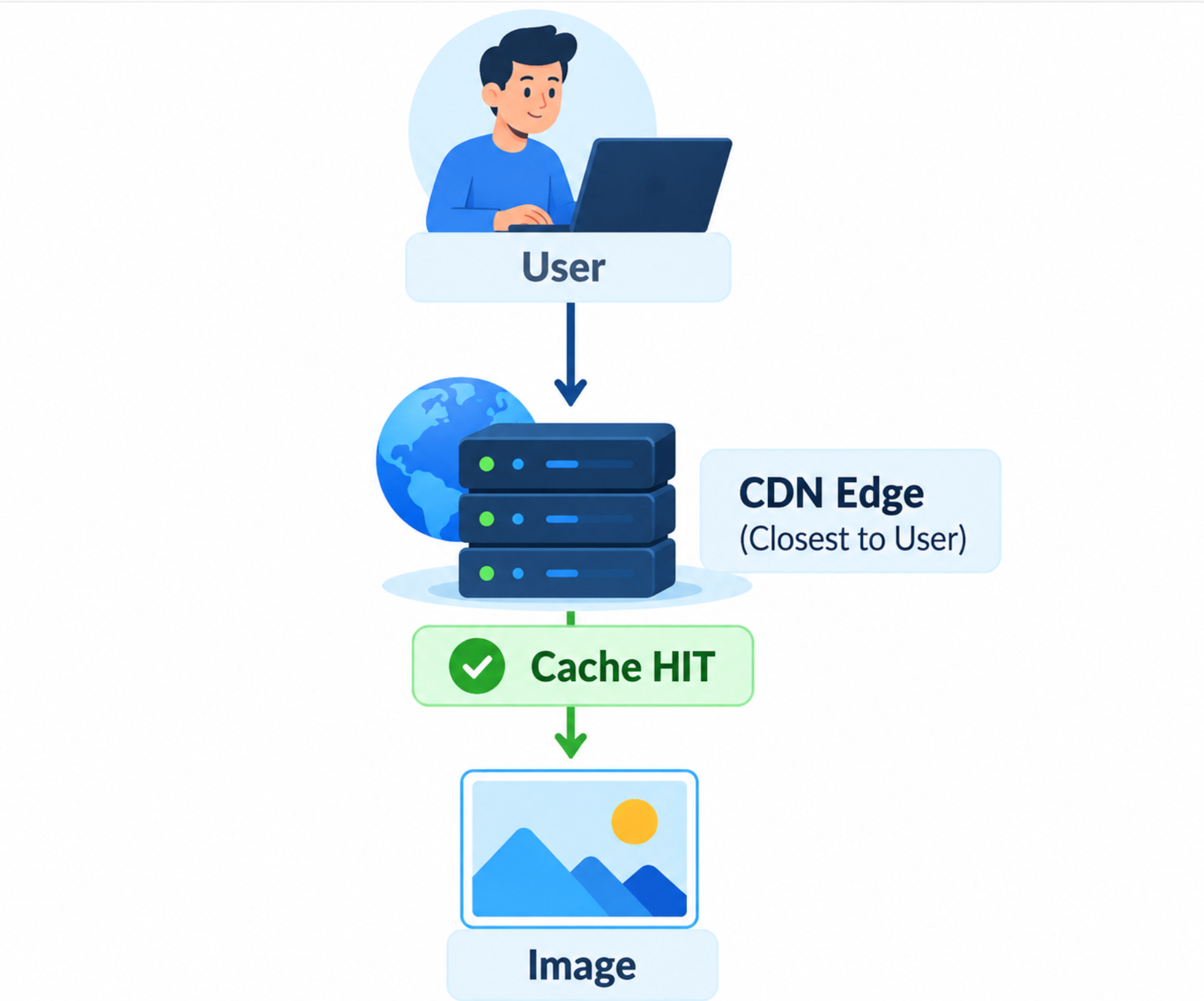
The CDN immediately returns the image.
The origin isn’t contacted.
🔴 Cache Miss
The content doesn’t exist at the edge.
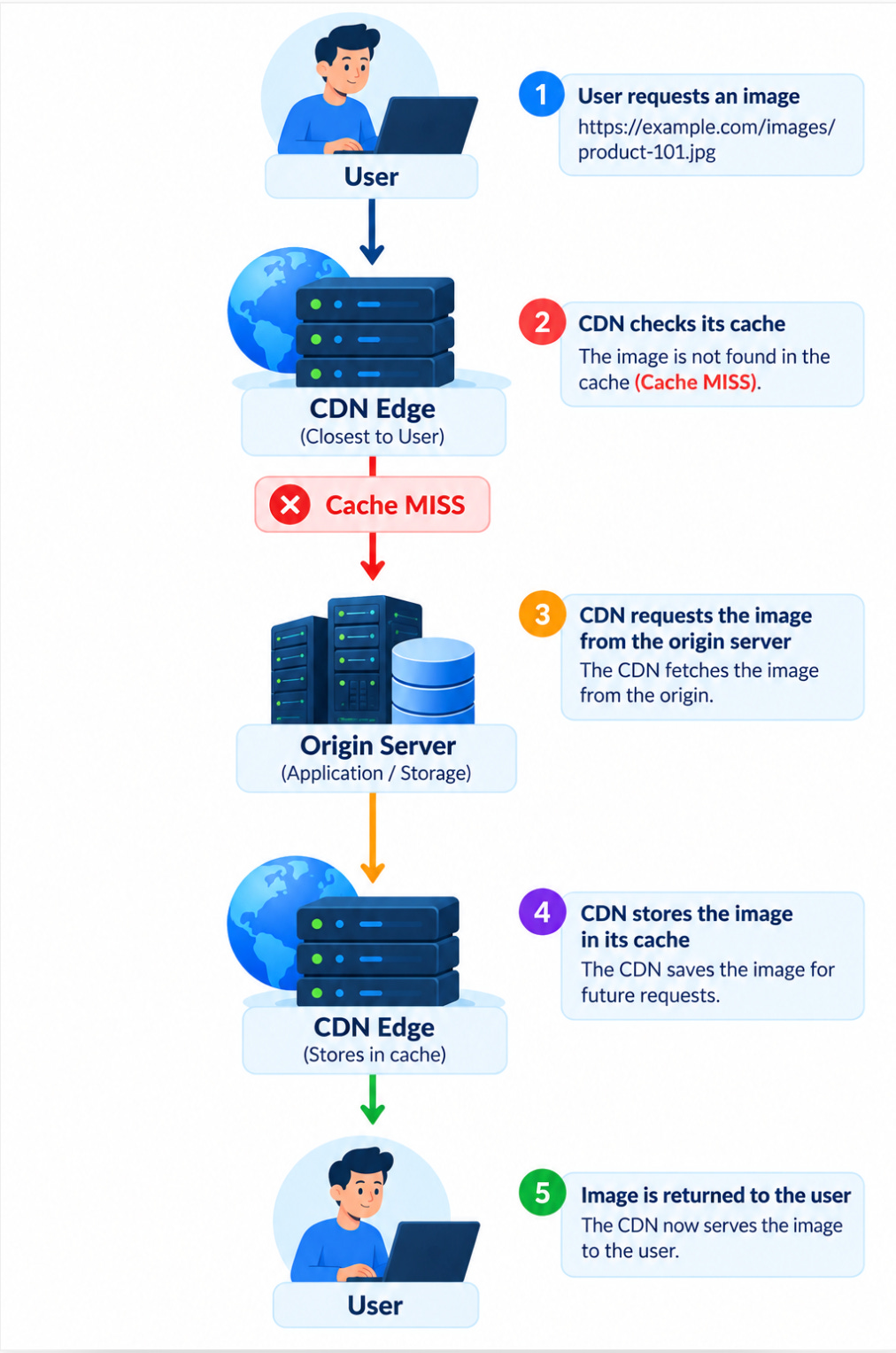
The CDN retrieves the content from the origin.
It can then store the content in its cache.
The next user requesting the same content can receive it directly from the CDN.
💡Understanding Cache Hit and Cache Miss
This is one of the most important concepts when working with CDNs.
Suppose 10,000 users request:
/logo.pngWithout caching:
10,000 Requests
       |
       v
    Origin
With CDN caching:
10,000 Requests
       |
       v
      CDN
       |
       +---- 9,999 Cache Hits
       |
       +---- 1 Cache Miss
                 |
                 v
               Origin
The exact number of origin requests depends on timing, cache behavior, configuration, and revalidation, but the important idea is that repeated requests can be served from the edge.
💾 What Does a CDN Cache?
CDNs are commonly used for content that is requested frequently and doesn’t change every second.
Typical examples include:
Images
.jpg
.png
.webp
.svg
JavaScript
app.js
vendor.js
main.js
CSS
app.css
style.css
Fonts
.woff
.woff2
.ttf
Videos
.mp4
.webm
Documents
.pdf
.zip
Static HTML
Depending on the application architecture, HTML pages can also be cached.
🌐 CDN Architecture
A simplified CDN architecture looks like this:
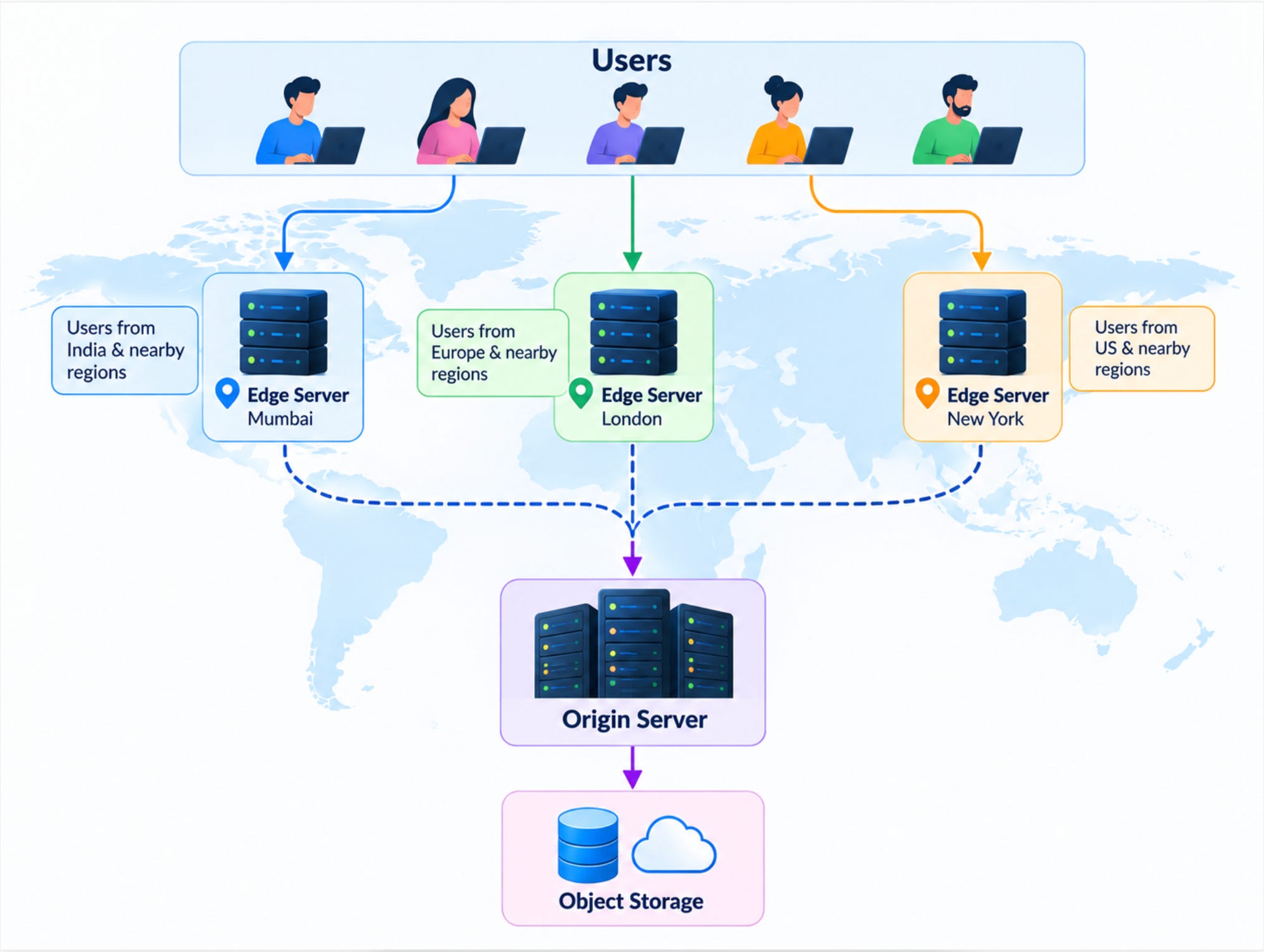
The origin contains the original content.
The edge servers cache frequently requested content.
The user ideally receives the content from an edge location instead of going all the way back to the origin every time.
🧩 What Is an Origin Server?
The origin is the original source of the content.
For example, your origin could be:
Application Serveror:
Object Storageor:
A dedicated media serverFor a web application, you might have:
Origin
   |
   +── HTML
   +── JavaScript
   +── CSS
   +── Images
   +── Videos
The CDN retrieves content from the origin when it doesn’t already have a valid cached copy.
📈 CDN Caching Strategy
Caching is where CDN architecture becomes interesting.
You need to decide:
What should be cached?
How long should it be cached?
When should it expire?
How should updated content reach users?
These decisions are usually controlled through HTTP caching headers and CDN configuration.
For example:
Cache-Control: public, max-age=3600This means the response can be cached and considered fresh for 3600 seconds.
Cache-Control
Some commonly used directives are:
public
Cache-Control: publicAllows shared caches to store the response.
max-age
Cache-Control: max-age=3600Specifies how long the response can be considered fresh.
no-store
Cache-Control: no-storeTells caches not to store the response.
immutable
Cache-Control: public, max-age=31536000, immutableThis can be useful for versioned static assets that never change at the same URL.
❓The Cache Invalidation Problem
Caching gives us performance.
But caching introduces another problem:
What happens when the original content changes?
Suppose your CDN cached:
logo-v1.pngYou update the logo.
But users still receive the cached version.
Why?
Because the CDN still considers the cached object valid.
There are several ways to solve this.
Strategy 1: TTL
Set an expiration time.
Cache-Control: max-age=3600After the specified period, the cached object can become stale and the CDN may retrieve a newer version.
Strategy 2: Cache Purging
When you deploy new content:
Deploy
  |
  v
Purge CDN Cache
  |
  v
New Content
The CDN removes the selected cached objects.
Strategy 3: Versioned Assets
Instead of:
app.jsuse:
app.v1.jsAfter deployment:
app.v2.jsThe URL changes, so the CDN treats it as a new resource.
This is a very common strategy for JavaScript, CSS, images, and other static assets.
🚨 Common CDN Mistakes
1. Caching Everything
Not every response should be cached.
2. Ignoring Cache Invalidation
Users may continue receiving stale content.
3. Using Long TTLs Without Versioning
Content updates can take too long to propagate.
4. Caching Personalized Data
This can create serious security and privacy issues.
5. Ignoring Cache Keys
Different requests can require different cached responses.
6. Not Monitoring Cache Performance
Without metrics, you don’t know whether your CDN configuration is effective.
🏢 Popular CDN Providers
Some widely used CDN platforms include:
Cloudflare
Amazon CloudFront
Akamai
Fastly
Google Cloud CDN
The right choice depends on your geographic requirements, traffic volume, caching needs, security requirements, cloud environment, and cost.
⭐ CDN Best Practices
If you’re designing a CDN strategy for production, keep these principles in mind:
1. Cache What Changes Slowly
Good candidates include:
Images
CSS
JavaScript
Fonts
Videos
Documents
2. Use Long TTLs for Versioned Assets
For example:
app.a81f92.jscan have a long cache lifetime because the filename changes when the content changes.
3. Keep Cache Keys Simple
Only include request attributes that actually change the response.
4. Protect Sensitive Data
Never make private or personalized content publicly cacheable by accident.
5. Plan Cache Invalidation
Have a clear strategy for handling content updates.
6. Monitor Cache Hit Ratio
Your CDN configuration should be driven by real traffic data.
7. Test Globally
Test performance from different geographic regions, not just from your development machine.
🎯 Final Takeaway
If you remember only five things about CDN, remember these:
1. CDN reduces latency
Content is delivered from locations closer to users.
2. CDN reduces origin traffic
Repeated requests can be served from the edge.
3. Cache strategy is critical
TTL, cache keys, and invalidation determine how effectively your CDN works.
4. Not everything should be cached
Personalized and sensitive content requires special care.
5. Measure the results
Cache hit ratio, latency, origin traffic, and geographic performance tell you whether your CDN strategy is working.
A CDN doesn’t make your content disappear from the origin. It makes your content available closer to the people who need it.