

Caching Patterns explain with real world scenarios In laravel with best practices
But adding Cache::remember() to a database query is not a complete caching strategy.
As an application grows, caching introduces important questions:
What data should be cached?
When should the cache be invalidated?
What happens when the database changes?
What if multiple users update the same data?
How do we prevent stale data?
What happens when Redis goes down?
How do we avoid a cache stampede?
Should we update the cache before or after updating the database?
These questions are where caching patterns become important.
In this article, we’ll explore the most common caching patterns and see how they can be implemented in Laravel using real-world scenarios.
.
🚀 What Is Caching?
Caching is the process of temporarily storing frequently accessed data in a faster storage layer so that future requests can retrieve it without repeating an expensive operation.
Avoid doing expensive work repeatedly when the result can be reused safely.
🧠 Why Do We Need Caching Patterns?
Caching sounds simple:
Cache::remember('users', 3600, function () {
    return User::all();
});
But real applications are more complicated.
Imagine an insurance platform where thousands of users frequently request:
Product configuration
State tax rates
Policy rules
Producer information
Permission configuration
Some of this data changes frequently, while some changes only once a day or once a month.
Using the same caching strategy for everything can create problems.
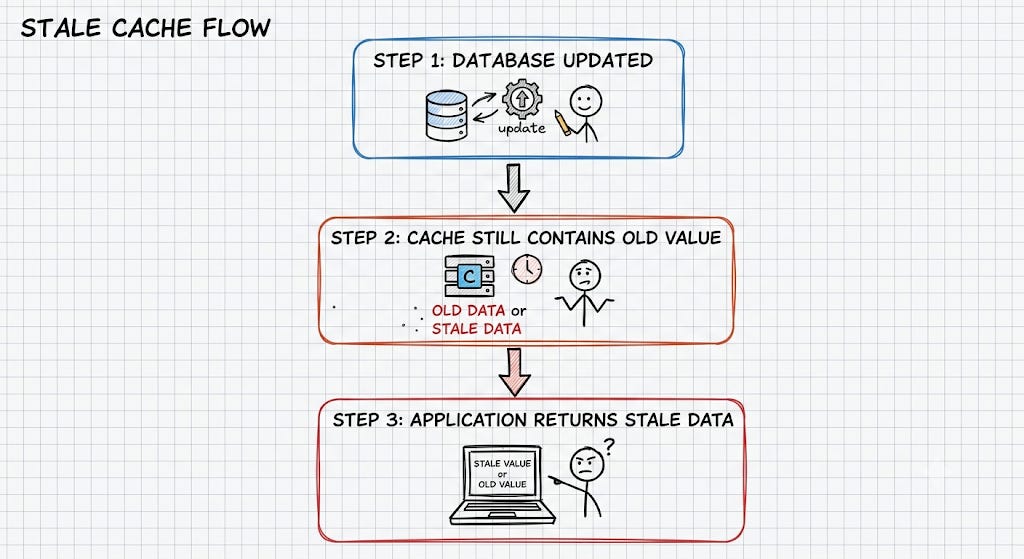
This is why we need different caching patterns.
📚 Common Caching Patterns
The most useful caching patterns for Laravel applications are:
Cache-Aside
Read-Through
Write-Through
Write-Behind / Write-Back
Refresh-Ahead
Stale-While-Revalidate
Cache-Through for External APIs
Cache-Aside with Event-Based Invalidation
1️⃣ Cache-Aside Pattern
The Most Common Pattern in Laravel
The Cache-Aside pattern is also called Lazy Loading.
The application is responsible for checking the cache first.
If the data exists:
Cache HIT
   ↓
Return cached data
If the data does not exist:
Cache MISS
   ↓
Query Database
   ↓
Store Result in Cache
   ↓
Return Result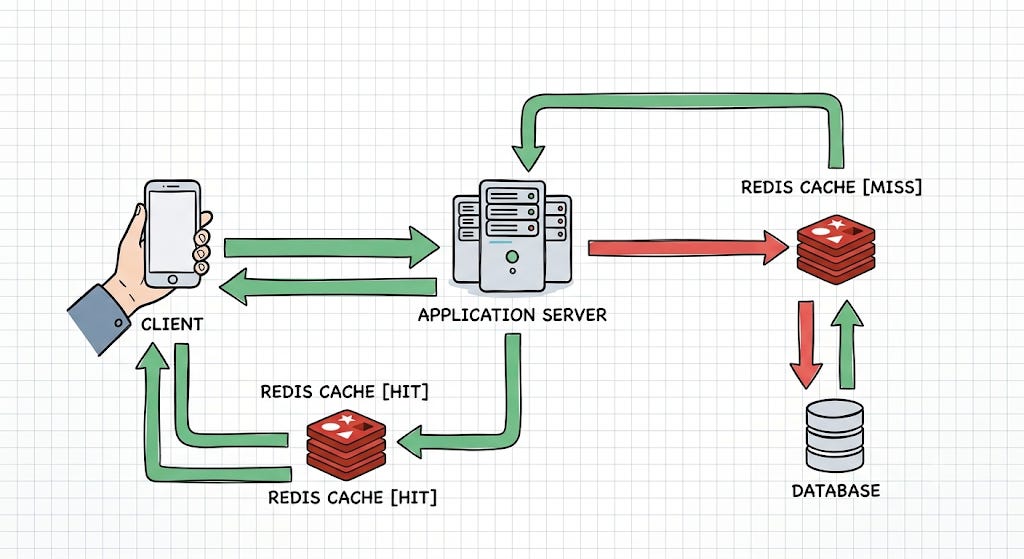
Example
$products = Cache::remember(
    'products',
    now()->addHour(),
    function () {
        return Product::where('active', true)->get();
    }
);
Laravel will:
Check the cache.
Return the cached value if available.
Execute the callback on a cache miss.
Store the result in the cache.
Return the result.
When Should You Use Cache-Aside?
Cache-Aside is a good choice when:
Data is read frequently.
Data changes relatively infrequently.
You can tolerate a small amount of staleness.
The application controls cache invalidation.
Examples:
Product catalog
Application configuration
User permissions
Tax rates
Country/state lists
Dashboard statistics
2️⃣ Read-Through Cache
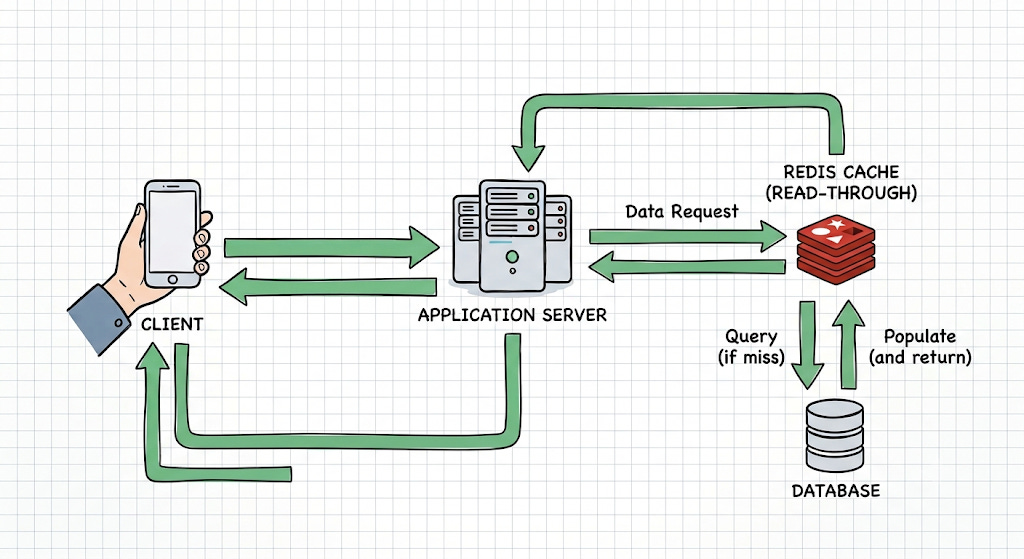
Read-Through caching moves the responsibility of loading missing data closer to the caching layer.
Conceptually:
Application
     ↓
   Cache
     ↓
Cache MISS
     ↓
Data Store
     ↓
Cache
     ↓
Application
The application doesn’t explicitly manage the cache-miss loading logic.
Instead, the caching abstraction handles it.
Conceptual Example
$product = $cache->get(
    'product:1001',
    fn () => Product::find(1001)
);
The cache abstraction decides what to do when the value isn’t available.
Example
Laravel applications commonly implement this behavior using service classes around Laravel’s cache abstraction.
For example:
class ProductService
{
    public function find(int $id): ?Product
    {
        return Cache::remember(
            "product:{$id}",
            now()->addMinutes(30),
            fn () => Product::find($id)
        );
    }
}
Although Laravel’s Cache::remember() is often described as Cache-Aside, a service layer can encapsulate that behavior so callers don’t need to know how the cache is populated.
3️⃣ Write-Through Cache
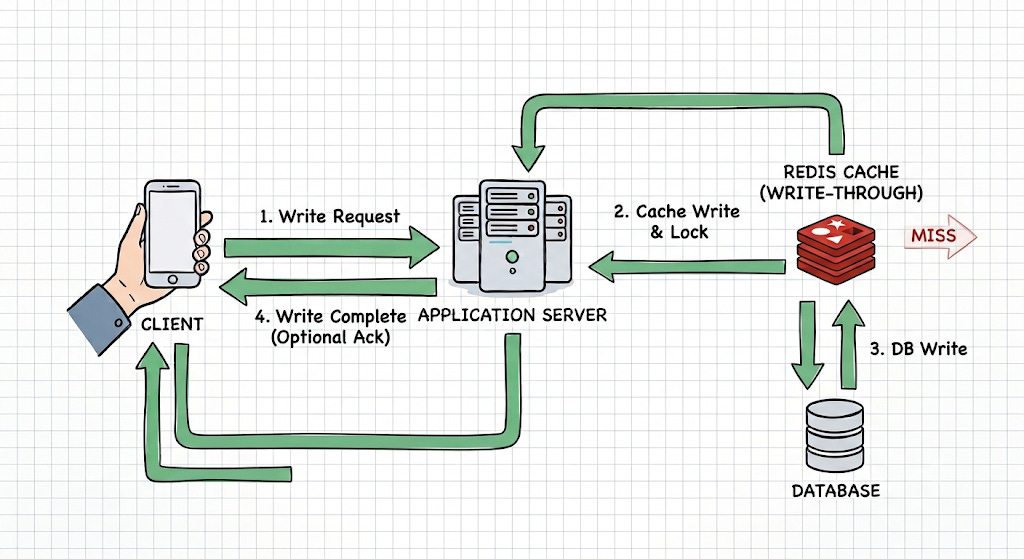
With Write-Through caching, data is written to the cache and persistent storage as part of the write operation.
The general flow is:
Application
     ↓
   Cache
     ↓
 Database
The cache is updated immediately when the data changes.
Example
Suppose an administrator updates a product price.
$product->update([
    'price' => $price,
]);

Cache::put(
    "product:{$product->id}",
    $product->fresh(),
    now()->addHour()
);
Now both the database and cache contain the latest value.
Important Consideration
Write-through caching increases write complexity.
You need to think about:
What happens if the database update succeeds but cache update fails?
What happens if cache update succeeds but database update fails?
Which system is considered the source of truth?
In most business applications:
The database should remain the source of truth.
The cache should be treated as a performance optimization, not the authoritative data store.
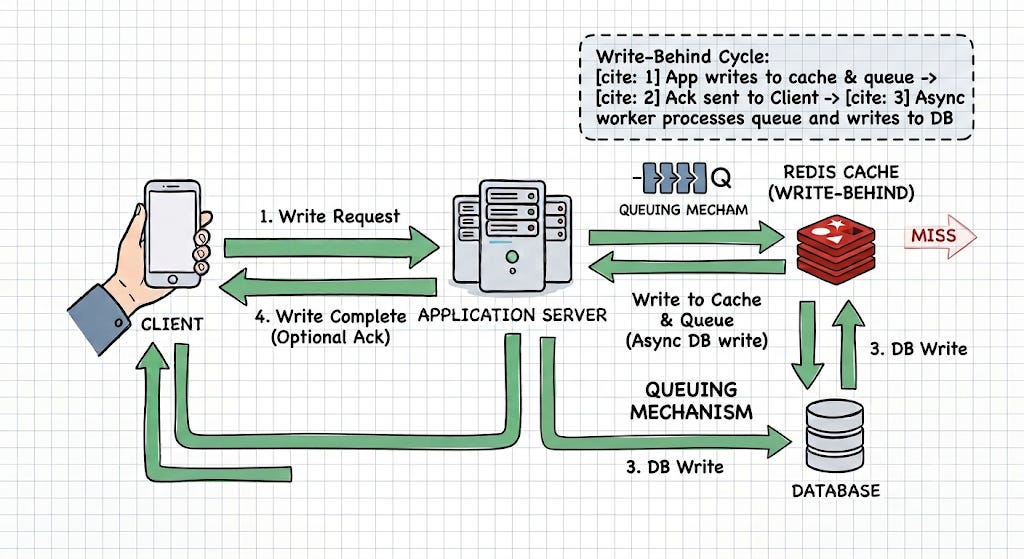
4️⃣ Write-Behind / Write-Back Cache
Write-Behind caching takes the idea further.
The application writes to the cache first, while the persistent database update happens asynchronously.
Application
     ↓
   Cache
     ↓
Queue
     ↓
Worker
     ↓
Database
This can make write-heavy systems faster because the user doesn’t always need to wait for the database operation.
Example
A simplified implementation might look like:
Cache::put(
    "counter:{$userId}",
    $newValue,
    now()->addHours(1)
);

UpdateCounter::dispatch($userId, $newValue);
The queue worker later persists the value.
Real-World Scenario
Consider a website tracking:
Page Views
Product Views
Video Views
Click Events
Writing every event synchronously to MySQL can create significant database load.
Instead:
User Activity
     ↓
Redis
     ↓
Queue
     ↓
Batch Processing
     ↓
MySQL
This approach can dramatically reduce database write pressure.
⚠️ The Risk
Write-behind caching introduces eventual consistency.
For example:
Redis = 10,500 views
Database = 10,200 views
The database may temporarily lag behind the cache.
Therefore, this pattern is more appropriate for data where eventual consistency is acceptable.
It should generally not be used casually for critical financial transactions, account balances, or other data where every write must be durably committed before success is reported.
5️⃣ Refresh-Ahead Pattern
Refresh-Ahead caching attempts to refresh cached data before it expires.
Without Refresh-Ahead:
Cache expires
     ↓
First user gets Cache MISS
     ↓
Database query
     ↓
Cache recreated
The first request after expiration can become slower.
With Refresh-Ahead:
Cache nearly expires
       ↓
Background refresh
       ↓
New cache value
       ↓
Users continue receiving cached data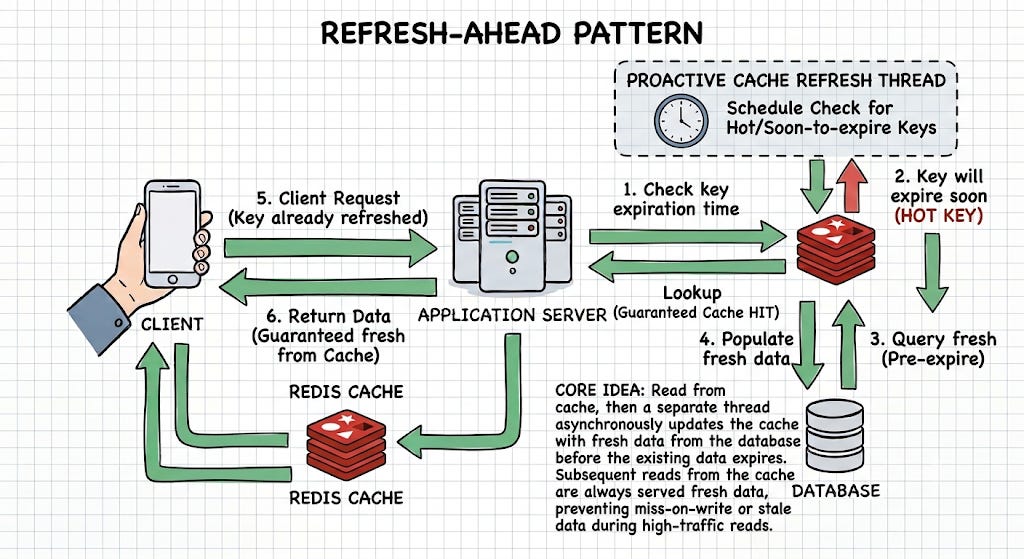
Real-World Scenario
Imagine a dashboard showing:
Daily Revenue
Active Policies
Open Claims
Pending Payments
Suppose the dashboard is requested heavily between:
9:00 AM - 6:00 PMYou don’t necessarily want the first user at 9:00 AM to trigger a large aggregation query.
Instead, a scheduled job can refresh the cache before users need it.
Laravel scheduler:
Schedule::job(RefreshDashboardCache::class)
    ->everyTenMinutes();
The job could calculate the latest dashboard metrics and update the cache.
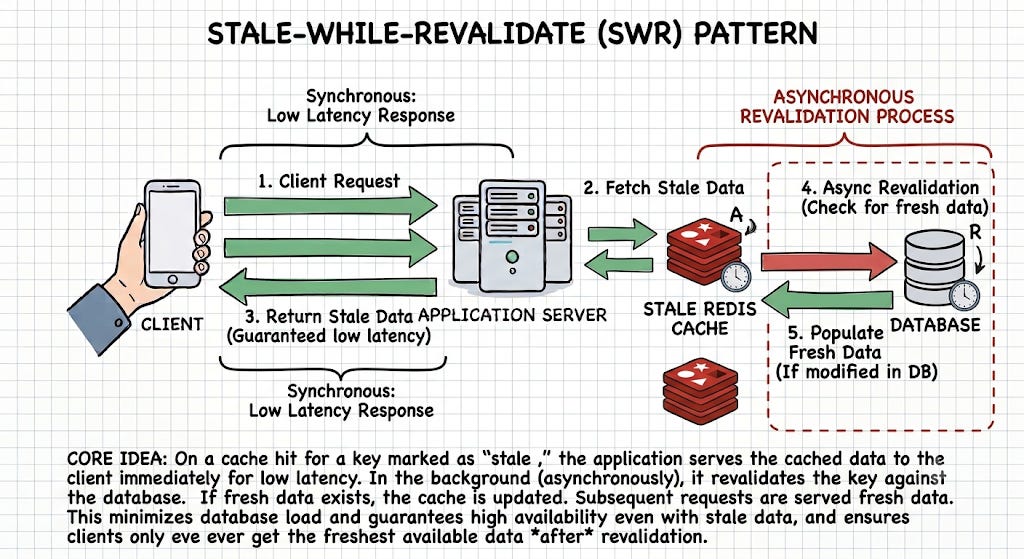
6️⃣ Stale-While-Revalidate
One of the most useful patterns for high-traffic applications is:
Stale-While-Revalidate
The idea is simple:
Fresh Data
   ↓
Return immediately

Stale but usable
   ↓
Return stale data
   +
Refresh in background

Expired
   ↓
Generate fresh data
This avoids making users wait for expensive cache regeneration.
Laravel Example
Laravel provides support for stale-while-revalidate behavior through Cache::flexible().
$data = Cache::flexible(
    'dashboard',
    [300, 600],
    function () {
        return $this->generateDashboard();
    }
);
The two values represent the fresh and stale periods.
Why Is This Powerful?
Imagine generating a report takes:
2 secondsAnd 500 users request the same report.
Without stale-while-revalidate:
Cache expires
     ↓
Users wait for regeneration
With stale-while-revalidate:
Existing stale result
     ↓
Return immediately
     ↓
Refresh asynchronously
Users get a much smoother experience.
7️⃣ Cache External API Responses
Caching isn’t limited to databases.
External APIs can also be expensive and slow.
Consider:
Laravel
   ↓
Tax API
   ↓
External Service
If the same tax information is requested repeatedly, calling the external API for every request is unnecessary.
Instead:
$taxRate = Cache::remember(
    "tax-rate:{$state}:{$year}",
    now()->addDay(),
    function () use ($state, $year) {
        return $this->taxApi->getRate($state, $year);
    }
);
Now:
Request 1 → API
Request 2 → Cache
Request 3 → Cache
Request 4 → Cache
Real-World Scenario
Suppose an application needs:
Currency Exchange Rates
Tax Rates
Shipping Rates
Weather Information
Third-Party Configuration
These values may not need to be fetched from the external provider on every request.
Caching can:
Reduce API usage
Reduce latency
Reduce external dependency
Protect against temporary API failures
8️⃣ Event-Based Cache Invalidation
One of the hardest problems in caching is:
When should the cache be invalidated?
Consider:
$product = Cache::remember(
    "product:{$id}",
    3600,
    fn () => Product::find($id)
);
Now the product changes.
If you don’t remove the cache:
Database
Price = ₹999

Cache
Price = ₹799
The application may return incorrect information until the TTL expires.
Use Events
Laravel events can help coordinate cache invalidation.
For example:
class ProductUpdated
{
    public function __construct(
        public Product $product
    ) {}
}
Listener:
class ClearProductCache
{
    public function handle(ProductUpdated $event): void
    {
        Cache::forget(
            "product:{$event->product->id}"
        );
    }
}
Now:
Product Updated
      ↓
Event
      ↓
Invalidate Cache
      ↓
Next request
      ↓
Database
      ↓
Repopulate Cache
This is a clean implementation of Cache-Aside with event-driven invalidation.