

If you’re building modern applications, you know that databases evolve constantly tables change, new columns get added, constraints get updated, and entire structures may require rethinking.
Managing this manually becomes messy, error-prone, and almost impossible when a team is involved.
This is where Database Migrations become a game-changer.
Laravel provides one of the most elegant migration systems in the industry, turning database changes into version-controlled, repeatable, trackable code.
In this article, you’ll learn:
What a database migration is
How migrations work in Laravel
Advantages & disadvantages
Best practices (with real examples)
Why migrations are essential for long-term project health
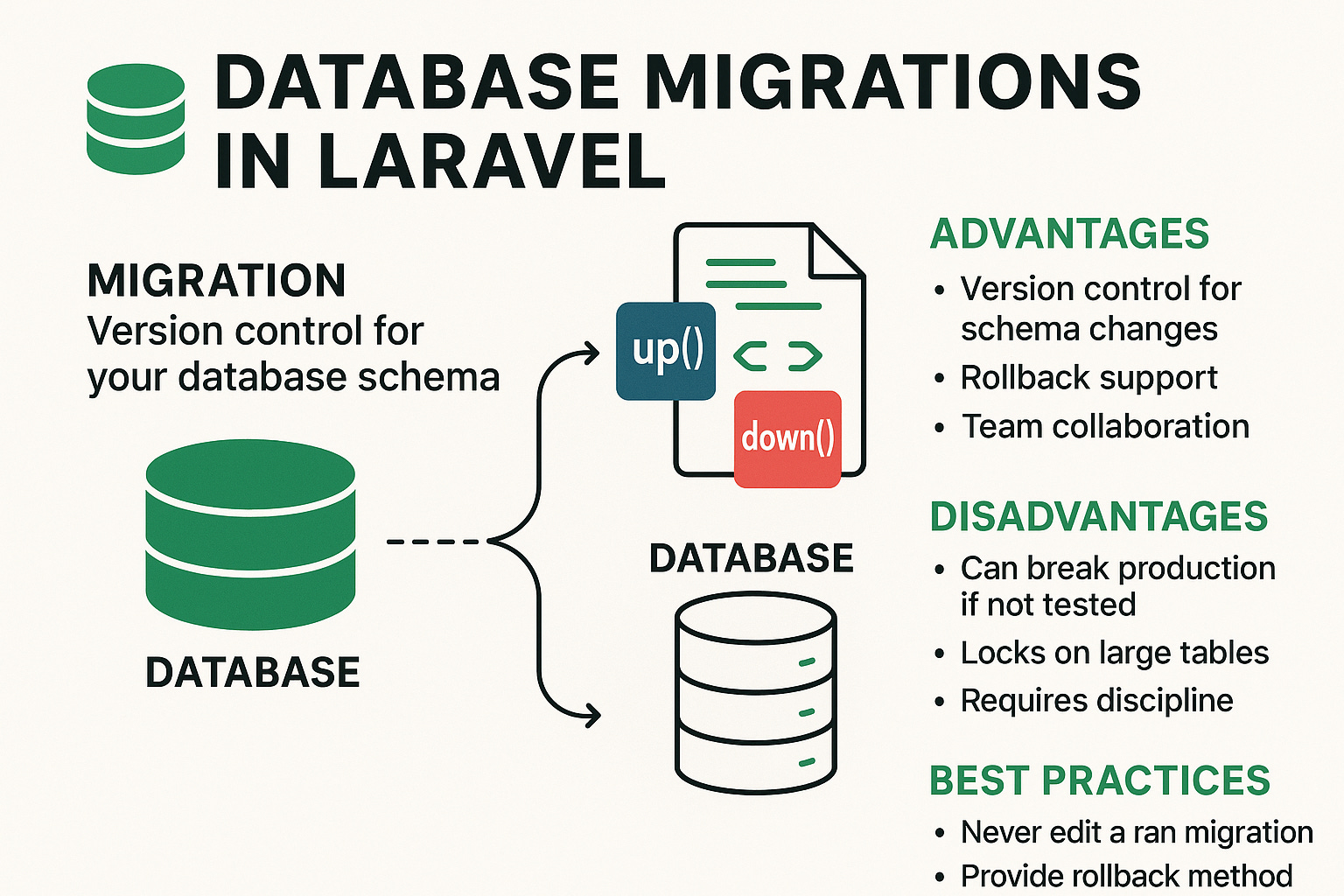
📌 What Is a Database Migration?
A Database Migration is simply a version control system for your database schema.
Just like Git tracks code changes, migrations track database structure changes such as:
Creating tables
Adding or removing columns
Adding indexes or foreign keys
Changing data types
Renaming tables
Each migration is a small PHP file that modifies the database in a controlled and reversible way.
📁 What Does a Migration File Look Like?
When you run:
php artisan make:migration create_users_tableLaravel generates a file like this:
<?php

use Illuminate\Database\Migrations\Migration;
use Illuminate\Database\Schema\Blueprint;
use Illuminate\Support\Facades\Schema;

return new class extends Migration
{
    /**
     * Run the migrations.
     */
    public function up(): void
    {
        Schema::create(’users’, function (Blueprint $table) {
            $table->id();
            $table->string(’name’);
            $table->string(’email’)->unique();
            $table->string(’password’);
            $table->boolean(’is_active’)->default(true);
            $table->timestamps();
        });
    }

    /**
     * Reverse the migrations.
     */
    public function down(): void
    {
        Schema::dropIfExists(’users’);
    }
};
🟦 up()
Describes what to do — create/modify tables.
🟥 down()
Describes how to roll back the changes.
Simple. Clean. Powerful.
⚙️ How Do Migrations Work in Laravel?
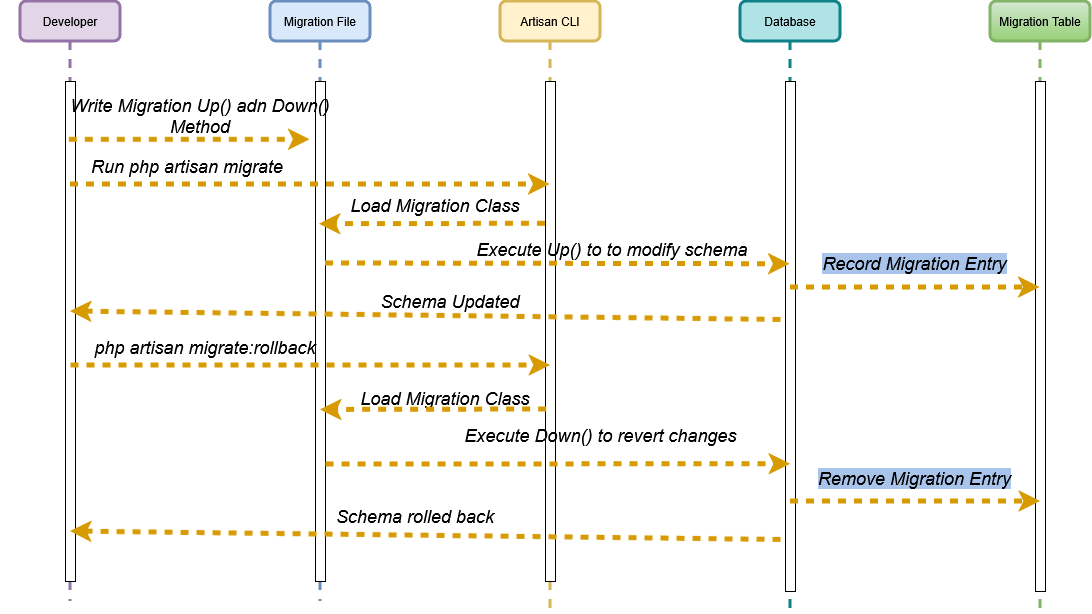
Laravel stores the history of executed migrations in a special table called migrations.
When you run:
php artisan migrateLaravel:
Reads all migration files
Checks which ones are not executed yet
Runs them in order
Records them in the
migrationstable
When you run:
php artisan migrate:rollbackLaravel executes the down() method of recent migrations.
This makes migrations safe, reversible, and manageable across environments like:
local
staging
production
Create Migration with Table:
You can create a new migration by defining the table name.
php artisan make:migration add_columns_to_orders_table --table=orders✅ Generated Migration File
File Name (Laravel will create something like)
2025_11_23_000000_add_columns_to_orders_table.php
(The timestamp will match the moment you run the command.)
Full Migration File Content
<?php

use Illuminate\Database\Migrations\Migration;
use Illuminate\Database\Schema\Blueprint;
use Illuminate\Support\Facades\Schema;

return new class extends Migration
{
    /**
     * Run the migrations.
     */
    public function up(): void
    {
        Schema::table(’orders’, function (Blueprint $table) {
            //
        });
    }

    /**
     * Reverse the migrations.
     */
    public function down(): void
    {
        Schema::table(’orders’, function (Blueprint $table) {
            //
        });
    }
};
📝 What this means
Laravel will NOT guess which columns you want to add.
It simply creates an empty Schema::table(’orders’) migration.
You need to fill in the columns manually.
Example (you will add this yourself):
$table->string(’status’)->default(’pending’);
$table->date(’delivery_date’)->nullable();
✅ Advantages of Using Migrations
1. Version Control for Your Database
Every schema change is stored as code.
No more “Did you update your DB?” chaos.
2. Team Collaboration Becomes Easy
Developers simply pull the latest code and run:
php artisan migrateBoom — database synced.
3. Automated Deployment
CI/CD pipelines can apply migrations automatically.
4. Rollback Support
Accidentally deployed a breaking change?
Rollback with one command.
5. No More Manual SQL
You define schema changes in PHP, not raw SQL.
6. Infrastructure Consistency
Same database structure across all environments.
❌ Disadvantages (Yes, They Exist)
1. Bad Migrations Can Break Production
If not tested properly, migrations can cause downtime.
2. Large Tables Can Lock During Alter Operations
Adding indexes or columns to big tables may cause slowdowns.
3. Migrations Require Discipline
Everyone in the team needs to follow the migration workflow.
4. Rollback May Fail for Complex Logic
Some operations (like data migrations) aren’t perfectly reversible.
.🧠 Best Practices for Laravel Migrations
✔️ 1. Never Edit a Migration That Has Already Been Run
Wrong ❌
Editing old migrations breaks other developers.
Right ✔️
Create a new migration:
php artisan make:migration add_status_to_users_table✔️ 2. Use Meaningful Migration Names
Good:
2025_11_20_101010_add_status_column_to_users_table.phpBad:
xyz_migration.php✔️ 3. Keep Migrations Small and Focused
One responsibility per migration.
✔️ 4. Always Provide a Rollback Method
A down() method should undo changes cleanly.
✔️ 5. Use Database Indexes Wisely
Example:
$table->index(’email’);They improve performance significantly.
✔️ 6. Use php artisan migrate:fresh Only in Local Development
Never run it on staging/production — it will drop all tables.
✔️ 7. Run Migrations in Transactions (If Supported)
Laravel can wrap migrations in a transaction:
public $withinTransaction = true;This keeps migrations atomic.
🎯 Benefits of Using Migrations in Real Projects
Faster onboarding of new developers
Zero manual DB setup
Consistent schema across all servers
Easy recovery in case of issues
Better CI/CD automation
Database and code stay in sync
Change history is preserved forever
🔥 Conclusion
Database migrations are one of the most powerful features in Laravel. They turn database management into a predictable, trackable, and reversible process.
Whether you’re working solo or on a large team, migrations help ensure your application remains stable, scalable, and easier to maintain.
If you’re still editing databases manually — it’s time to level up.
Let your database evolve with confidence using Laravel migrations. 🚀