

🚨 Introduction: One Wrong Choice Can Break Your Security
Every Laravel developer works with sensitive data.
Passwords.
API keys.
Bank accounts.
Personal identifiers.
Yet one mistake is shockingly common:
Treating encryption, hashing, and encoding as the same thing.
They’re not.
Using the wrong technique doesn’t just cause bugs — it can lead to security breaches, failed audits, compliance violations, and irreversible data loss.
In this guide, we’ll clearly break down:
🔍 What Encryption, Hashing, and Encoding really are
🧠 When you should use each one (and when you absolutely shouldn’t)
🛠️ Real Laravel examples you can copy-paste today
🚫 Costly mistakes even experienced developers make
This isn’t theory — it’s written for real Laravel applications: APIs, SaaS platforms, fintech products, and multi-tenant systems.
1️⃣ Encryption: Lock It, Unlock It (When You Must)
🔐 What Is Encryption?
Encryption transforms readable data (plaintext) into unreadable data (ciphertext) using a secret key.
👉 It is reversible — if (and only if) you have the correct key.
Think of encryption as a secure locker:
You lock the data
You unlock it only when truly necessary
✅ When Should You Use Encryption?
Use encryption only when the original value must be retrieved later.
✔ Bank account numbers
✔ API tokens & secrets
✔ OAuth credentials
✔ Personally Identifiable Information (PII)
🛠️ Laravel Encryption (Built-In & Battle-Tested)
Laravel ships with strong encryption using AES-256-CBC — no setup required.
Encrypting Data
use Illuminate\Support\Facades\Crypt;

$encrypted = Crypt::encryptString(’1234-5678-9012-3456’);
Decrypting Data
$decrypted = Crypt::decryptString($encrypted);
✔ Key-based
✔ Secure
✔ Fully reversible
🌍 Real-World Example: Storing Bank Details Securely
Schema::create(’client_bank_accounts’, function (Blueprint $table) {
    $table->id();
    $table->string(’account_holder_name’);
    $table->text(’account_number’); // encrypted
    $table->text(’ifsc_code’);       // encrypted
    $table->timestamps();
});
$bank->account_number = Crypt::encryptString($request->account_number);
$bank->ifsc_code = Crypt::encryptString($request->ifsc_code);
$bank->save();🔒 Even if your database is leaked, the data remains useless without APP_KEY.
2️⃣ Hashing: Verify Without Ever Knowing
🔑 What Is Hashing?
Hashing converts data into a fixed-length string using a mathematical algorithm.
👉 It is irreversible — forever.
You don’t unlock hashed data.
You compare against it.
✅ When Should You Use Hashing?
Use hashing when you never need the original value again.
✔ Passwords
✔ PINs
✔ Security answers
🛠️ Laravel Hashing Example
Laravel uses bcrypt or Argon2, both industry-approved.
Hashing a Password
use Illuminate\Support\Facades\Hash;

$hashed = Hash::make(’my-secret-password’);
Verifying a Password
Hash::check(’my-secret-password’, $hashed); // true✔ One-way
✔ Automatically salted
✔ Resistant to brute-force attacks
🚫 The Biggest Security Mistake: Encrypting Passwords
❌ Never do this:
Crypt::encryptString(’password123’);
Why this is dangerous:
Anyone with
APP_KEYcan decrypt every passwordViolates OWASP standards
Fails security audits instantly
✅ Passwords must always be hashed — never encrypted.
3️⃣ Encoding: Data Travel, Not Data Protection
🔄 What Is Encoding?
Encoding transforms data into another format so it can be safely transmitted or stored.
👉 It provides ZERO security.
Encoding is about compatibility, not protection.
✅ When Should You Use Encoding?
✔ Sending data over APIs
✔ URLs
✔ JSON responses
✔ File uploads
🛠️ Common Encoding Examples
Base64 Encoding
$encoded = base64_encode(’Hello World’);
$decoded = base64_decode($encoded);
JSON Encoding
$data = [’name’ => ‘John’, ‘role’ => ‘admin’];

$json  = json_encode($data);
$array = json_decode($json, true);
⚠️ Anyone can decode encoded data in seconds.
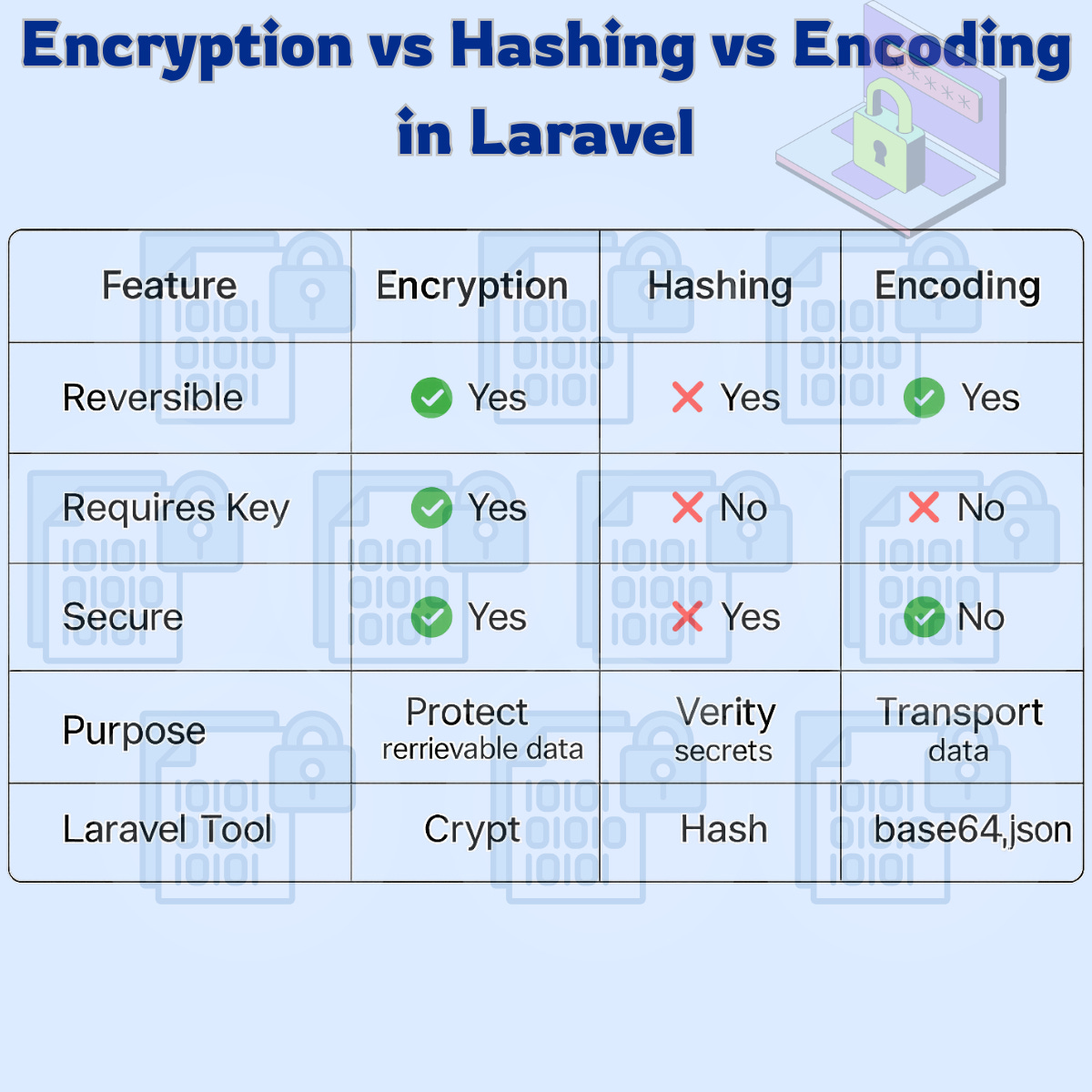
🔍 Encryption vs Hashing vs Encoding (At a Glance)
🚫 Costly Mistakes Developers Still Make
❌ Treating encoding as security
❌ Encrypting passwords
❌ Logging decrypted sensitive data
❌ Sharing APP_KEY across environments
❌ Skipping key rotation policies
✅ Laravel Security Best Practices
✔ Hash all passwords with Hash::make()
✔ Encrypt sensitive data with Crypt
✔ Protect your APP_KEY like production credentials
✔ Restrict access to decrypted data
✔ Rotate keys if compromised
🧠 Final Thoughts: Choose Wisely or Pay Later
These three concepts are not interchangeable — and confusing them is expensive.
🔐 Encryption → for data you must retrieve
🔑 Hashing → for secrets you must never see again
🔄 Encoding → for data movement, not protection
If you’re building fintech, healthcare, SaaS, or multi-tenant systems, this knowledge isn’t optional — it’s foundational.
Secure code is not about more tools.
It’s about using the right one.
Happy coding — and stay secure 🔐