

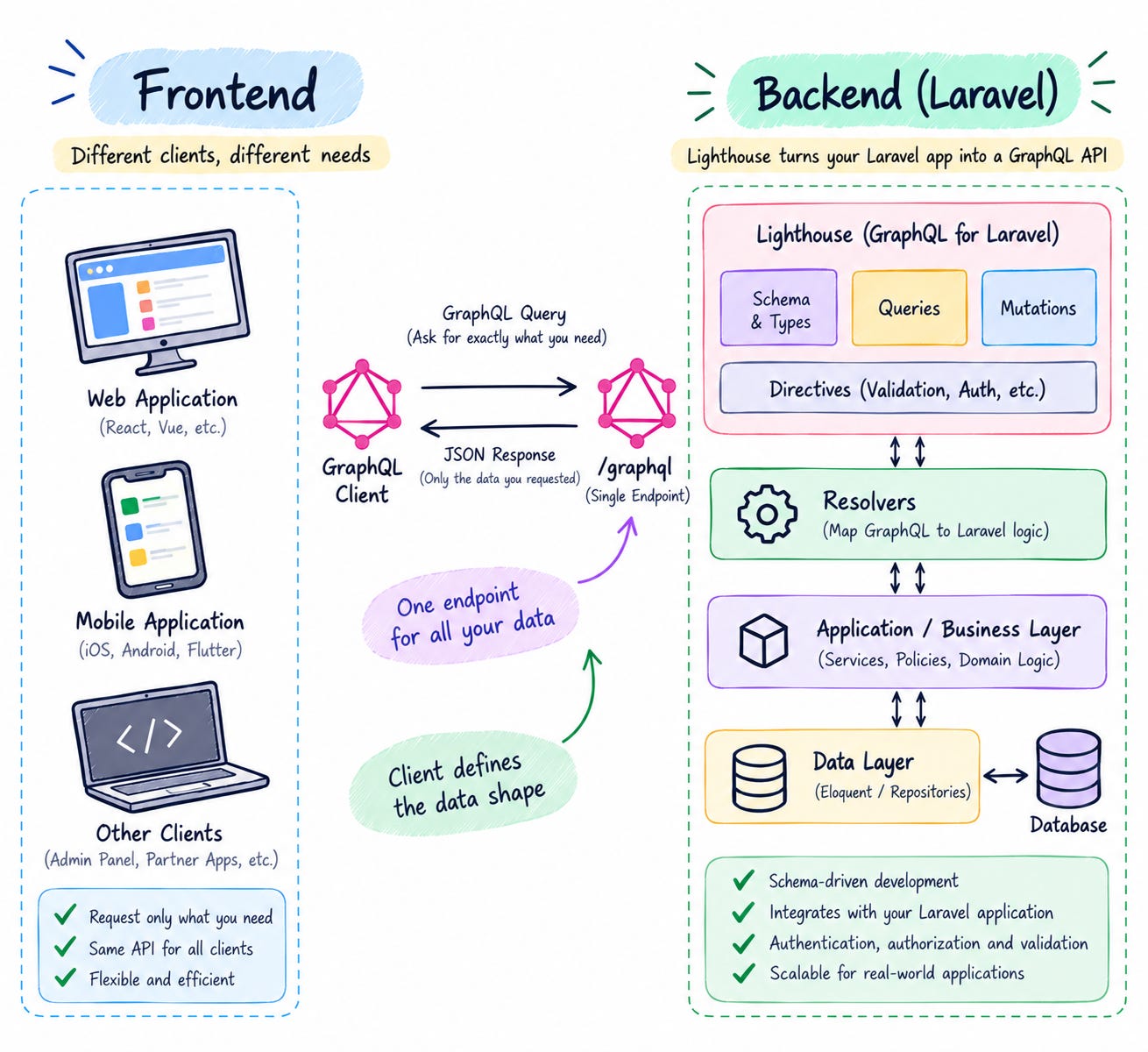
Building an API is easy.
Building an API that continues to work well as your application grows, your frontend requirements change, and multiple clients consume the same backend—that’s where things become interesting.
Imagine you’re building an e-commerce platform with three different clients:
A React web application
A Flutter mobile application
An admin dashboard
All three applications use the same Laravel backend, but they don’t necessarily need the same data.
For example, the mobile application might only need a product’s basic information:
Product
├── id
├── name
├── price
└── image
The product listing page might need:
Product
├── id
├── name
├── price
├── image
├── rating
└── stock
While the admin dashboard might need considerably more:
Product
├── id
├── name
├── description
├── price
├── stock
├── categories
├── reviews
├── supplier
├── sales
└── inventory
This creates an interesting API design problem.
With a traditional REST approach, you might start with an endpoint such as:
GET /api/products/100But as different clients require different representations of the same resource, you may eventually find yourself adding more endpoints, query parameters, response transformations, or specialized APIs.
You can also run into two common problems.
⭐ Over-fetching
The API returns more data than the client needs.
{
    "id": 100,
    "name": "MacBook Pro",
    "price": 1999,
    "description": "...",
    "stock": 25,
    "supplier": "...",
    "created_at": "...",
    "updated_at": "..."
}
The mobile application might only need:
{
    "id": 100,
    "name": "MacBook Pro",
    "price": 1999
}
The remaining fields are unnecessary for that particular screen.
⭐ Under-fetching
The opposite problem can also occur.
Suppose a customer details page needs:
Customer
 ├── Profile
 ├── Orders
 │    └── Order Items
 │          └── Products
 └── Payments
With REST, this might require several API calls:
GET /api/customers/10
GET /api/customers/10/orders
GET /api/orders/100/items
GET /api/customers/10/payments
The frontend now has to make multiple requests and combine the results.
This is where GraphQL becomes interesting.
Instead of defining the response entirely on the server, GraphQL allows the client to describe exactly what data it needs.
For example:
query {
    customer(id: 10) {
        id
        name

        orders {
            id
            orderNumber

            items {
                quantity
                product {
                    id
                    name
                    price
                }
            }
        }

        payments {
            amount
            status
        }
    }
}
The server returns a response that follows the exact structure requested by the client.
{
    "data": {
        "customer": {
            "id": "10",
            "name": "John Doe",
            "orders": [
                {
                    "id": "100",
                    "orderNumber": "ORD-1001",
                    "items": [
                        {
                            "quantity": 2,
                            "product": {
                                "id": "50",
                                "name": "MacBook Pro",
                                "price": 1999
                            }
                        }
                    ]
                }
            ],
            "payments": [
                {
                    "amount": 3998,
                    "status": "PAID"
                }
            ]
        }
    }
}
The important idea is not simply that GraphQL can retrieve data through a single endpoint.
The bigger idea is this:
GraphQL allows the client to describe the shape of the data it needs, while the server controls what data and operations are actually available.
This makes GraphQL particularly interesting for applications with multiple clients, complex relationships, and rapidly changing frontend requirements.
But GraphQL is not a replacement for REST in every situation.
It introduces its own challenges, including:
Schema design
Authorization
N+1 database queries
Query complexity
Query depth
Pagination
Caching
Security
Schema evolution
So the real question isn’t:
“Is GraphQL better than REST?”
⚡ Why Was GraphQL Created ?
Traditional REST APIs generally expose resources through URLs.
For example:
GET /users/1
GET /users/1/orders
GET /users/1/orders/10/items
As applications become more complex, clients can end up making many requests to construct a single screen.
Consider an order details page.
The page needs:
Customer
Order
Order Items
Products
Shipping Address
Payment
A REST implementation might require:
GET /customers/10
GET /customers/10/orders/100
GET /orders/100/items
GET /orders/100/shipping-address
GET /orders/100/payment
GraphQL allows the client to describe this relationship as a single query:
query {
    order(id: 100) {
        id
        orderNumber
        status

        customer {
            id
            name
            email
        }

        items {
            quantity
            price

            product {
                id
                name
            }
        }

        shippingAddress {
            city
            state
            country
        }

        payment {
            status
            amount
        }
    }
}
This is one of the most powerful ideas behind GraphQL.
🔷 GraphQL Core Concepts
Before implementing GraphQL in Laravel, you need to understand a few fundamental concepts.
The most important ones are:
Schema
Type
Query
Mutation
Field
Argument
Input
Resolver
Scalar
Enum
Interface
Union
Subscription
Let’s understand them one by one.
👉 Schema
The schema defines what your GraphQL API supports.
For example:
type Product {
    id: ID!
    name: String!
    price: Float!
}
This tells GraphQL that a Product has:
id
name
price
The schema is effectively the contract between the frontend and backend.
If a client requests a field that doesn’t exist:
query {
    product(id: 1) {
        id
        unknownField
    }
}
GraphQL can reject the query because unknownField isn’t part of the schema.
👉 GraphQL Types
A type describes the structure of an object.
For example:
type User {
    id: ID!
    name: String!
    email: String!
}
Here:
Useris a GraphQL object type.
It contains three fields:
id
name
email
👉 GraphQL Scalar Types
GraphQL provides several built-in scalar types.
String
Int
Float
Boolean
ID
Example:
type Product {
    id: ID!
    name: String!
    quantity: Int!
    price: Float!
    isActive: Boolean!
}
The exclamation mark is important.
name: String!means:
namecannot be null.
While:
description: Stringmeans:
descriptionmay be null.
👉 Query
A query is used to read data.
For example:
query {
    products {
        id
        name
        price
    }
}
Conceptually:
GraphQL Query = REST GETBut GraphQL gives the client much more control over the requested response shape.
👉 Mutation
A mutation is used to modify data.
Typical mutation operations include:
Create
Update
Delete
For example:
mutation {
    createProduct(
        name: "MacBook Pro"
        price: 1999
    ) {
        id
        name
        price
    }
}
Conceptually:
Query     → Read
Mutation  → Write
👉 Arguments
Fields can accept arguments.
For example:
type Query {
    product(id: ID!): Product
}
The client can call:
query {
    product(id: 10) {
        id
        name
        price
    }
}
Here:
idis an argument.
👉 Input Types
When mutations become more complex, use input types.
Instead of:
createProduct(
    name: String!
    description: String
    price: Float!
)
define:
input CreateProductInput {
    name: String!
    description: String
    price: Float!
}
Then:
type Mutation {
    createProduct(
        input: CreateProductInput!
    ): Product!
}
The client can send:
mutation {
    createProduct(
        input: {
            name: "MacBook Pro"
            description: "Apple laptop"
            price: 1999
        }
    ) {
        id
        name
        price
    }
}
Input types become especially useful as mutations evolve.
👉 Resolver
Resolver is the piece of code that tells GraphQL:
“When the client asks for this field, where should I get the data from?”
Think of a resolver as a bridge between the GraphQL query and your actual application/database.
Simple example
Suppose the client sends:
query {
    user(id: 10) {
        id
        name
        email
    }
}
GraphQL knows that there is a user field, but it doesn’t automatically know how to find user 10.
The resolver handles that:
public function user($root, array $args)
{
    return User::find($args['id']);
}
An important point
You don’t necessarily need to write a resolver for every field.
If Laravel’s Eloquent relationship already provides the data, your GraphQL library may automatically resolve it.
For example:
class Order extends Model
{
    public function customer()
    {
        return $this->belongsTo(Customer::class);
    }

    public function items()
    {
        return $this->hasMany(OrderItem::class);
    }
}
GraphQL can use these relationships to resolve:
order {
    customer {
        name
    }

    items {
        quantity
    }
}
👉 Enum
An Enum (Enumeration) is a GraphQL type that defines a fixed list of allowed values.
In simple words:
Enum means: “You can choose only from these predefined values.”
Suppose an order can have only these statuses:
pending
processing
shipped
delivered
cancelled
Instead of allowing the client to send any random string:
status: "hello"
status: "something"
status: "abc"
we define an Enum:
enum OrderStatus {
    PENDING
    PROCESSING
    SHIPPED
    DELIVERED
    CANCELLED
}
Now GraphQL knows:
OrderStatuscan contain only these five values.
👉 Interface
A GraphQL Interface is a way to define a common set of fields that multiple types must have.
In simple words:
Interface = a common contract shared by multiple GraphQL types.
If different types have some common fields, instead of repeating those fields, you can define them once in an interface.
We can create an interface:
interface User {
    id: ID!
    name: String!
    email: String!
}
Then tell GraphQL that these types implement the interface:
type Customer implements User {
    id: ID!
    name: String!
    email: String!
    orders: [Order!]!
}

type Admin implements User {
    id: ID!
    name: String!
    email: String!
    permissions: [String!]!
}

type Seller implements User {
    id: ID!
    name: String!
    email: String!
    products: [Product!]!
}
Now Customer, Admin, and Seller must provide:
id
name
email
because those fields are defined by the User interface.
⚙️ Setting Up GraphQL in Laravel
Laravel doesn’t provide GraphQL functionality in the same way it provides Eloquent or routing, so you normally install a GraphQL package.
A popular Laravel option is Lighthouse.
Install it with Composer:
composer require nuwave/lighthouseThen publish its configuration:
php artisan vendor:publish --tag=lighthouse-configYou should then have:
config/
└── lighthouse.php
⭐ GraphQL Best Practices
Design Your Schema Around the Business Domain
Keep Resolvers Thin
Use Input Types for Mutations
Use Enums for Fixed Values
Validate Mutation Input
📌 Conclusion
GraphQL provides a flexible and efficient way to build modern APIs by allowing clients to request exactly the data they need.
When combined with Laravel, it works well with Eloquent, authentication, validation, and Laravel's existing application architecture.
Understanding Queries, Mutations, Resolvers, Types, Enums, Interfaces, and Subscriptions gives you a strong foundation for GraphQL development.
With proper schema design, authorization, pagination, and performance optimization, you can build scalable and maintainable GraphQL APIs.
This is very informative blog. We encountered similar problem for one of our products. Would have definitely tried this if knew. Thank you Pritesh for sharing such insightful information.