

Ever faced this nightmare?
You’ve built and tested your application rigorously. Every new API endpoint is working like a charm. All tests are green, and you feel ready for a successful release.
But just a few hours after deploying to production, chaos erupts.
Customers start flooding your inbox:
📱 Their mobile apps are crashing
🔁 Automated scripts are failing
🛑 Critical business operations are down
You rush to debug the issue… and discover the root cause:
Your latest API update wasn’t backward compatible.
You renamed a field, changed a response structure, or retired an endpoint — without considering that dozens of client applications still depend on the old behavior.
This situation is more common than you'd think, and it all boils down to one key oversight:
👉 Lack of proper API versioning.
Without versioning, even the smallest change can break everything for your users.
🔍 What is API Versioning
API versioning is the practice of managing changes to your API without breaking existing client integrations. It allows you to introduce new features, deprecate old ones, and maintain backward compatibility.
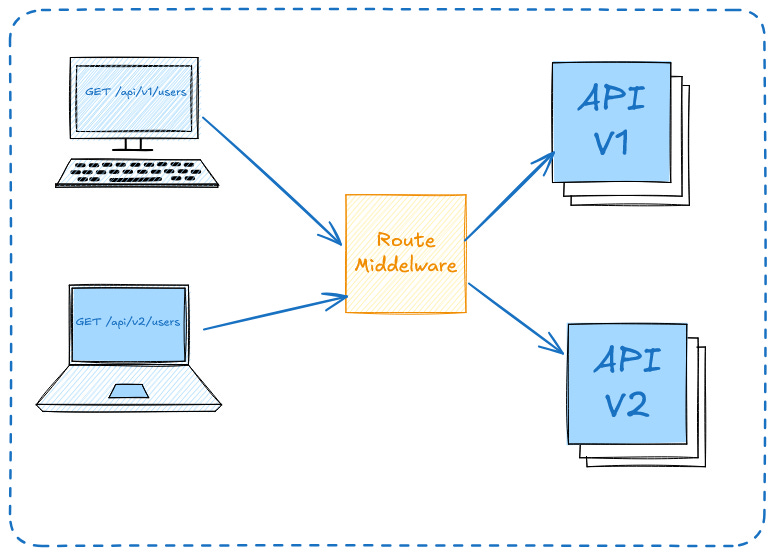
🚀 Why Use API Versioning?
To avoid breaking changes for existing users
To allow parallel development of new API features
To cleanly deprecate outdated functionality
✅ Common API Versioning Strategies
1. URI Versioning (most common)
GET /api/v1/usersPros: Easy to understand, widely supported by tools
Cons: Version becomes part of the resource identifier
Route::prefix('v1')->group(function () {
    Route::get('/users', [UserController::class, 'index']);
});
2. Header Versioning
GET /api/users
Accept: application/vnd.myapp.v1+jsonPros: Keeps URL clean, flexible
Cons: Harder to debug, less browser-friendly
Laravel (custom middleware required):
php artisan make:middleware ApiVersionMiddleware// app/Http/Middleware/ApiVersionMiddleware.php
namespace App\Http\Middleware;
use Closure;
use Illuminate\Http\Request;
class ApiVersionMiddleware
{
public function handle(Request $request, Closure $next)
{
$acceptHeader = $request->header('Accept');
preg_match('/vnd\.myapp\.v(\d+)\+json/', $acceptHeader, $matches);
$version = $matches[1] ?? '1'; // default to v1
$request->attributes->set('api_version', 'v' . $version);
return $next($request);
}
}Register the Middleware In app/Http/Kernel.php
'api.version' => \App\Http\Middleware\ApiVersionMiddleware::class,Define a Common Route and Dispatch to Version
// routes/api.php

Route::middleware(['api.version'])->group(function () {
    Route::get('/users', function (\Illuminate\Http\Request $request) {
        $version = $request->get('api_version');

        $controllerClass = "\\App\\Http\\Controllers\\Api\\" . ucfirst($version) . "\\UserController";

        return app()->make($controllerClass)->index($request);
    });
});
3. Query Parameter Versioning
GET /api/users?version=1Pros: Easy to implement and test
Cons: Considered less RESTful
4. Subdomain Versioning
GET https://v1.api.myapp.com/usersPros: Clean separation
Cons: More DNS/config complexity
📅 When to Create a New Version
You’re making breaking changes
You’re significantly changing response structure
You want to deprecate an existing method
🔍 Real-World Scenarios
✅ 1. Changing Response Structure
🧾 Use Case:
You have a mobile app using this API:
Version 1
GET /api/v1/users/1
{
  "id": 1,
  "name": "Pritesh",
  "email": "pritesh@example.com"
}
Later, you want to return more structured data in Version 2:
GET /api/v2/users/1
{
  "data": {
    "user_id": 1,
    "full_name": "Pritesh Bhanushali",
    "email_address": "pritesh@example.com"
  },
  "meta": {
    "version": "2.0"
  }
}
🔁 Why version?
Changing key names like name → full_name will break existing clients that expect name.
✅ 2. Deprecating or Removing Endpoints
🧾 Use Case:
In v1, you allow users to delete their account:
DELETE /api/v1/users/1In v2, business rules change and you disallow account deletion. Instead, you allow only deactivation:
PATCH /api/v2/users/1/deactivate🔁 Why version?
Removing or repurposing the DELETE endpoint would break clients expecting that functionality.
✅ 3. Adding New Features Without Affecting Old Clients
🧾 Use Case:
You introduce a new search filter in v2:
GET /api/v2/products?category=electronics&sort=price_descBut in v1, you want to keep things simple:
GET /api/v1/products🔁 Why version?
New clients can benefit from advanced features; old clients stay unaffected.
✅ 4. Business Rule Changes
🧾 Use Case:
In an insurance app:
v1: Returns policy premium including tax
v2: Returns premium excluding tax, and tax info separately
// v1
{ "premium": 1200 }

// v2
{
  "premium": 1000,
  "tax": 200
}
🔁 Why version?
Financial calculations might depend on how values are presented — older apps must not break.
🧭 Conclusion
Yes, API versioning is a good practice, especially when:
Your API is public or consumed by multiple apps
You want long-term stability and maintainability
You want to avoid breaking changes for users
📌 It’s not about if you need versioning, but when you’ll need it — and being ready for that moment.