

If you work with databases and applications, you may have heard of the N+1 problem. It’s a common performance issue that happens when an application makes too many database queries instead of fetching data efficiently. This can slow down your app and make it harder to scale.
🔍What Is the N+1 Problem?
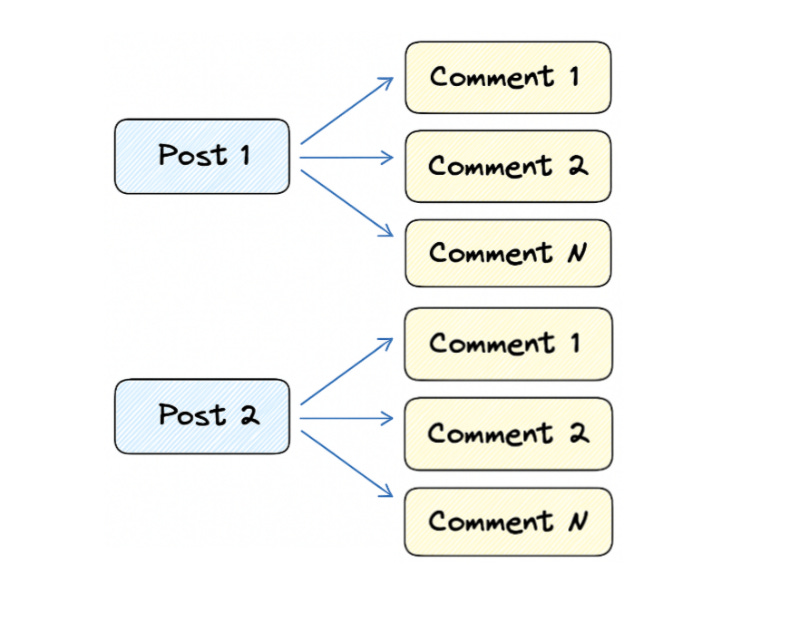
Imagine you have a list of blog posts, and each post has multiple comments. This is a classic one-to-many relationship because one post can have many comments.
Now, let’s say you need to fetch all posts along with their comments.
If your application isn’t optimized, it might do something like this:
1. First, fetch all posts:
$posts = Post::all();2. Then, for each post, fetch its comments one by one:
foreach ($posts as $post) {
    // Query for each post: SELECT * FROM comments WHERE post_id = ?
    $comments = Comment::where(’post_id’, $post->id)->get();
}
If you have 100 posts, this results in 101 queries
(1 query for posts + 100 queries for comments).
That’s why it’s called the N+1 problem —
you run N queries (one for each post) + 1 main query.
⚠️Why Is This a Problem?
The N+1 problem can seriously slow down your application for several reasons:
Too many database queries overload your database server.
Fetching each post’s comments separately forces the database to run the same query again and again.Increased network traffic between your Laravel app and the database.
Instead of sending 2 queries (posts + all comments), your app may send 101 queries or more.Slower response times because the application waits for multiple comment queries to finish.
Each post triggers its own query, adding delay for every request.Performance gets worse as the dataset grows.
For example, if you have 1,000 posts, Laravel may execute 1,001 queries
(1 for posts + 1 for each post’s comments).
In short, the more posts you have, the slower your page becomes.
🧭How to Fix the N+1 Problem
1. Use Joins to Fetch Data in One Query
Instead of making a separate query for each post’s comments, you can fetch everything in a single database query using a JOIN.
SELECT posts.*, comments.*
FROM posts
LEFT JOIN comments ON posts.id = comments.post_id;
This way, you avoid running 101 queries (1 for posts + 100 for comments).
Everything is retrieved in one efficient request.
Laravel Query Builder Equivalent:
$posts = DB::table(’posts’)
    ->leftJoin(’comments’, ‘posts.id’, ‘=’, ‘comments.post_id’)
    ->select(’posts.*’, ‘comments.*’)
    ->get();
2. Batch Queries Instead of Fetching One by One
If you prefer not to use a JOIN, another solution is batch querying—fetching all comments for multiple posts in one call.
SQL Example:
SELECT * FROM comments WHERE post_id IN (1, 2, 3, 4, 5);This allows you to:
First fetch all posts
Then fetch all comments for those posts in a single batch query
Instead of 100 separate queries, you now perform:
1 query → posts
1 query → all their comments
Total = 2 queries instead of 101.
Laravel Eloquent Equivalent:
$posts = Post::all(); // Query 1

$comments = Comment::whereIn(’post_id’, $posts->pluck(’id’))->get(); // Query 2
✅ The Laravel fix: Eager loading (with())
Laravel’s built-in solution is to eager-load relations before looping:
// Controller (fixed)
$posts = Post::with(’comments’)->get(); // Query #1 (posts) + Query #2 (comments for all posts)

// Now in the view, no extra queries:
@foreach($posts as $post)
  @foreach($post->comments as $comment)
    {{ $comment->body }}
  @endforeach
@endforeach
Result: 2 queries total no matter how many posts.
🔎 Detect N+1 in Laravel
Laravel Debugbar (dev): shows each query and count.
Laravel Telescope: records queries for requests.
DB::listen(): log queries in tests or a temporary debug route.
Add assertions in tests to monitor query count (use sparingly).
Quick example using DB::listen:
DB::listen(function ($query) {
    logger($query->sql, $query->bindings);
});
🛠 Handling large datasets
Eager-loading everything for massive datasets can blow memory. Use chunking or cursors:
Post::chunkById(100, function ($posts) {
    $posts->load(’comments’); // eager-load per chunk
    foreach ($posts as $post) {
        // process
    }
});
cursor() streams models but you can only eager-load per batch (collect ids, then load in batches).
👀 Common gotchas & pitfalls
If you select() custom columns on a relation, include the foreign key so Eloquent can map relations:
$posts = Post::with([’comments’ => function ($q) {
    $q->select(’id’, ‘post_id’, ‘body’, ‘created_at’);
}])->select(’id’, ‘title’)->get();limit()inside eager load is not the same as “limit per parent” in every DB. UselatestOfMany()or subquery patterns for latest-N-per-parent.Polymorphic relations require careful eager-loading; Laravel groups by type and runs efficient queries, but always test.
Over-eager-loading deep relations (
with(’a.b.c.d’)) can increase memory and do too much work — load only what’s required.
✅ Best practices checklist (senior devs use this)
Before merging a PR, ask:
Am I accessing a relation inside a loop? If yes, ensure that relation is eager-loaded.
Do I only need aggregates (count, sum)? Use
withCount(),withSum().Am I selecting only the columns needed for the view/API? (Use
select()).Is this endpoint high-traffic? Consider caching or denormalized read models.
For large datasets, did I use chunking or streaming?
Did I profile queries with Debugbar or Telescope?
Are there joins/subqueries that could replace heavy eager-loading?
🏁 Final thoughts
The N+1 problem is simple to understand and easy to fix once you know where to look. In Laravel, with(), withCount(), constrained eager loading, and smart use of joins/subqueries give you a powerful toolbox to fetch data efficiently.
If you:
identify relations used in views,
eager-load what’s required,
prefer aggregates when possible,
and profile query counts regularly,
you’ll keep your app fast and scalable as data grows.