

Modern applications rarely perform a single operation.
A seemingly simple “Place Order” action might actually involve:
🔍 Validating the order
💰 Calculating discounts
🧮 Calculating tax
📦 Reserving inventory
💳 Charging the customer
💾 Persisting the order
📢 Publishing events
📧 Sending notifications
When all of this logic lives inside one service method, the code can quickly become difficult to understand and maintain.
That’s where the Pipeline Design Pattern can help.
Laravel already provides an excellent implementation through:
Illuminate\Pipeline\PipelineIn this article, we’ll use one example throughout the entire article: an e-commerce order-processing workflow.
🧩 What Is the Pipeline Design Pattern?
The Pipeline Design Pattern allows us to divide a large workflow into a sequence of smaller processing steps.
Each step is called a pipe.
Imagine our order-processing workflow:
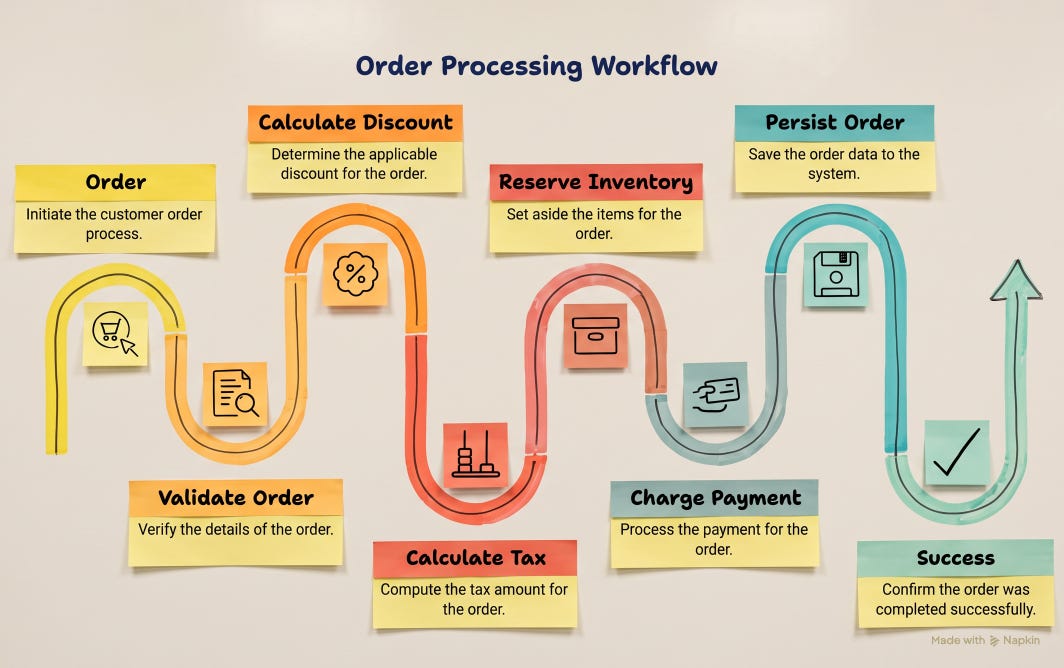
Instead of one large method containing everything, each operation gets its own class.
The fundamental idea is:
A pipeline passes a payload through a sequence of processing steps, where each step performs one responsibility and passes the payload to the next step.
This gives us three important properties:
🎯 Separation of concerns
🧪 Better testability
🧱 Composable workflows
😰 The Problem: A Growing Service Class
Let’s start with our order-processing example.
A traditional implementation might look something like this:
public function processOrder(Order $order)
{
    $this->validateOrder($order);

    $discount = $this->calculateDiscount($order);

    $tax = $this->calculateTax($order, $discount);

    $this->inventoryService->reserve($order);

    $paymentId = $this->paymentService->charge($order);

    $this->orderRepository->save(
        $order,
        $discount,
        $tax,
        $paymentId
    );
}
At first, this isn’t bad.
But requirements rarely stay simple.
Soon we might need:
Validate order
Validate customer
Apply coupon
Calculate discount
Calculate tax
Check inventory
Reserve inventory
Check payment limit
Charge payment
Create invoice
Persist order
Publish event
Send notification
Our service starts growing.
Eventually:
public function processOrder(...)
{
    // 300+ lines of business logic
}
Now we have a problem.
Adding one new business rule requires modifying the same large service.
Testing one operation may require setting up the entire workflow.
Understanding the workflow requires reading a large amount of code.
This is a good candidate for a Pipeline.
🏗️ Introducing Laravel Pipeline
Laravel gives us:
use Illuminate\Pipeline\Pipeline;We can define our workflow like this:
app(Pipeline::class)
    ->send($context)
    ->through([
        ValidateOrder::class,
        CalculateDiscount::class,
        CalculateTax::class,
        ReserveInventory::class,
        ChargePayment::class,
        PersistOrder::class,
    ])
    ->thenReturn();
At first glance, this looks simple.
But there are three important methods here.
📦 send()
->send($context)This defines the object that enters the pipeline.
In our example, that object represents the current order-processing state.
🔗 through()
->through([
    ValidateOrder::class,
    CalculateDiscount::class,
    CalculateTax::class,
    ReserveInventory::class,
    ChargePayment::class,
    PersistOrder::class,
])
This defines the sequence of pipes.
The order matters.
For example:
Validate
   ↓
Discount
   ↓
Tax
   ↓
Inventory
   ↓
Payment
   ↓
Persist
is different from:
Payment
   ↓
Validate
   ↓
Persist
The pipeline makes this order explicit.
🏁 thenReturn()
->thenReturn();
This executes the pipeline and returns the final payload.
Laravel also provides then() when you want to define a final destination manually.
📦 What Should We Pass Through the Pipeline?
Our order workflow needs to carry information between pipes.
For example:
Order
Discount
Tax
Inventory status
Payment ID
Payment status
Metadata
We could pass these around individually, but that quickly becomes messy.
Instead, create an OrderContext.
final class OrderContext
{
    public function __construct(
        public Order $order,
        public float $discount = 0,
        public float $tax = 0,
        public bool $inventoryReserved = false,
        public bool $paymentCharged = false,
        public ?string $paymentId = null,
    ) {}
}
Now every pipe receives the same object:
public function handle(
    OrderContext $context,
    Closure $next
): OrderContext
This gives the pipeline a clear contract.
🔄 How Does a Pipe Work?
A typical Laravel pipe looks like this:
class CalculateDiscount
{
    public function handle(
        OrderContext $context,
        Closure $next
    ): OrderContext {

        // Process current step

        return $next($context);
    }
}
There are two important things here:
$contextand:
$nextThe context is our data.
The $next callback represents the remaining pipeline.
When we write:
return $next($context);we are saying:
“My work is complete. Pass this context to the next pipe.”
This is the most important line to understand when learning Laravel Pipeline.
🛠️ Building Our Order Pipeline
Now let’s implement our workflow.
Our pipeline will contain six pipes:
1️⃣ ValidateOrder
2️⃣ CalculateDiscount
3️⃣ CalculateTax
4️⃣ ReserveInventory
5️⃣ ChargePayment
6️⃣ PersistOrder
The final configuration becomes:
app(Pipeline::class)
    ->send($context)
    ->through([
        ValidateOrder::class,
        CalculateDiscount::class,
        CalculateTax::class,
        ReserveInventory::class,
        ChargePayment::class,
        PersistOrder::class,
    ])
    ->thenReturn();
Notice how easy the workflow is to read.
A developer can understand the high-level business process without reading every implementation.
That’s one of the biggest advantages of Pipeline.
🔍 Pipe #1: Validate Order
The first pipe validates the order.
class ValidateOrder
{
    public function handle(
        OrderContext $context,
        Closure $next
    ): OrderContext {

        if ($context->order->items->isEmpty()) {
            throw new ValidationException(
                'Order must contain at least one item.'
            );
        }

        return $next($context);
    }
}
This pipe has one job:
Validate the order.
It doesn’t calculate tax.
It doesn’t charge payment.
It doesn’t reserve inventory.
That separation is intentional.
🏷️ Pipe #2: Calculate Discount
Suppose our business rule is:
Order >= $1,000 → 10% discount
Order >= $500   → 5% discount
Otherwise       → No discount
The pipe can implement that rule:
class CalculateDiscount
{
    public function handle(
        OrderContext $context,
        Closure $next
    ): OrderContext {

        $subtotal = $context->order->subtotal;

        if ($subtotal >= 1000) {
            $context->discount = $subtotal * 0.10;
        } elseif ($subtotal >= 500) {
            $context->discount = $subtotal * 0.05;
        }

        return $next($context);
    }
}
Again, one responsibility.
🧮 Pipe #3: Calculate Tax
Now the tax pipe uses the values calculated by the previous pipe.
class CalculateTax
{
    public function handle(
        OrderContext $context,
        Closure $next
    ): OrderContext {

        $taxableAmount =
            $context->order->subtotal
            - $context->discount;

        $context->tax = $taxableAmount * 0.18;

        return $next($context);
    }
}
Notice something important.
The pipeline allows one pipe to prepare information for the next pipe.
Discount Pipe
      │
      ▼
context->discount
      │
      ▼
Tax Pipe
This is why the shared context is useful.
📦 Pipe #4: Reserve Inventory
Now we have a side effect.
The inventory service reserves the products.
class ReserveInventory
{
    public function __construct(
        private InventoryService $inventory
    ) {}

    public function handle(
        OrderContext $context,
        Closure $next
    ): OrderContext {

        $this->inventory->reserve(
            $context->order
        );

        $context->inventoryReserved = true;

        return $next($context);
    }
}
Laravel’s service container resolves InventoryService automatically.
This is another advantage of using Laravel Pipeline rather than manually creating every pipe.
💳 Pipe #5: Charge Payment
Now we charge the customer.
class ChargePayment
{
    public function __construct(
        private PaymentService $payment
    ) {}

    public function handle(
        OrderContext $context,
        Closure $next
    ): OrderContext {

        $paymentId = $this->payment->charge(
            $context->order->id,
            $context->order->total
        );

        $context->paymentId = $paymentId;
        $context->paymentCharged = true;

        return $next($context);
    }
}
This operation is different from calculating tax.
It interacts with an external system.
That difference becomes very important when we discuss failure handling.
💾 Pipe #6: Persist the Order
Finally, we save the order.
class PersistOrder
{
    public function handle(
        OrderContext $context,
        Closure $next
    ): OrderContext {

        $context->order->update([
            'discount' => $context->discount,
            'tax' => $context->tax,
            'total' =>
                $context->order->subtotal
                - $context->discount
                + $context->tax,
            'payment_id' => $context->paymentId,
            'status' => 'completed',
        ]);

        return $next($context);
    }
}
❌ What Happens When a Pipe Fails?
Now let’s look at the most important production question:
What happens when something goes wrong?
Suppose payment fails:
🔍 Validate       ✅
🏷️ Discount       ✅
🧮 Tax            ✅
📦 Inventory      ✅
💳 Payment        ❌
💾 Persist        ⛔
The payment pipe throws an exception:
throw new PaymentException(
    'Payment provider rejected the payment.'
);
The pipeline stops normal forward execution.
PersistOrder doesn’t execute.
This behavior is useful because later operations don’t run after a failure.
But we now have another problem.
Inventory was already reserved.
⚠️ Pipeline Does NOT Automatically Roll Back
This is one of the biggest misconceptions about Pipeline.
You might think:
“If payment fails, Laravel will automatically undo inventory reservation.”
It won’t.
Pipeline controls execution flow.
It doesn’t know how to reverse your business operations.
So we have:
📦 Inventory Reserved
        ↓
💳 Payment Failed
        ↓
❓ Inventory is still reserved
We need an explicit strategy.
🎯 Best Practices
1. Give Every Pipe One Responsibility
Good:
ValidateOrder
CalculateDiscount
CalculateTax
Avoid:
ProcessEntireOrder2. Keep the Pipeline Declaration Easy to Read
This is good:
->through([
    ValidateOrder::class,
    CalculateDiscount::class,
    CalculateTax::class,
    ReserveInventory::class,
    ChargePayment::class,
    PersistOrder::class,
])
The code itself documents the workflow.
3. Keep Side Effects Explicit
A pipe called:
CalculateTaxshouldn’t secretly charge a payment.
Predictability is important.
4. Make Failure Behavior Explicit
Every pipe should have a clear answer to:
What happens if this operation fails?
For example:
Validation
   → Stop

Inventory
   → Stop

Payment
   → Stop + release inventory

Persistence
   → Stop + refund payment + release inventory
5. Don’t Make Everything a Pipe
This is important.
If a method contains two simple operations and is already easy to understand, introducing five pipe classes may make the design worse.
Use abstraction when it provides value.
6. Keep External Side Effects in Mind
Before introducing:
Payment
Email
External API
Message Queue
ask:
“How will I handle this if a later step fails?”
That question can prevent many production problems.
⚖️ Pipeline Trade-offs
Pipeline has significant benefits.
✅ Separation of Concerns
Each pipe focuses on one task.
✅ Readability
The workflow becomes explicit.
✅ Testability
Pipes can be tested independently.
✅ Extensibility
New steps can be added without turning one service into a giant method.
✅ Reusability
Pipes can potentially be reused across workflows.
But there are trade-offs.
❌ More Classes
A six-step workflow may require six pipe classes.
❌ More Indirection
Developers need to jump between classes to understand the implementation.
❌ Shared State Can Become Complicated
A large context object can eventually become difficult to manage.
❌ Rollback Isn’t Automatic
Pipeline doesn’t provide transaction semantics.
❌ Distributed Workflows Need More Architecture
🚦 When Should You Use Pipeline?
Pipeline is a good fit when:
🔹 You have a sequential workflow
A → B → C → D🔹 Each step has a clear responsibility
Validate
Transform
Calculate
Persist
🔹 The workflow changes frequently
Pipes can be added, removed, or reordered.
🔹 Steps need to be tested independently
Each pipe can have focused tests.
🔹 The processing sequence is important
The pipeline makes the sequence explicit.
🛑 When Should You NOT Use Pipeline?
Don’t use Pipeline just because Laravel provides it.
For example, this would be unnecessary:
app(Pipeline::class)
    ->send($user)
    ->through([
        LoadUser::class,
        UpdateUser::class,
    ])
    ->thenReturn();
if all you really need is:
$user->update([
    'name' => $name,
]);
The goal of a design pattern is not to make code more sophisticated.
The goal is to make the system easier to understand, change, and maintain.
🏁 Final Conclusion
The Laravel Pipeline Pattern is much more than a convenient way to divide a large method into several smaller classes. Its real value is in making the flow of a business process explicit, predictable, and easier to evolve.
The Pipeline Design Pattern isn’t about creating more classes.
It’s about giving a complex workflow a clear structure.
This is a great distinction. 👏
I’ve found that Pipelines are most valuable when they make the workflow easier to reason about—not simply when a service class gets large.
The production challenge is exactly what you highlighted: failure handling across side effects. A DB transaction can roll back database changes, but it can’t undo a payment, API call, or email.
That’s where idempotency, retries, compensating actions, and patterns like the Outbox Pattern become important.
The real win isn’t “smaller classes”—it’s making the business workflow explicit and resilient.