

In today’s digital world, data is one of the most valuable assets — and also one of the most vulnerable. Whether you’re building a SaaS platform, a healthcare portal, or a financial app, protecting sensitive information is not optional. Laravel makes this easier with its built-in, developer-friendly encryption system.
This guide will help you understand:
What encryption is
How Laravel handles encryption
When you should use it
Best practices every developer must follow
Real-world use cases to apply in your projects
Let’s dive in! 🧠
🧩 1. What Is Encryption?
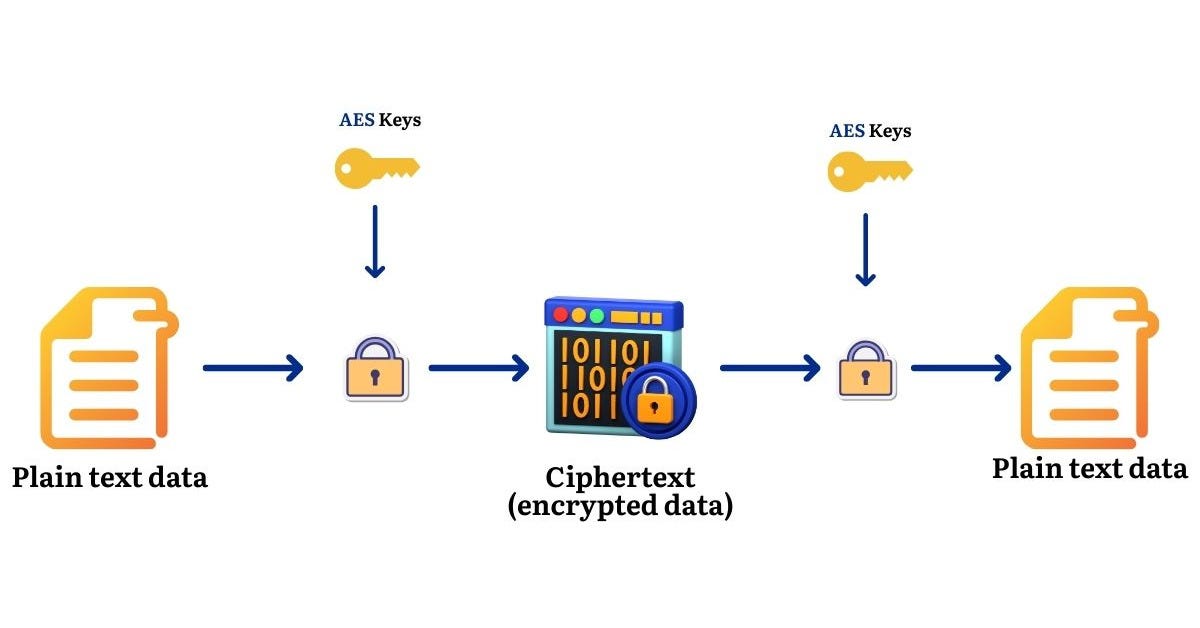
Encryption is the process of converting readable data (plaintext) into unreadable data (ciphertext) using a key.
Only someone with the correct key can decrypt the data.
Why We Need Encryption?
To protect sensitive data
To comply with security standards
To secure database-stored information
To prevent identity theft, fraud, or data leaks
Laravel’s Encryption
Laravel uses OpenSSL and the industry-standard AES-256-CBC or AES-128-CBC encryption.
It is:
Secure
Fast
Easy to use
Opinionated (removes complexity)
⚙️ 2. How Laravel Encryption Works
Laravel uses a secret key stored in .env → APP_KEY.
APP_KEY=base64:JQ1XC77tVRa1Tt56Zl................This key is used to encrypt/decrypt values.
✔️ Encrypting Data
use Illuminate\Support\Facades\Crypt;

$encrypted = Crypt::encryptString(’Hello Pritesh’);
✔️ Decrypting Data
use Illuminate\Support\Facades\Crypt;

$decrypted = Crypt::decryptString($encrypted);
🕒 3. When Should You Use Encryption?
You should NOT encrypt everything.
Use encryption when storing or transmitting highly sensitive information such as:
✔️ Personally identifiable information (PII)
Aadhaar / SSN
Phone numbers
Government IDs
Passport numbers
✔️ Financial data
Bank account details
Credit card numbers
Transaction tokens
✔️ Authentication-related data
API keys
Access tokens
Refresh tokens
OAuth secrets
✔️ Business confidential data
Internal notes
Private documents
Signed agreements
❌ When NOT to Use Encryption
Fields used for search or filtering (
LIKE,WHERE)Sorting fields
Non-sensitive fields
Because encrypted data is unreadable, database-level queries become impossible.
⭐ 4. Best Practices for Using Encryption in Laravel
✅ 1. Always protect your APP_KEY
Never share your .env file
Never commit it to GitHub
Rotate keys during breaches
Use server-level secrets management (AWS/GCP/Vault)
✅ 2. Use model encryption casts
Cleaner, automatically applied, and standardized.
protected $casts = [
   ‘pan_number’ => ‘encrypted’,
];
✅ 3. Encrypt only what is necessary
Avoid performance overhead and indexing problems.
✅ 4. Store hash values for searchable encrypted fields
Example: store hashed email for lookup.
email_encrypted
email_hash (for searching)
✅ 5. Use Queue Encryption for Queued Jobs
Never put raw sensitive data in queues.
$job->data = Crypt::encrypt($sensitive);✅ 6. Secure backups
Encrypted data must remain encrypted even in backups.
✅ 7. Don’t log sensitive information
Disable logging for encrypted sensitive data.
🏦 Real-World Scenario: Storing Client Bank Details (EFT)
Imagine you’re building an insurance or loan management system where clients can set up their bank account for EFT payouts.
You want to store:
Account holder name
Bank name
Account number (Sensitive 🚨)
Routing number (Sensitive 🚨)
Bank identifiers (IFSC / SWIFT / Branch code)
This must be safe.
Let’s build it the secure way.
🧩 Step 1: Create the Migration
Here’s the migration you’ll use:
Schema::create(’client_bank_details’, function (Blueprint $table) {
    $table->id();
    $table->unsignedBigInteger(’client_id’);

    $table->string(’account_holder_name’);
    $table->string(’bank_name’);

    // Sensitive fields - stored encrypted
    $table->text(’account_number’);
    $table->text(’routing_number’);

    $table->enum(’account_type’, [’checking’, ‘savings’, ‘business’]);
    $table->boolean(’is_primary’)->default(false);
    $table->boolean(’is_verified’)->default(false);
    $table->enum(’status’, [’active’, ‘inactive’])->default(’active’);

    $table->string(’branch_code’)->nullable();
    $table->string(’swift_code’)->nullable();
    $table->string(’country’)->nullable();
    $table->string(’currency’)->nullable();

    $table->json(’metadata’)->nullable();

    $table->timestamps();
});
🛡️ Step 2: Apply Laravel Encryption Using Model Casts
This is the secret sauce.
Laravel provides a beautiful, painless way to automatically encrypt/decrypt model attributes.
Just add:
protected $casts = [
    ‘account_number’ => ‘encrypted’,
    ‘routing_number’ => ‘encrypted’,
];
Your model becomes:
class ClientBankDetail extends Model
{
    protected $fillable = [
        ‘client_id’,
        ‘account_holder_name’,
        ‘bank_name’,
        ‘account_number’,
        ‘routing_number’,
        ‘account_type’,
        ‘is_primary’,
        ‘is_verified’,
        ‘status’,
        ‘branch_code’,
        ‘swift_code’,
        ‘country’,
        ‘currency’,
        ‘metadata’,
    ];

    protected $casts = [
        ‘account_number’ => ‘encrypted’,
        ‘routing_number’ => ‘encrypted’,
        ‘metadata’ => ‘array’,
        ‘is_primary’ => ‘boolean’,
        ‘is_verified’ => ‘boolean’,
    ];
}
🚀 Step 3: Storing Encrypted Bank Information
ClientBankDetail::create([
    ‘client_id’ => 101,
    ‘account_holder_name’ => ‘John Doe’,
    ‘bank_name’ => ‘Wells Fargo’,
    ‘account_number’ => ‘9876543210’,
    ‘routing_number’ => ‘021000021’,
    ‘account_type’ => ‘checking’,
    ‘country’ => ‘USA’,
    ‘currency’ => ‘USD’
]);
Laravel will:
Encrypt the data before storing it
Decrypt it when you retrieve it
Protect it using application key (
APP_KEY)
All automatically.
🔍 Step 4: Reading Decrypted Values
$bank = ClientBankDetail::find(1);
echo $bank->account_number;
You get a clean value like:
9876543210
But if you open the database, you see unreadable encrypted content — exactly what we want.
📜 Compliance & Legal Benefits
Encryption helps meet:
PCI-DSS
GDPR
SOC 2
Encryption ≠ compliance
But compliance is impossible without encryption.
📌 Conclusion
Laravel makes encryption incredibly simple without compromising security.
If you’re dealing with sensitive data, encryption is non-negotiable.
This blog covered:
✔️ What encryption is
✔️ How Laravel handles it
✔️ When to use it
✔️ Best practices
✔️ Real-world examples
✔️ Practical code snippets