

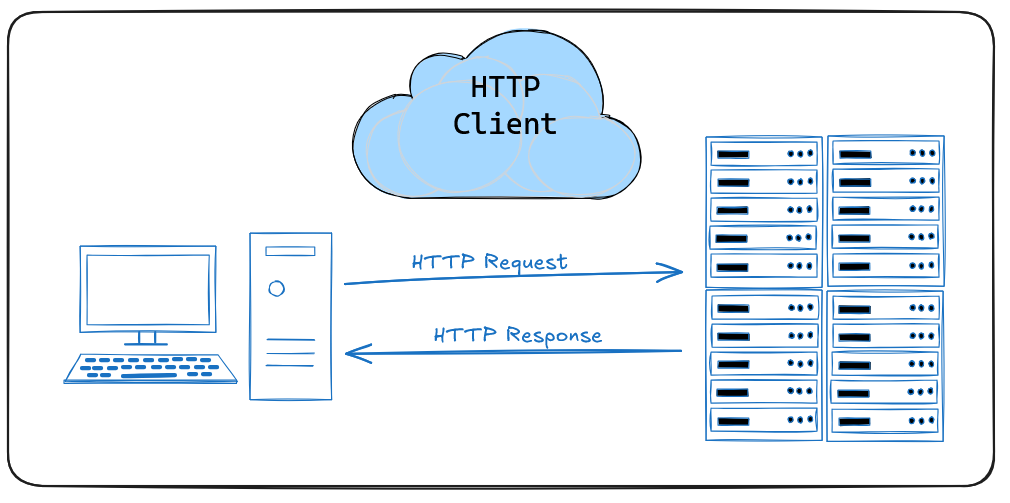
When building modern web applications, interacting with external APIs has become a core requirement. Whether you’re integrating with payment gateways, third-party CRMs, or fetching weather data, you need a reliable way to send and receive HTTP requests.
In Laravel, the HTTP Client (introduced in Laravel 7, powered by Guzzle under the hood) makes working with APIs elegant, expressive, and developer-friendly.
🔹 Why Use Laravel’s HTTP Client?
Before Laravel 7, developers often used Guzzle directly or other libraries. But it required extra setup and didn’t feel very "Laravel-ish."
Laravel’s HTTP Client solves this by providing:
✅ A clean, expressive API
✅ Built-in JSON handling
✅ Automatic retries & error handling
✅ Support for asynchronous requests
✅ Easy integration with testing and fakes
🔹 What is Guzzle?
Guzzle is a powerful PHP HTTP client. It’s feature-rich and widely used outside Laravel.
With Guzzle, you get:
✔ Full control over requests
✔ Middleware support
✔ Streaming large files
✔ Cookie/session handling
✔ Advanced async workflows
Laravel developers usually don’t need raw Guzzle unless doing something advanced — but it’s good to know both.
✅ Using Laravel HTTP Client
use Illuminate\Support\Facades\Http;

$response = Http::get('https://jsonplaceholder.typicode.com/posts/1');

$post = $response->json();
👉 $response->json() instantly gives you an array.
✅ Using Guzzle
use GuzzleHttp\Client;

$client = new Client(['base_uri' => 'https://jsonplaceholder.typicode.com']);

$response = $client->request('GET', '/posts/1');

$post = json_decode($response->getBody()->getContents(), true);
👉 With Guzzle, you need to manually decode JSON.
🔹 Real-World Example : Payment Gateway 💳
Laravel HTTP Client
$response = Http::withHeaders([
    'Authorization' => 'Bearer ' . config('services.payment.api_key'),
])->post('https://api.paymentprovider.com/payments', [
    'amount' => 1000,
    'currency' => 'USD',
    'customer_id' => 12345,
]);

if ($response->failed()) {
    Log::error('Payment failed', ['response' => $response->body()]);
} else {
    $paymentData = $response->json();
}
Guzzle Alternative
$client = new Client();

$response = $client->request('POST', 'https://api.paymentprovider.com/payments', [
    'headers' => [
        'Authorization' => 'Bearer ' . env('PAYMENT_API_KEY')
    ],
    'form_params' => [
        'amount' => 1000,
        'currency' => 'USD',
        'customer_id' => 12345
    ]
]);

$paymentData = json_decode($response->getBody()->getContents(), true);
🚨 Error Handling
Laravel HTTP Client makes error handling easier:
$response->successful();  // true if 200-level
$response->failed();      // true if 400 or 500
$response->clientError(); // true if 400-level
$response->serverError(); // true if 500-level
In Guzzle, you’d need to catch exceptions:
try {
    $response = $client->request('GET', $url);
} catch (\GuzzleHttp\Exception\ClientException $e) {
    // Handle 400-level errors
} catch (\GuzzleHttp\Exception\ServerException $e) {
    // Handle 500-level errors
}
🕒Retries & Timeouts
Laravel HTTP Client
$response = Http::retry(3, 200)->timeout(10)->get($url);Guzzle
$client = new Client([
    'timeout' => 10,
    'retry' => 3 // Requires middleware for custom retry logic
]);
👉 Retry logic is built-in for Laravel, but requires extra setup in Guzzle.
🔹 Testing with Fakes
Laravel HTTP Client makes API testing easy:
Http::fake([
    'api.paymentprovider.com/*' => Http::response(['status' => 'success'], 200),
]);

$response = Http::post('https://api.paymentprovider.com/payments', [
    'amount' => 500,
]);

$response->json(); // ['status' => 'success']
In Guzzle, you’d need MockHandler, which is more verbose.
🔹 Which Should You Use?
Laravel HTTP Client 👉 If you’re working inside a Laravel app (cleaner syntax, testing support, retries, easy JSON handling).
Guzzle 👉 If you need advanced features (streaming, complex middleware, custom transports, or if you’re working outside Laravel).
🔄 Building a Reusable HTTP Client for Multiple Services in Laravel
Modern Laravel applications often need to talk to multiple APIs — payment gateways, weather services, CRMs, notification systems, etc.
If you have 10 different services to integrate with, you don’t want to copy-paste the same Http::get() logic everywhere. That would be:
❌ Hard to maintain
❌ Difficult to test
❌ Messy when adding retries/logging
Instead, we can design a clean, centralized HTTP client approach that is:
✅ Reusable across all services
✅ Configurable with .env variables
✅ Testable with Http::fake()
✅ Maintainable when scaling from 2 → 10+ services
🔹 Step 1: Store API Configurations in config/services.php
Instead of hardcoding API keys or URLs, keep them in .env and config/services.php.
// config/services.php
return [
    'payment' => [
        'base_uri' => env('PAYMENT_API_URL', 'https://api.paymentprovider.com'),
        'token'    => env('PAYMENT_API_KEY'),
    ],

    'weather' => [
        'base_uri' => env('WEATHER_API_URL', 'https://api.openweathermap.org/data/2.5'),
        'token'    => env('WEATHER_API_KEY'),
    ],

    // ... add other 8 services here
];
👉 Benefits:
Easy to manage all API credentials in one place
No sensitive data in code (kept in
.env)Simple to switch between staging/production APIs
🔹 Step 2: Create a Base HTTP Service
We’ll create a base class that defines how our app talks to APIs (headers, retries, timeouts, logging).
// app/Services/BaseHttpService.php
namespace App\Services;

use Illuminate\Support\Facades\Http;

abstract class BaseHttpService
{
    protected string $baseUri;
    protected array $headers = [];

    protected function client()
    {
        return Http::withHeaders($this->headers)
            ->baseUrl($this->baseUri)
            ->retry(3, 200) // retry 3 times, 200ms apart
            ->timeout(10);  // 10 second timeout
    }
}
👉 Every service (Payment, Weather, etc.) will extend this base class, so we don’t repeat retry/timeout logic.
🔹 Step 3: Create Individual Service Classes
Each API gets its own service class for clarity and single responsibility.
// app/Services/PaymentService.php
namespace App\Services;

class PaymentService extends BaseHttpService
{
    public function __construct()
    {
        $this->baseUri = config('services.payment.base_uri');
        $this->headers = [
            'Authorization' => 'Bearer ' . config('services.payment.token'),
            'Accept'        => 'application/json',
        ];
    }

    public function createPayment(array $data)
    {
        return $this->client()->post('/payments', $data)->json();
    }

    public function getPayment(string $id)
    {
        return $this->client()->get("/payments/{$id}")->json();
    }
}
// app/Services/WeatherService.php
namespace App\Services;
class WeatherService extends BaseHttpService
{
public function __construct()
{
$this->baseUri = config('services.weather.base_uri');
$this->headers = [
'Accept' => 'application/json',
];
}
public function getWeather(string $city)
{
$response = $this->client()->get('/weather', [
'q' => $city,
'appid' => config('services.weather.token'),
'units' => 'metric',
]);
return $response->successful()
? $response->json()
: ['error' => 'Unable to fetch weather data'];
}
}🔹 Step 4: Use Dependency Injection in Controllers
Since each service is a dedicated class, you can inject it directly into your controllers.
use App\Services\PaymentService;
use App\Services\WeatherService;

class ApiController extends Controller
{
    public function checkout(PaymentService $paymentService)
    {
        $payment = $paymentService->createPayment([
            'amount' => 1500,
            'currency' => 'USD',
            'customer_id' => 123,
        ]);

        return response()->json($payment);
    }

    public function forecast(WeatherService $weatherService)
    {
        $weather = $weatherService->getWeather('New York');
        return response()->json($weather);
    }
}
👉 Now, your controllers stay clean and don’t care about API logic.
🔹 Best Practices
✔ Keep all API credentials in .env & config/services.php
✔ Use a BaseHttpService to avoid repeated code
✔ Create dedicated service classes for each API
✔ Use Dependency Injection instead of new Class()
✔ Always handle errors with failed(), throw(), or retries
✔ Use Http::fake() in tests to avoid hitting real APIs
🎯 Wrapping Up
Both Laravel HTTP Client and Guzzle are excellent choices for consuming APIs.
Laravel HTTP Client gives you an expressive, developer-friendly wrapper for common tasks — perfect for clean, testable, and maintainable code.
Guzzle gives you full power and flexibility when you need advanced features or fine-grained control.
For most Laravel projects, the HTTP Client will cover everything you need while keeping your code elegant and simple. When things get complex, you always have the option to drop down into Guzzle’s full capabilities.