

When working with SQL queries, we often need to combine results from multiple tables or queries into one unified dataset.
In MySQL, this is where UNION and UNION ALL come in handy.
Although they look similar, they behave differently under the hood and have performance implications that every developer should understand.
⚙️ What is UNION?
The UNION operator combines the results of two or more SELECT statements and removes duplicate rows from the final result set.
✅ Syntax:
SELECT column_list FROM table1
UNION
SELECT column_list FROM table2;
🔍 Example:
Let’s say we have two tables — employees_2024 and employees_2025.

Now, if we run:
SELECT name FROM employees_2024
UNION
SELECT name FROM employees_2025;
🧾 Output:

➡️ Notice how “Alice” appears only once — duplicates are removed automatically.
⚡ What is UNION ALL?
The UNION ALL operator also combines the results of multiple SELECT statements —
but it does not remove duplicates.
✅ Syntax:
SELECT column_list FROM table1
UNION ALL
SELECT column_list FROM table2;
🔍 Example:
Using the same tables:
SELECT name FROM employees_2024
UNION ALL
SELECT name FROM employees_2025;
🧾 Output:

➡️ Here, “Alice” appears twice — once from each table.
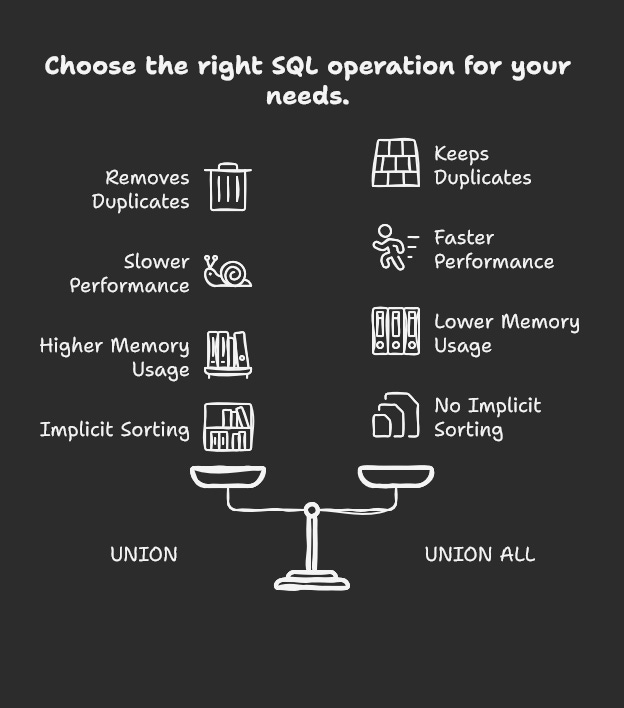
⚖️ Key Differences Between UNION and UNION ALL
🚀 Performance Example
Let’s run a quick comparison with a large dataset.
-- UNION
SELECT name FROM sales_2023
UNION
SELECT name FROM sales_2024;

-- UNION ALL
SELECT name FROM sales_2023
UNION ALL
SELECT name FROM sales_2024;
⚙️ Behind the scenes:
UNIONperforms an implicitDISTINCToperation — MySQL creates a temporary table, sorts results, and removes duplicates.UNION ALLsimply concatenates results, making it much faster for large data sets.
Rule of thumb:
If you don’t need to eliminate duplicates → always prefer UNION ALL for better performance.
🌍 Real-World Examples
🏢 Example 1: Combining Customer Lists from Multiple Branches
Let’s say you have separate databases or tables for different store branches:
customers_mumbaicustomers_delhi
Each table stores customer names. Some customers shop in both branches.
✅ Using UNION (to get unique customers)
SELECT customer_name FROM customers_mumbai
UNION
SELECT customer_name FROM customers_delhi;
Output:

➡️ This gives you a unique list of customers across both branches — useful for CRM or marketing campaigns where duplicates are not needed.
⚡ Using UNION ALL (to track total visits)
SELECT customer_name FROM customers_mumbai
UNION ALL
SELECT customer_name FROM customers_delhi;
Output:

➡️ This shows each occurrence, meaning Priya visited both branches — helpful when you want to count total visits or analyze activity.
💡 When to Use Which?
✅ Use UNION When:
You need unique results only.
Example: Combining customer lists from multiple regions.
✅ Use UNION ALL When:
You’re sure data won’t overlap or duplicates are acceptable.
Example: Merging monthly logs or combining partitions.
⚠️ Common Mistakes to Avoid
Mismatched columns:
Each SELECT must return the same number of columns with compatible data types.
-- ❌ This will fail
SELECT id, name FROM table1
UNION
SELECT name FROM table2;
Expecting automatic sorting:
The result ofUNIONorUNION ALLis not guaranteed to be ordered.
UseORDER BYafter the last query:
SELECT name FROM table1
UNION ALL
SELECT name FROM table2
ORDER BY name;
🧠 Pro Tip
If you need to count duplicates or analyze overlaps, you can simulate both behaviors:
SELECT name, COUNT(*) AS occurrence
FROM (
  SELECT name FROM employees_2024
  UNION ALL
  SELECT name FROM employees_2025
) AS combined
GROUP BY name;
This helps detect duplicates even when using UNION ALL.
🏁 Conclusion
Both UNION and UNION ALL are powerful tools in MySQL for combining data from multiple queries — but understanding their differences is essential for writing efficient SQL.
UNIONgives you a clean, unique result set by removing duplicates — ideal for cases where you care about distinct data (like unique customers, leads, or products).UNION ALL, on the other hand, is faster and lighter because it doesn’t check for duplicates — making it perfect for analytics, reporting, and log data where every record matters.
In short:

Think of it this way —
Use
UNIONfor accuracy, andUNION ALLfor speed.
The best SQL developers know when to choose between the two, balancing data correctness and query performance based on the context.
So next time you merge data across tables, pause for a second and ask yourself —
Do I really need to remove duplicates?
If not, give UNION ALL the green light. 🚦