

React Hooks changed the way developers build React applications. They allow us to use state, manage side effects, share data, and reuse component logic without writing class components.
But with several Hooks available in React, understanding which Hook to use and when to use it can sometimes be confusing.
In this article, we’ll explore 7 essential React Hooks, understand their purpose, and see practical examples of how they work.
🪝 What Are React Hooks?
React Hooks are built-in functions that allow functional components to use React features such as state, context, refs, and lifecycle-related behavior.
Before Hooks were introduced, developers primarily used class components to manage state and lifecycle methods.
With Hooks, we can achieve the same functionality using simpler and more reusable functional components.
Why do we need React Hooks?
Manage component state without class components.
Handle side effects such as API calls.
Share data between components.
Reuse stateful logic.
Improve code readability and maintainability.
📋 Rules of Hooks
Before exploring individual Hooks, it’s important to understand two fundamental rules:
Only call Hooks at the top level: Never call Hooks inside loops, conditions, or nested functions.
Only call Hooks from React functions: Use Hooks inside functional components or custom Hooks.
Following these rules ensures React can correctly maintain Hook state between renders.
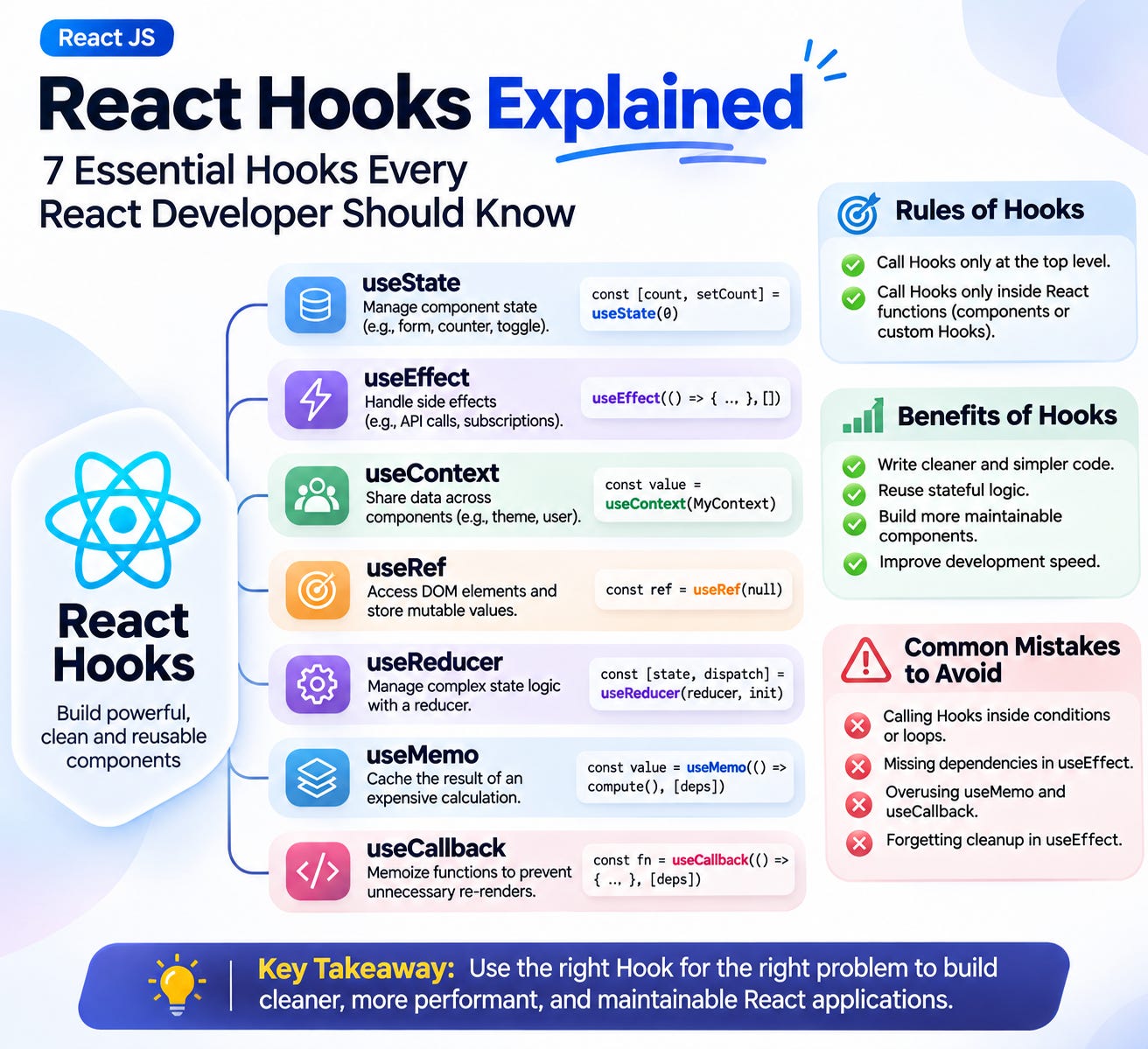
⚡ 7 Essential React Hooks
1️⃣ useState - Manage Component State
useState allows functional components to manage and update state.
Example:
import { useState } from "react";

function Counter() {
  const [count, setCount] = useState(0);

  return (
    <div>
      <h2>Count: {count}</h2>
      <button onClick={() => setCount(count + 1)}>
        Increment
      </button>
    </div>
  );
}
When to use it?
Managing form inputs.
Building counters.
Showing or hiding elements.
Managing component-level data.
2️⃣ useEffect - Handle Side Effects
useEffect allows you to synchronize a component with external systems, such as APIs, subscriptions, timers, and browser event listeners.
Example:
import { useEffect, useState } from "react";

function Users() {
  const [users, setUsers] = useState([]);

  useEffect(() => {
    async function fetchUsers() {
      const response = await fetch(
        "https://jsonplaceholder.typicode.com/users"
      );

      const data = await response.json();
      setUsers(data);
    }

    fetchUsers();
  }, []);

  return (
    <ul>
      {users.map((user) => (
        <li key={user.id}>{user.name}</li>
      ))}
    </ul>
  );
}
When to use it?
Fetching data from APIs.
Setting up subscriptions.
Handling browser events.
Managing timers and cleanup operations.
3️⃣ useContext - Share Data Across Components
useContext allows components to access shared data without passing props through multiple levels of the component tree.
Example:
import { createContext, useContext } from "react";

const ThemeContext = createContext("light");

function Header() {
  const theme = useContext(ThemeContext);

  return <h1>Current theme: {theme}</h1>;
}

function App() {
  return (
    <ThemeContext.Provider value="dark">
      <Header />
    </ThemeContext.Provider>
  );
}
When to use it?
Theme management.
Authentication information.
Language preferences.
Sharing application-level data.
4️⃣ useRef - Access DOM Elements and Store Values
useRef allows you to reference DOM elements and store mutable values that persist between renders without triggering a re-render when changed.
Example:
import { useRef } from "react";

function SearchBox() {
  const inputRef = useRef(null);

  const handleFocus = () => {
    inputRef.current.focus();
  };

  return (
    <div>
      <input ref={inputRef} placeholder="Search..." />
      <button onClick={handleFocus}>
        Focus Input
      </button>
    </div>
  );
}
When to use it?
Accessing DOM elements.
Managing focus.
Storing timer IDs.
Keeping mutable values between renders.
5️⃣ useReducer - Manage Complex State
useReducer is useful when state management involves multiple related values or complex update logic.
It works with a reducer function that receives the current state and an action, then returns the next state.
Example:
import { useReducer } from "react";

function reducer(state, action) {
  switch (action.type) {
    case "increment":
      return { count: state.count + 1 };

    case "decrement":
      return { count: state.count - 1 };

    default:
      return state;
  }
}

function Counter() {
  const [state, dispatch] = useReducer(reducer, {
    count: 0
  });

  return (
    <div>
      <h2>{state.count}</h2>

      <button onClick={() => dispatch({ type: "increment" })}>
        Increment
      </button>

      <button onClick={() => dispatch({ type: "decrement" })}>
        Decrement
      </button>
    </div>
  );
}
When to use it?
Complex state transitions.
Forms with multiple related fields.
Managing multiple actions.
State logic that is difficult to maintain with useState.
6️⃣ useMemo - Optimize Expensive Calculations
useMemo caches the result of a calculation between renders and recalculates it when its dependencies change.
Example:
import { useMemo, useState } from "react";

function ProductList({ products }) {
  const [search, setSearch] = useState("");

  const filteredProducts = useMemo(() => {
    return products.filter((product) =>
      product.name.toLowerCase().includes(search.toLowerCase())
    );
  }, [products, search]);

  return (
    <div>
      <input
        value={search}
        onChange={(e) => setSearch(e.target.value)}
        placeholder="Search products"
      />

      {filteredProducts.map((product) => (
        <p key={product.id}>{product.name}</p>
      ))}
    </div>
  );
}
When to use it?
Expensive calculations.
Filtering large datasets.
Avoiding unnecessary recalculations.
Remember: Don’t use useMemo for every calculation. Use it when memoization provides a meaningful performance benefit.
7️⃣ useCallback - Memoize Functions
useCallback caches a function definition between renders until its dependencies change.
Example:
import { useCallback, useState } from "react";

function Counter() {
  const [count, setCount] = useState(0);

  const increment = useCallback(() => {
    setCount((prev) => prev + 1);
  }, []);

  return (
    <div>
      <h2>{count}</h2>
      <button onClick={increment}>
        Increment
      </button>
    </div>
  );
}
When to use it?
Passing callbacks to memoized child components.
Maintaining function identity between renders.
Avoiding unnecessary re-renders in certain component patterns.
Remember: useCallback is a performance optimization, not something every function needs.
⚙️ What Are Custom Hooks?
Custom Hooks allow developers to extract and reuse stateful logic across multiple components.
A Custom Hook is simply a JavaScript function whose name starts with use and can call other Hooks.
Example:
import { useEffect, useState } from "react";

function useWindowWidth() {
  const [width, setWidth] = useState(window.innerWidth);

  useEffect(() => {
    const handleResize = () => {
      setWidth(window.innerWidth);
    };

    window.addEventListener("resize", handleResize);

    return () => {
      window.removeEventListener("resize", handleResize);
    };
  }, []);

  return width;
}

function App() {
  const width = useWindowWidth();

  return <h2>Window Width: {width}px</h2>;
}
Now, any component can reuse this logic by calling useWindowWidth().
Other common Custom Hooks:
useFetch()– Fetch API data.useDebounce()– Delay execution until user input stops.useLocalStorage()– Synchronize state with local storage.useWindowSize()– Track browser dimensions.
🚫 Common Mistakes to Avoid
Even experienced developers sometimes misuse React Hooks.
Here are some common mistakes:
Calling Hooks inside conditions or loops.
Missing dependencies in useEffect.
Using useEffect for calculations that can happen during rendering.
Forgetting cleanup functions for subscriptions and event listeners.
Overusing useMemo and useCallback.
Directly mutating state instead of updating it correctly.
Avoiding these mistakes helps keep your React applications predictable and maintainable.
⭐ React Hooks Best Practices
A few practical recommendations:
Follow the Rules of Hooks.
Keep components and Hooks focused on a single responsibility.
Extract reusable logic into Custom Hooks.
Avoid unnecessary state and effects.
Use functional state updates when the next state depends on the previous state.
Always clean up subscriptions and event listeners.
Use memoization only when there is a real performance benefit.
🎯 Conclusion
React Hooks make functional components more powerful, flexible, and easier to maintain.
Understanding the purpose of each Hook is more important than memorizing every available Hook.
Start with useState, useEffect, and useContext. Once you’re comfortable with them, explore useRef, useReducer, useMemo, and useCallback.
Remember: Good React development isn’t about using more Hooks. It’s about using the right Hook for the right problem.
Happy Coding! 🚀