

Have you ever wondered how to keep your Laravel controllers clean, your services reusable, and your application data properly structured?
As Laravel applications grow, passing arrays between controllers and services can make code harder to understand and maintain. Services may depend on loosely defined data structures, and developers may struggle to determine which fields an operation actually requires.
This is where DTOs (Data Transfer Objects) become useful.
DTOs help you define clear data contracts between different parts of your application. Instead of passing an entire HTTP request or an unstructured array, you can pass an object that explicitly represents the required data.
In this article, we’ll explore:
What a DTO is and why it matters.
The benefits and limitations of using DTOs.
How to implement a DTO in Laravel using a student registration example.
How to integrate DTOs with Laravel validation and services.
How Spatie Laravel Data simplifies DTO implementation.
When to choose plain PHP DTOs versus Spatie Laravel Data.
Let’s get started.
📨 What Is a DTO?
A Data Transfer Object (DTO) is an object designed to carry data between different parts of an application.
Its primary responsibility is to define the structure of the data being transferred, rather than perform the business operation itself.
Consider a student registration application built with Laravel.
When a student registers for a course, the application might need the following information:
Student name
Email address
Age
Course ID
We could pass this information as an associative array:
$studentData = [
    'name' => 'Rahul Sharma',
    'email' => 'rahul@example.com',
    'age' => 21,
    'course_id' => 1,
];
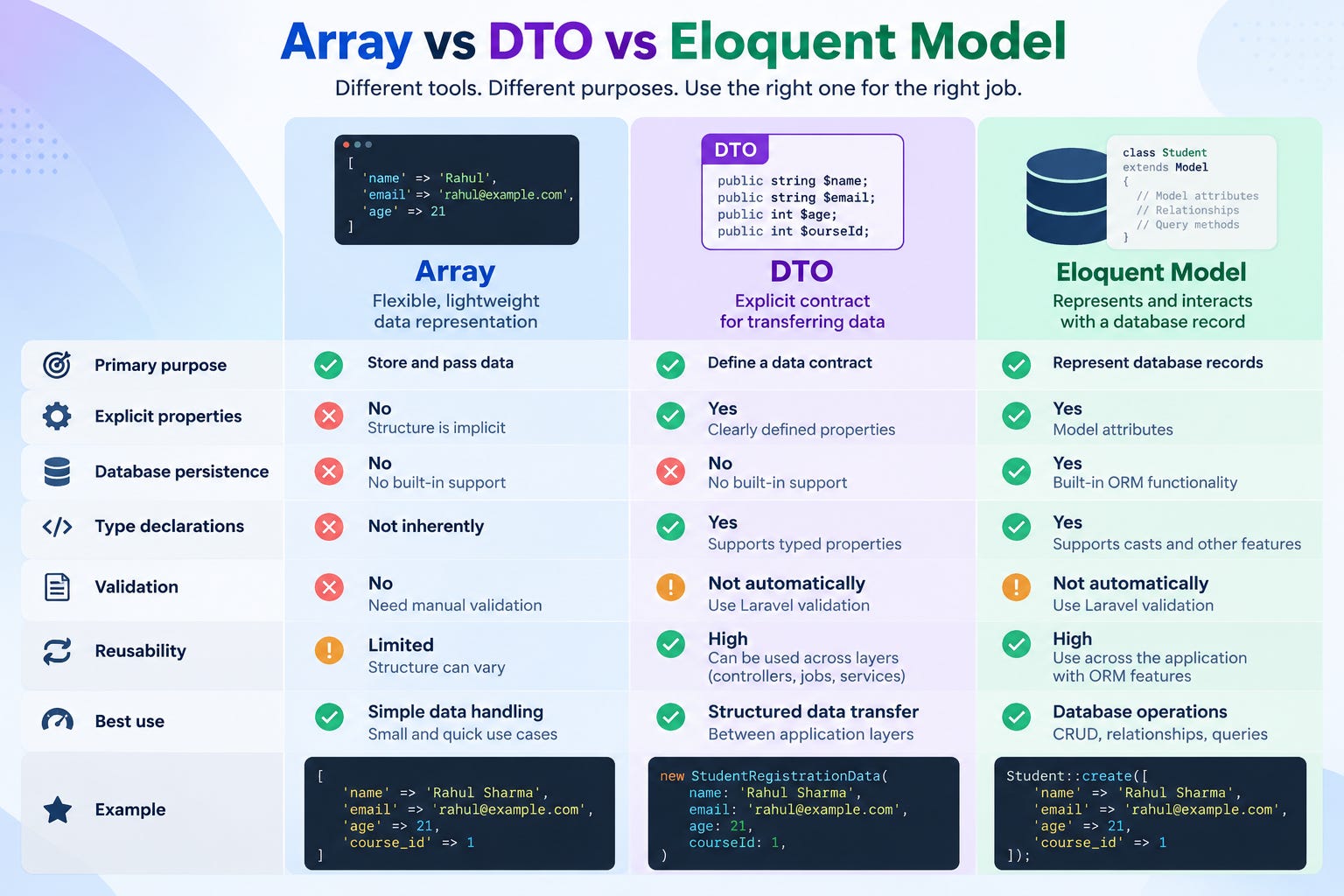
This works, but the expected structure is implicit. Nothing in the array itself tells us which fields are mandatory or what types they should have.
We can represent the same information using a DTO:
$studentData = new StudentRegistrationData(
    name: 'Rahul Sharma',
    email: 'rahul@example.com',
    age: 21,
    courseId: 1,
);
Now the data is represented by a defined class with explicitly named properties and types.
The key idea: A DTO makes the data contract explicit and provides a structured way to transfer data between application layers.
💡 Why Do We Need DTOs in Laravel?
Laravel makes it easy to access request data:
$request->input('name');
$request->input('email');
For a simple CRUD operation, this may be sufficient.
However, as an application grows, controllers and services can become tightly coupled to HTTP requests or depend on arrays with inconsistent structures.
Consider this service method:
public function register(array $data): Student
{
    // Registration logic
}
What fields does $data require? Is age an integer? Is course_id mandatory? Does the service need the student’s email or the entire request?
The method signature doesn’t tell us.
Now consider this version:
public function register(
    StudentRegistrationData $data
): Student {
    // Registration logic
}
The method explicitly declares the type of data it expects.
DTOs are especially useful when:
Services contain complex business logic.
Multiple application components call the same service.
Data comes from APIs, imports, or external integrations.
Queued jobs need structured input.
You want to test services independently of HTTP requests.
Your application benefits from clear boundaries between layers.
🎯 What Are the Benefits of DTOs?
✅ Clear data contracts
A DTO explicitly defines which fields an operation expects.
Developers can understand the structure of the data by reading the class rather than searching through several controllers and array definitions.
✅ Better separation of concerns
Controllers handle HTTP-related responsibilities, DTOs carry data, and services coordinate business operations.
Each component has a clearer purpose.
✅ Improved type safety
Typed properties help detect certain programming mistakes and make the expected data types explicit.
For example:
public function __construct(
    public string $name,
    public string $email,
    public int $age,
    public int $courseId,
) {}
These declarations help communicate the intended structure, although they do not replace validation of untrusted input.
✅ Easier unit testing
You can construct a DTO directly in a test without creating an HTTP request.
This makes it easier to test service behavior independently of the controller.
✅ Reusability
The same service can receive a DTO from a controller, queued job, console command, or another service.
The service does not need to know where the data originated.
✅ Controlled data transfer
You can explicitly map only the fields needed for an operation. This reduces the risk of accidentally passing unrelated request fields into business logic or database operations.
🛠️ Implementing a DTO in Laravel Using Student Registration
Let’s build a practical student registration workflow using plain PHP DTOs.
The flow will be:
HTTP Request → Validation → DTO → Service → Database
We’ll use a Form Request for validation, a DTO to represent the registration data, a service to handle persistence, and a controller to coordinate the process.
Step 1: Create the DTO class
Create the following file:
app/DTOs/StudentRegistrationData.php
<?php

namespace App\DTOs;

final readonly class StudentRegistrationData
{
    public function __construct(
        public string $name,
        public string $email,
        public int $age,
        public int $courseId,
    ) {}

    public static function fromArray(array $data): self
    {
        return new self(
            name: $data['name'],
            email: $data['email'],
            age: (int) $data['age'],
            courseId: (int) $data['course_id'],
        );
    }

    public function toArray(): array
    {
        return [
            'name' => $this->name,
            'email' => $this->email,
            'age' => $this->age,
            'course_id' => $this->courseId,
        ];
    }
}
Let’s understand the important parts.
final prevents the class from being extended.
readonly prevents the properties from being reassigned after initialization. This syntax requires PHP 8.2 or later.
__construct() defines the data the DTO requires.
fromArray() converts an associative array into a DTO.
toArray() converts the DTO into an array when needed.
Notice that the DTO contains no database queries or registration workflow. Its responsibility is to represent the registration data.
Also, the type casts in fromArray() are not validation. We will validate incoming values before creating the DTO.
Step 2: Create a Form Request for validation
Run the following command:
php artisan make:request StudentRegistrationRequestUpdate app/Http/Requests/StudentRegistrationRequest.php:
<?php

namespace App\Http\Requests;

use Illuminate\Foundation\Http\FormRequest;

class StudentRegistrationRequest extends FormRequest
{
    public function authorize(): bool
    {
        return true;
    }

    public function rules(): array
    {
        return [
            'name' => [
                'required',
                'string',
                'max:255',
            ],
            'email' => [
                'required',
                'email',
                'max:255',
                'unique:students,email',
            ],
            'age' => [
                'required',
                'integer',
                'min:16',
                'max:100',
            ],
            'course_id' => [
                'required',
                'integer',
                'exists:courses,id',
            ],
        ];
    }
}
The Form Request validates incoming data before the controller action executes.
For this example:
namemust be a non-empty string.emailmust be valid and unique in the students table.agemust be between 16 and 100.course_idmust reference an existing course.
These age limits are example business rules and should be adjusted to suit the application.
In a real application, also implement the necessary authorization checks to ensure that the student is permitted to register for the selected course.
Step 3: Create the registration service
Create app/Services/StudentRegistrationService.php:
<?php

namespace App\Services;

use App\DTOs\StudentRegistrationData;
use App\Models\Student;

class StudentRegistrationService
{
    public function register(
        StudentRegistrationData $data
    ): Student {
        return Student::create(
            $data->toArray()
        );
    }
}
The service accepts a StudentRegistrationData object rather than an HTTP request.
This makes it independent of the HTTP layer.
For example, a queued job could construct the same DTO and call this service without creating an HTTP request.
In a larger registration system, the service might also coordinate enrollment rules, seat availability, and notifications.
Step 4: Use the DTO in the controller
Create the controller if it doesn’t already exist:
php artisan make:controller StudentControllerUpdate app/Http/Controllers/StudentController.php:
<?php

namespace App\Http\Controllers;

use App\DTOs\StudentRegistrationData;
use App\Http\Requests\StudentRegistrationRequest;
use App\Services\StudentRegistrationService;
use Illuminate\Http\JsonResponse;

class StudentController extends Controller
{
    public function store(
        StudentRegistrationRequest $request,
        StudentRegistrationService $service
    ): JsonResponse {
        $data = StudentRegistrationData::fromArray(
            $request->validated()
        );

        $student = $service->register($data);

        return response()->json([
            'message' => 'Student registered successfully',
            'data' => $student,
        ], 201);
    }
}
The controller now coordinates the process without containing the database operation itself.
Its responsibilities are straightforward:
Receive validated input.
Convert the input into a DTO.
Pass the DTO to the service.
Return an HTTP response.
Laravel’s service container automatically resolves the service dependency.
Step 5: Register the API route
Add this to routes/api.php:
use App\Http\Controllers\StudentController;
use Illuminate\Support\Facades\Route;

Route::post('/students', [
    StudentController::class,
    'store',
]);
Make sure the Student model, database migration, and Course model exist.
The Student model should permit the intended fields through its $fillable property:
protected $fillable = [
    'name',
    'email',
    'age',
    'course_id',
];
Step 6: Test the endpoint
Send a POST request to /api/students with the following JSON body:
{
    "name": "Rahul Sharma",
    "email": "rahul@example.com",
    "age": 21,
    "course_id": 1
}
If validation passes and the database operation succeeds, the endpoint returns a 201 Created response.
If the email is invalid, the age is outside the configured range, or the course does not exist, Laravel rejects the request during validation.
We now have a registration workflow in which the request, DTO, service, and database responsibilities are clearly separated.
⚖️ DTOs vs. Arrays vs. Eloquent Models
🔌 Using Spatie Laravel Data: Taking DTOs to the Next Level
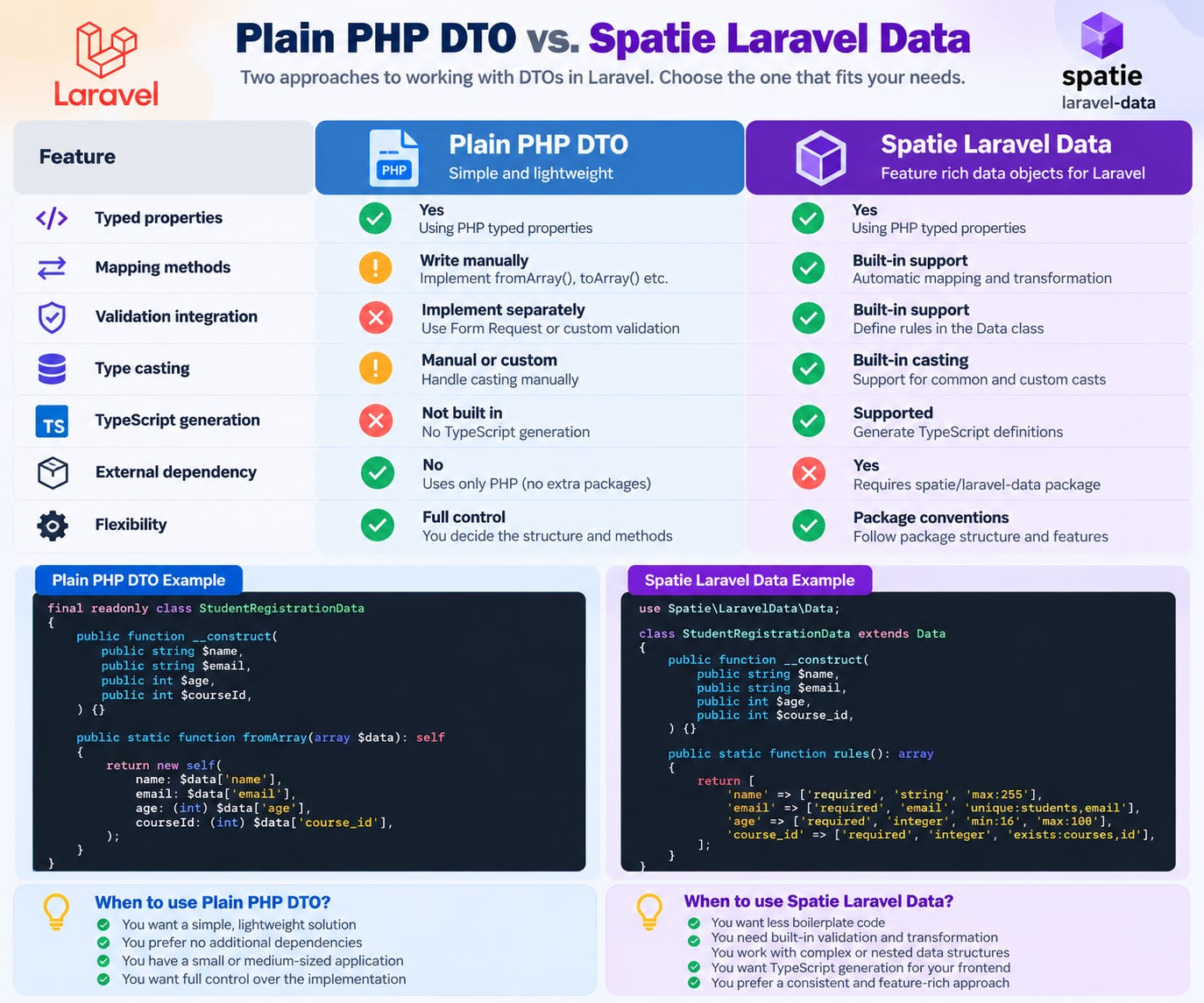
So far, we’ve implemented a DTO using plain PHP. This approach is straightforward, but we had to write our own fromArray() and toArray() methods and define validation rules separately.
As an application grows, this mapping code can become repetitive.
What if we could reduce some of that boilerplate and gain additional functionality?
This is where Spatie Laravel Data comes in.
Spatie Laravel Data is a package that builds on the DTO concept and provides functionality for data transformation, validation, casting, and serialization. It also supports features such as nested data objects and TypeScript generation.
✅ Install Spatie Laravel Data
Install the package with Composer:
composer require spatie/laravel-dataThe following example uses the package’s version 4 API.
✅ Create a Student Registration Data object
Create app/Data/StudentRegistrationData.php:
<?php

namespace App\Data;

use Spatie\LaravelData\Data;

class StudentRegistrationData extends Data
{
    public function __construct(
        public string $name,
        public string $email,
        public int $age,
        public int $course_id,
    ) {}

    public static function rules(): array
    {
        return [
            'name' => [
                'required',
                'string',
                'max:255',
            ],
            'email' => [
                'required',
                'email',
                'max:255',
                'unique:students,email',
            ],
            'age' => [
                'required',
                'integer',
                'min:16',
                'max:100',
            ],
            'course_id' => [
                'required',
                'integer',
                'exists:courses,id',
            ],
        ];
    }
}
The data structure and its validation rules are now defined in the same class.
The package can infer basic validation rules from property types, while custom rules let us express requirements such as email uniqueness and course existence.
✅ Use the Data object in the controller
With Spatie Laravel Data, you can inject the data object directly into a controller action.
<?php

namespace App\Http\Controllers;

use App\Data\StudentRegistrationData;
use App\Models\Student;
use Illuminate\Http\JsonResponse;

class StudentController extends Controller
{
    public function store(
        StudentRegistrationData $data
    ): JsonResponse {
        $student = Student::create(
            $data->toArray()
        );

        return response()->json([
            'message' => 'Student registered successfully',
            'data' => $student,
        ], 201);
    }
}
When the data object is resolved from the request, the package can validate the incoming data and create the object before the controller action executes.
In this version of the example, Spatie Laravel Data handles the request validation, so a separate Form Request is not needed for the same validation rules.
If you require more complex authorization or already have a Form Request, you can retain that approach and construct the data object from validated input instead.
As before, ensure the model’s $fillable configuration and database schema match the fields being persisted.
⭐ What are the benefits of Spatie Laravel Data?
1. Less boilerplate code
The package reduces the need to manually implement common data conversion and transformation methods.
2. Built-in validation support
You can define validation rules alongside your data structure and use the package’s request integration.
3. Automatic data transformation
Data objects can be created from supported input sources and transformed into arrays or JSON.
4. Type casting
The package supports casting values into appropriate types, including configured or supported date-related casts.
5. Consistent data contracts
A data object can be reused across controllers, services, and API responses, reducing duplicated definitions.
6. API response transformation
The package supports transforming data objects for output and controlling which properties are included.
7. TypeScript integration
You can generate TypeScript definitions from data objects, which is particularly useful when working with React or other TypeScript-based frontends.
⚖️ Plain PHP DTO vs. Spatie Laravel Data
🤔 Should you always use Spatie Laravel Data?
Not necessarily.
Plain PHP DTOs are a good choice when you need a simple data structure and want to avoid additional dependencies.
Spatie Laravel Data becomes particularly useful when an application has complex request payloads, nested objects, multiple API response structures, and repeated data transformation requirements.
The package does not replace the DTO concept. It provides a more feature-rich way to implement data objects in Laravel.
⭐ DTO Best Practices
👉 Keep DTOs focused
Create DTOs around meaningful operations, such as StudentRegistrationData, rather than creating a generic object that contains every possible student field.
👉 Keep business logic out of DTOs
A DTO should carry data, not perform database queries, register students, or send notifications.
Those responsibilities belong in services or other appropriate application components.
👉 Validate data at the appropriate boundary
Typed properties do not automatically validate untrusted input. Use Laravel validation or suitable domain-level validation where required.
👉 Use immutable DTOs where appropriate
PHP’s readonly classes can prevent accidental reassignment of properties after initialization.
👉 Avoid coupling services to HTTP requests
Prefer passing the data a service actually needs rather than the entire request object.
👉 Don’t introduce DTOs unnecessarily
For a small CRUD operation, a validated array may be enough. Introduce a DTO when its explicit structure and separation of concerns provide real value.
🚫 Common DTO Mistakes to Avoid
Mistake 1: Assuming a DTO validates data automatically
A plain PHP DTO does not enforce Laravel validation rules.
Mistake 2: Treating DTOs as Eloquent models
DTOs carry data; Eloquent models handle database persistence and ORM functionality.
Mistake 3: Putting business logic inside DTOs
Keep the data structure separate from registration workflows, database operations, and external integrations.
Mistake 4: Passing every request field into a DTO
Map only the fields required for the operation. Use validated input and deliberate field selection.
Mistake 5: Creating DTOs for every method
A DTO should solve a real design problem rather than add unnecessary classes and mapping code.
🏁 Conclusion
DTOs are a practical design technique for building maintainable Laravel applications.
They provide a structured way to transfer data between controllers, services, queued jobs, and other application components. By making data contracts explicit, DTOs can improve readability, reduce coupling, and simplify testing.
In our student registration example, we used a DTO to separate validated registration data from the HTTP request and the database operation.
We also explored Spatie Laravel Data, which can reduce repetitive code and provide additional functionality for validation, transformation, and serialization.
Start with plain PHP DTOs to understand the underlying concept. Introduce them where your application benefits from explicit data contracts, and consider Spatie Laravel Data when your requirements become more complex.
Remember these three principles:
Validation determines whether incoming data is acceptable.
DTOs define the structure of the data being transferred.
Services coordinate the business operation.
Used appropriately, DTOs can help your Laravel applications remain easier to understand, test, and maintain as they grow.