

When writing SQL queries, choosing between a Subquery, CTE, or Temporary Table can make or break your query’s performance and readability.
Though they all help you break complex problems into smaller chunks, each has its own strengths and ideal use cases.
In this post, we’ll explore:
What each of them is
How they differ
Practical SQL examples
When to use which one
🔹 1. What is a Subquery?
A subquery (or nested query) is a query inside another query.
It can appear in the SELECT, FROM, or WHERE clause and is used when you need to use the result of one query inside another.
🧩 Example:
Let’s say you want to fetch all employees who work in the IT department.
SELECT first_name, last_name
FROM employees
WHERE department_id = (
    SELECT department_id
    FROM departments
    WHERE department_name = ‘IT’
);
Here, the inner query:
SELECT department_id FROM departments WHERE department_name = ‘IT’;runs first, and its result is used by the outer query.
✅ When to Use:
For simple filtering or lookups.
When you need the result only once.
⚠️ Be Careful:
Can become slow if used inside loops or complex joins.
Not ideal for reusing results.
🔹 2. What is a CTE (Common Table Expression)?
A CTE is a temporary named result set that exists only during the execution of a single SQL statement.
Think of it as a named subquery that improves readability and maintainability.
It starts with the WITH keyword.
🧩 Example:
WITH IT_Employees AS (
    SELECT employee_id, first_name, last_name, department_id
    FROM employees
    WHERE department_id = (
        SELECT department_id FROM departments WHERE department_name = ‘IT’
    )
)
SELECT first_name, last_name
FROM IT_Employees
WHERE last_name LIKE ‘S%’;
Here, the CTE IT_Employees holds the intermediate result which we later query again.
✅ Benefits:
Readable and modular — perfect for long, multi-step queries.
Can be recursive, great for hierarchical data (like org charts).
⚠️ Limitations:
Exists only within that query.
Cannot be indexed or reused across multiple queries.
🔹 3. What is a Temporary Table?
A Temporary Table is like a normal table, but it’s stored temporarily in your database (e.g., in tempdb in SQL Server).
You can create, index, update, and reuse it across multiple queries within the same session.
🧩 Example:
CREATE TEMPORARY TABLE temp_it_employees AS
SELECT employee_id, first_name, last_name, department_id
FROM employees
WHERE department_id = (
    SELECT department_id FROM departments WHERE department_name = ‘IT’
);

SELECT * FROM temp_it_employees WHERE last_name LIKE ‘S%’;
You can even index it for faster performance:
CREATE INDEX idx_lastname ON temp_it_employees(last_name);✅ Benefits:
Can be reused multiple times.
Supports indexing — improves performance on large datasets.
Ideal for complex transformations or multi-step logic.
⚠️ Limitations:
Needs manual creation and cleanup.
Slight overhead for disk/memory usage.
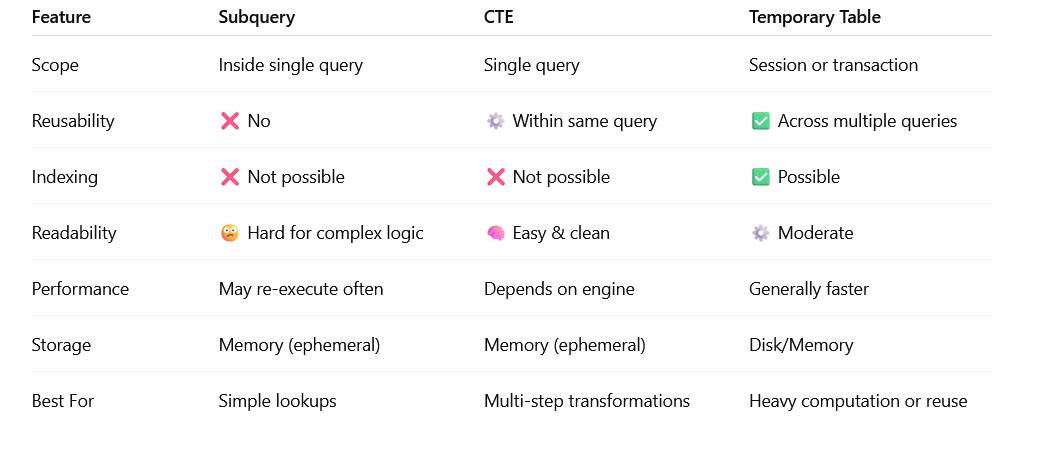
🔸 4. Comparison Summary
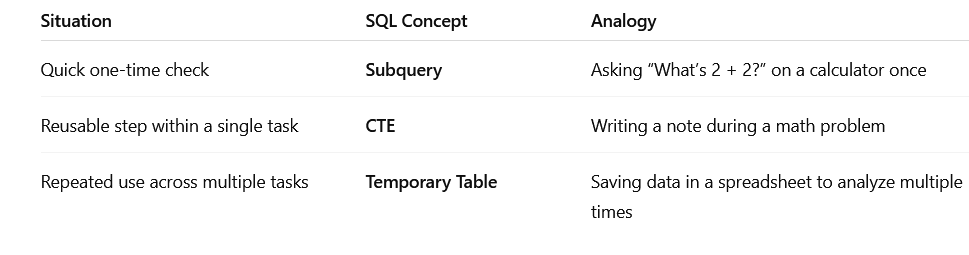
🧠 5. Real-World Analogy
🔹 6. Practical Performance Example
Let’s consider a real-world scenario:
You need to find all employees who worked more than 200 hours in the past 3 months and belong to departments with average salary > 80,000.
You can do it in three ways:
🔸 Subquery:
SELECT e.employee_id, e.first_name, e.last_name
FROM employees e
WHERE e.department_id IN (
    SELECT department_id FROM departments WHERE avg_salary > 80000
)
AND e.employee_id IN (
    SELECT employee_id FROM work_hours
    WHERE total_hours > 200
);
🔸 CTE:
WITH HighSalaryDepartments AS (
    SELECT department_id FROM departments WHERE avg_salary > 80000
),
ActiveEmployees AS (
    SELECT employee_id FROM work_hours WHERE total_hours > 200
)
SELECT e.employee_id, e.first_name, e.last_name
FROM employees e
JOIN HighSalaryDepartments d ON e.department_id = d.department_id
JOIN ActiveEmployees a ON e.employee_id = a.employee_id;
🔸 Temporary Table:
CREATE TEMPORARY TABLE high_salary_departments AS
SELECT department_id FROM departments WHERE avg_salary > 80000;

CREATE TEMPORARY TABLE active_employees AS
SELECT employee_id FROM work_hours WHERE total_hours > 200;

SELECT e.employee_id, e.first_name, e.last_name
FROM employees e
JOIN high_salary_departments d ON e.department_id = d.department_id
JOIN active_employees a ON e.employee_id = a.employee_id;
👉 In this example:
Subquery works fine for small datasets.
CTE is cleaner and easier to maintain.
Temporary Table gives the best performance for large datasets or repeated queries.
🔹 7. Best Practices
✅ Use Subqueries for quick and simple conditions.
✅ Use CTEs for readable, modular logic and recursive problems.
✅ Use Temporary Tables for large or reusable intermediate data sets.
✅ Always test performance with EXPLAIN or query plans.
✅ Clean up temporary tables if not automatically dropped.
💡 Final Thoughts
Choosing between a Subquery, CTE, and Temporary Table depends on what you value most — readability, performance, or reusability.

Remember — clean SQL is not just about running faster, but also about being maintainable.
Start small, measure performance, and evolve your query structure as your data grows.
Great article! Loved the Comparison Summary section — it clearly shows which feature fits different scenarios. Very well explained, Pritesh! 👍