

“Something went wrong.”
Three words that can ruin a developer’s day — or night.
At 2 AM, staring at a blinking cursor in the terminal, you realize those are the only words your application decided to leave you. No context. No clues. Just an expensive game of hide-and-seek with the root cause.
Logging isn’t glamorous. It’s rarely the star of the sprint demo, and it doesn’t get applause in release notes. But when your system goes rogue, logs are your only map through the chaos.
If code is the heart of your application, logs are its memory. Without logs, debugging is guesswork, troubleshooting takes forever, and security incidents can go unnoticed.
Good logging isn’t just about writing messages — it’s about recording the right information in the right way at the right time.
📝What is Logging?
In software development, logging means recording information about a program’s execution so you can review it later. These records (logs) can include:
Events (e.g., "User logged in", "Order placed")
Errors and exceptions
Performance metrics
System states and variable values
Logs are usually written to files, databases, or centralized log management tools like Datadog, Splunk, ELK (Elasticsearch + Logstash + Kibana), CloudWatch, etc.
A log entry usually contains:
Timestamp – When it happened
Severity level – DEBUG, INFO, WARN, ERROR, etc.
Message – What happened
Context – User ID, request ID, related data
✅Why is Logging Important?
Without logs, debugging is like trying to find a black cat in a dark room — when there might not even be a cat. 🐱💻
Benefits of Logging:
Debugging – Find and fix issues faster.
Auditing – Track who did what and when.
Monitoring – Spot unusual patterns or security breaches.
Compliance – Meet regulatory requirements in finance, healthcare, etc.
Performance Analysis – Identify bottlenecks and optimize.
🔧How Logging Works in Laravel
Laravel’s logging configuration lives in config/logging.php.
You define channels — think of them as destinations for your logs.
Example: Basic Logging
use Illuminate\Support\Facades\Log;

Log::info('User logged in.', ['user_id' => auth()->id()]);
Log::warning('Profile update failed.', ['user_id' => 5]);
Log::error('Payment failed.', ['order_id' => 12345, 'amount' => 250]);
🧩 Laravel Log Levels
emergencyalertcriticalerrorwarningnoticeinfodebug
🧪 Custom Log Channel
in logging.php
'channels' => [
    'payment' => [
        'driver' => 'single',
        'path' => storage_path('logs/payment.log'),
        'level' => 'info',
    ],
],
Usage:
Log::channel('payment')->info('Payment initiated.', ['order_id' => 6789]);🧠How to Log Like a Pro
Logging is easy — logging well is a skill. Here’s how:
🧩Use a Logging Framework
Don’t reinvent the wheel with echo or print_r. Use built-in or external logging tools:
Laravel:
LogfacadePython:
loggingmoduleNode.js:
winston,pino
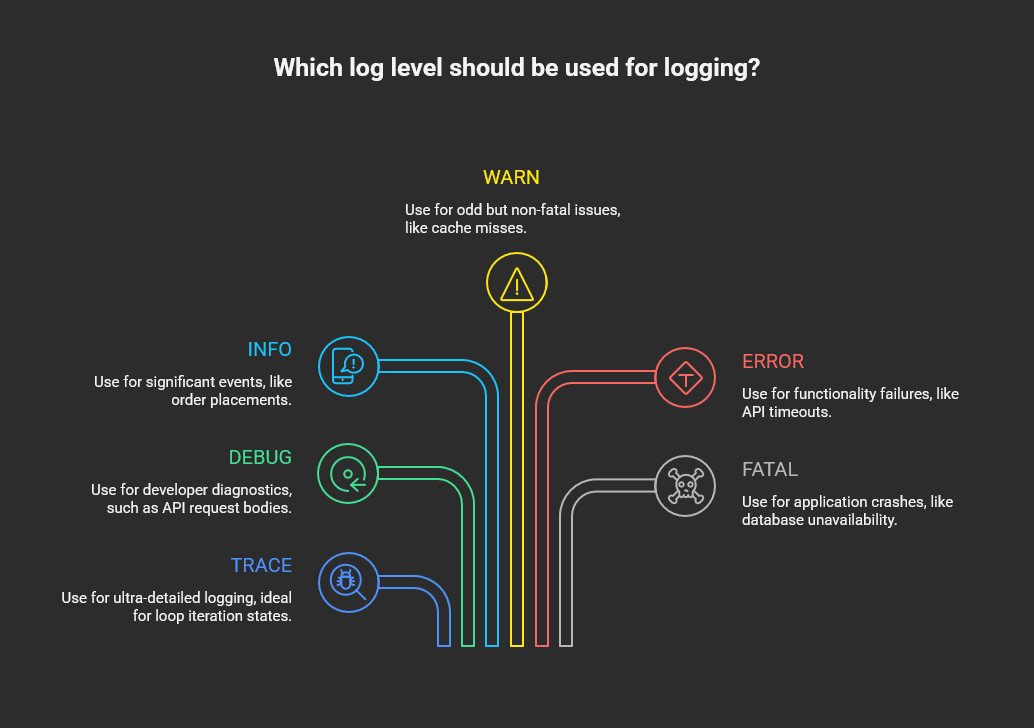
🧩Choose the Right Log Level
🧩Log in a Structured Format
Structured logs (like JSON) are easier to search and analyze:
{
  "timestamp": "2025-08-11T10:15:22Z",
  "level": "ERROR",
  "message": "Payment failed",
  "order_id": 7891,
  "user_id": 102,
  "error": "Insufficient funds",
  "correlation_id": "ac3f5c1d-4b91-4c91-b5ea-9baf1b90b2d4"
}
🧩Add Context
Every log should answer:
What happened?
Where did it happen?
Who was involved?
What was the state at the time?
use Illuminate\Support\Facades\Log;

try {
    // Simulate a payment processing failure
    $paymentGateway->charge($order->amount, $order->payment_method);
} catch (\Exception $e) {
    Log::error('Payment processing failed', [
        // ✅ What happened?
        'event' => 'payment_failed',

        // ✅ Where did it happen?
        'service' => 'PaymentService',
        'method' => __METHOD__,
        'file' => __FILE__,
        'line' => __LINE__,

        // ✅ Who was involved?
        'user_id' => auth()->id(),
        'order_id' => $order->id,

        // ✅ What was the state at the time?
        'order_amount' => $order->amount,
        'payment_method' => $order->payment_method,
        'gateway_response' => $e->getMessage(),

        // Extra good practice: correlation/tracking ID
        'correlation_id' => request()->header('X-Correlation-ID') ?? Str::uuid()
    ]);
}
🧩Use Correlation IDs
In distributed systems, a correlation ID lets you trace a request across multiple services.
public function handle($request, Closure $next)
{
    $correlationId = $request->header('X-Correlation-ID') ?? Str::uuid();
    Log::withContext(['correlation_id' => $correlationId]);
    return $next($request);
}
📦Best Practices for Effective Logging
✅ Log only what matters — Too much noise hides real issues.
✅ Avoid sensitive data — Never log passwords, tokens, or personal info.
✅ Use the right level — Don’t mark everything as ERROR.
✅ Centralize logs — Use ELK, Datadog, or CloudWatch for aggregation.
✅ Rotate and archive — Prevent storage bloat.
✅ Set up alerts — Notify on repeated errors or suspicious activity.
🚫Common Logging Mistakes
❌ Logging everything at DEBUG and INFO in production (hurts performance).
❌ Using vague messages like “Something failed” without details.
❌ Dumping large objects without summarizing.
❌ Ignoring log retention and storage limits.
💡Benefits of Logging Like a Pro
Fast troubleshooting – Fewer “where did it break?” moments.
Better collaboration – Ops, QA, and dev teams read the same story.
Security visibility – Detect anomalies early.
Compliance-ready – Easy to audit.
Performance insights – Identify slow spots without intrusive profiling.
🧘Final Thoughts
Logging is the black box recorder of your application. When implemented thoughtfully, it becomes your most reliable ally in debugging, monitoring, and securing your system.
So next time you write a log, ask yourself:
“Will this message help me (or someone else) understand the full story later?”
Logging is not just recording history — it’s writing tomorrow’s answers today.