

Every Laravel developer eventually reaches a point where a single controller begins to do too much.
At first, everything feels manageable.
Your application only needs to save data to the database.
Later, product requirements evolve.
Marketing wants an email.
Finance wants an invoice.
Operations wants analytics.
Customer Support wants notifications.
The Product team wants reward points.
Engineering wants audit logs.
Before long, your once-simple controller has become responsible for half of your application’s business logic.
If you’ve ever opened a controller and found hundreds of lines of code performing unrelated tasks, you’re not alone.
This is exactly the problem Laravel’s Event-Driven Architecture solves.
Instead of placing every responsibility inside your controller, Laravel allows you to announce that something happened, while independent components react to that event.
In this article, we’ll build a complete Uber Ride Booking workflow using Laravel Events and Listeners and learn why this design pattern is used in production applications.
🚨 The Problem We’re Trying to Solve
Imagine we’re building an Uber-like ride booking platform.
When a rider completes a trip, several things need to happen.
Save ride information
Charge the customer
Send an email receipt
Generate an invoice
Update the driver’s earnings
Award loyalty points
Notify the accounting team
Store analytics data
Trigger a webhook for third-party integrations
Most developers initially write everything inside the controller.
public function completeRide(Request $request)
{
    $ride = Ride::create([
        'driver_id' => $request->driver_id,
        'rider_id'  => $request->rider_id,
        'fare'      => $request->fare,
        'status'    => 'completed',
    ]);

    PaymentService::charge($ride);

    Mail::to($ride->rider)->send(new RideReceiptMail($ride));

    InvoiceService::generate($ride);

    DriverService::updateEarnings($ride);

    RewardPointService::addPoints($ride);

    AnalyticsService::trackRide($ride);

    Notification::send(
        User::accountingTeam(),
        new RideCompletedNotification($ride)
    );

    return response()->json([
        'message' => 'Ride Completed'
    ]);
}
At first glance, this code looks perfectly fine.
Everything works.
So what’s wrong?
The problem isn’t functionality.
The problem is architecture.
⛔ Why This Controller Is a Problem
Look carefully.
Our controller now knows about:
Payment Service
Mail Service
Invoice Service
Driver Service
Reward Service
Analytics
Notifications
That’s seven different dependencies.
Now imagine six months later.
Management asks for:
Send SMS
Push Notification
Slack Notification
Webhook Integration
Fraud Detection
AI Recommendation Engine
Guess what happens?
We open the same controller again.
And again.
And again.
Eventually, the controller grows into something like this:
RideController

↓

Create Ride

↓

Charge Customer

↓

Send Email

↓

Generate Invoice

↓

Update Driver Wallet

↓

Update Driver Rating

↓

Reward Rider

↓

Send SMS

↓

Push Notification

↓

Slack Notification

↓

Webhook

↓

Analytics

↓

Audit Logs

↓

Fraud Detection
The controller is no longer responsible for one thing.
It’s responsible for everything.
This violates the Single Responsibility Principle (SRP).
🔔 What Is an Event?
Think about a fire alarm in a building.
When someone pulls the alarm:
The alarm doesn’t call the fire department.
It doesn’t contact security.
It doesn’t evacuate people.
It simply announces:
A fire has occurred.
Different departments react independently.
Fire Alarm

↓

Fire Department Responds

↓

Security Responds

↓

Medical Team Responds

↓

Building Evacuates
Laravel Events work exactly the same way.
An Event simply says:
Something important happened.
Nothing more.
👉 In Our Ride Booking System
When a ride finishes successfully, our application doesn’t need to know who is interested.
It simply announces:
RideCompletedThat’s it.
👂What Is a Listener?
A Listener waits for an event.
When the event occurs, it performs exactly one responsibility.
For our application, we might have these listeners:
RideCompleted

├── ChargeCustomer

├── SendReceiptEmail

├── GenerateInvoice

├── UpdateDriverWallet

├── RewardRider

├── NotifyAccounting

├── StoreAnalytics
Notice something interesting.
Each listener has one job.
Nothing more.
Nothing less.
🎯 Understanding Laravel's Event Flow
Here’s what actually happens internally.
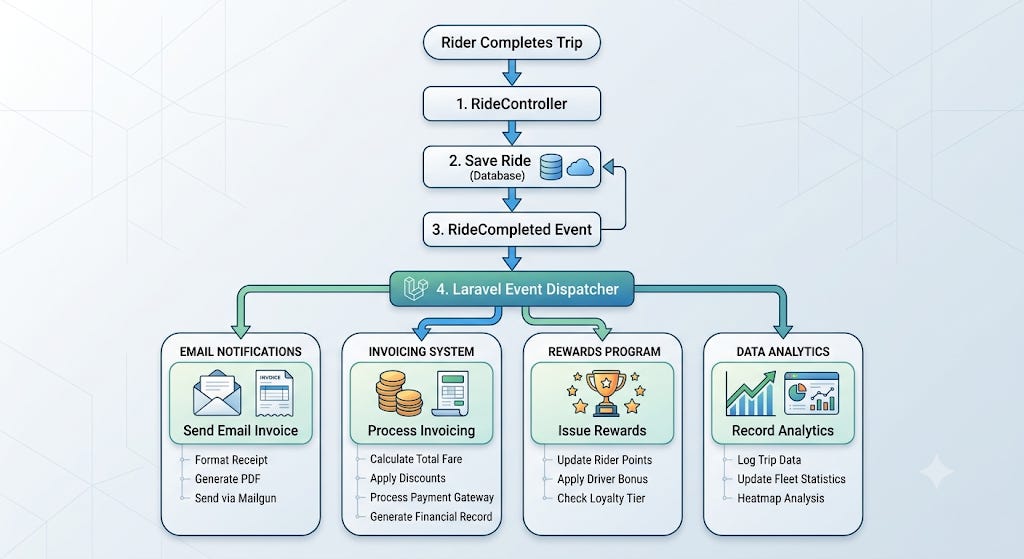
The controller has no idea who receives the event.
Laravel’s Event Dispatcher takes care of everything.
This is called Loose Coupling.
⚡ Why Is This Better?
Imagine tomorrow the business says:
“Whenever a ride completes, also notify our CRM system.”
Without Events:
You modify the controller.
Again.
With Events:
You simply create another listener.
RideCompleted

↓

SyncWithCRM Listener
No controller changes.
No service modifications.
No risk of breaking existing logic.
This follows the Open/Closed Principle (OCP):
Software should be open for extension but closed for modification.
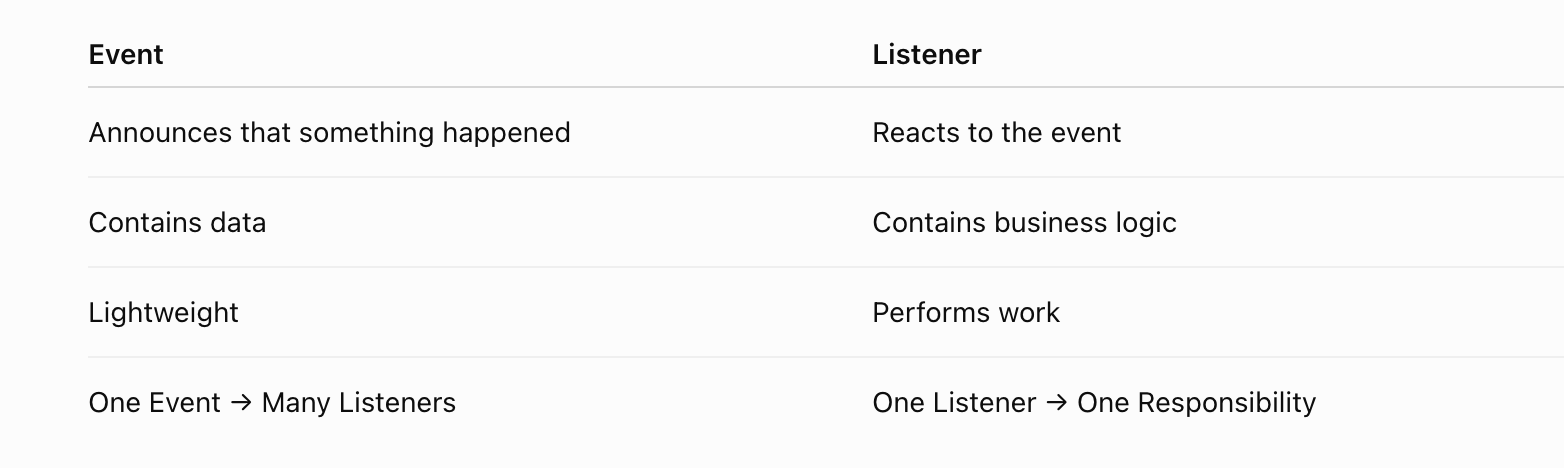
⚖️ Event vs Listener
🖥️ Create the Event
php artisan make:event RideCompletedLaravel creates:
app/Events/RideCompleted.php<?php
namespace App\Events;
use App\Models\Ride;
use Illuminate\Foundation\Events\Dispatchable;
use Illuminate\Queue\SerializesModels;
class RideCompleted
{
use Dispatchable, SerializesModels;
public function __construct(
public Ride $ride
) {}
}The Event contains only the data.
It does not
Send emails
Charge payment
Generate invoices
It simply announces
A ride has been completed.
✔️ Controller
<?php

namespace App\Http\Controllers;

use App\Events\RideCompleted;
use App\Models\Ride;
use Illuminate\Http\Request;

class RideController extends Controller
{
    public function completeRide(Request $request)
    {
        $ride = Ride::create([
            'driver_id' => $request->driver_id,
            'rider_id'  => $request->rider_id,
            'fare'      => $request->fare,
            'status'    => 'completed',
        ]);

        RideCompleted::dispatch($ride);

        return response()->json([
            'message' => 'Ride completed successfully.'
        ]);
    }
}
Notice how the controller has only two responsibilities:
Save the ride
Dispatch the event
✔️ Charge Customer Listener
php artisan make:listener ChargeCustomer<?php
namespace App\Listeners;
use App\Events\RideCompleted;
use App\Services\PaymentService;
class ChargeCustomer
{
public function __construct(
protected PaymentService $paymentService
) {}
public function handle(RideCompleted $event)
{
$this->paymentService->charge(
$event->ride
);
}
}Responsibility
Only charge payment.
Nothing else.
✔️ Send Receipt Email
php artisan make:listener SendRideReceipt<?php
namespace App\Listeners;
use App\Events\RideCompleted;
use App\Mail\RideReceiptMail;
use Illuminate\Support\Facades\Mail;
class SendRideReceipt
{
public function handle(RideCompleted $event)
{
Mail::to($event->ride->rider->email)
->send(
new RideReceiptMail($event->ride)
);
}
}we need to create a GenerateInvoice, UpdateDriverWallet, RewardRider, and StoreRideAnalytics all this listeners.
✔️ Register Listeners
In your event registration (such as an event service provider), associate the event with its listeners.
protected $listen = [

    RideCompleted::class => [

        ChargeCustomer::class,

        SendRideReceipt::class,

        GenerateInvoice::class,

        UpdateDriverWallet::class,

        RewardRider::class,

        StoreRideAnalytics::class,

    ],

];
🏆 Conclusion
Laravel Events and Listeners provide a clean and elegant way to build scalable, maintainable applications by separating business logic into independent, reusable components. Instead of overloading controllers with multiple responsibilities, you can simply dispatch an event and let dedicated listeners handle the tasks that follow. This approach promotes loose coupling, improves code organization, and makes it easier to extend your application as new business requirements arise.