

🧩 Introduction — Why JOINs Matter
Databases are built on relationships — and JOINs are how you bring those relationships to life.
Imagine running an e-commerce platform. You have one table for customers, one for orders, and one for products. To know which customer bought what, you need to connect these tables. That’s where JOINs come in.
In this post, we’ll walk through different types of MySQL JOINs with clear diagrams, real-world examples, and best practices to make your data relationships clean and efficient.
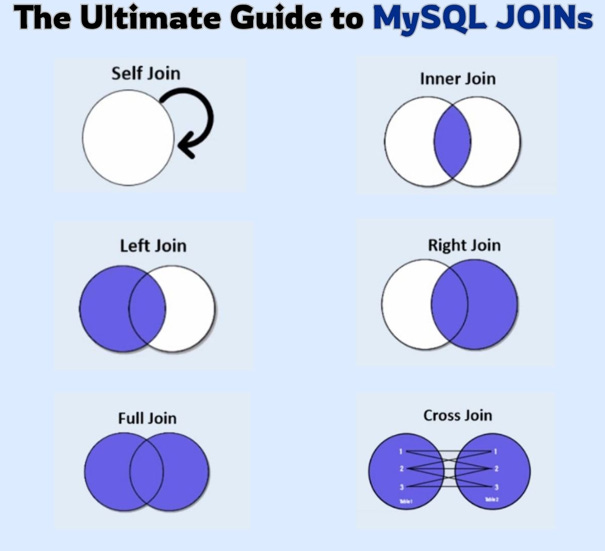
🔍 What is a JOIN in MySQL?
A JOIN in MySQL is used to combine rows from two or more tables based on a related column — usually a foreign key.
Syntax:
SELECT columns
FROM table1
JOIN table2
ON table1.common_column = table2.common_column;
🏪 Real-World Example Setup
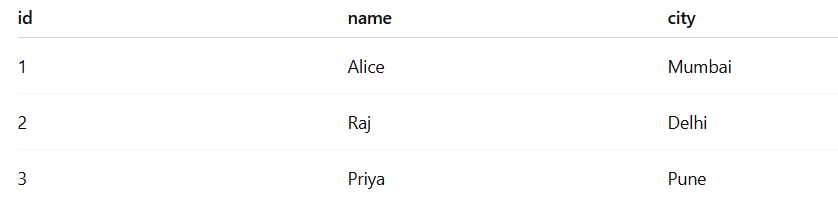
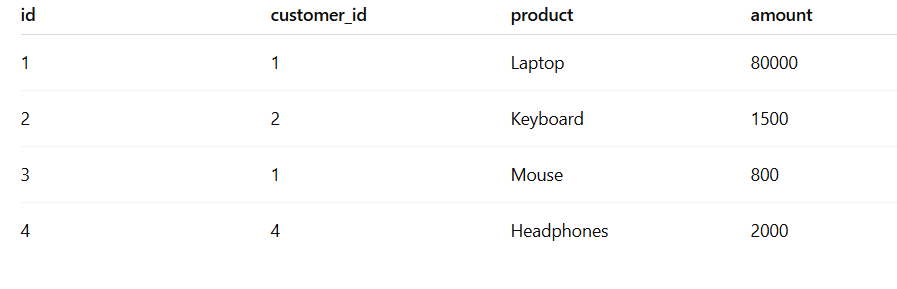
Let’s say you have a small online store with these two tables:
customers
orders
🔗 1. INNER JOIN — “Only Matching Data”
The INNER JOIN returns only the records that have matching values in both tables.
Example:
SELECT customers.name, orders.product, orders.amount
FROM customers
INNER JOIN orders
ON customers.id = orders.customer_id;
Result:

🧠 Use Case: When you want only customers who have placed orders.
💡 Tip: INNER JOIN is the most common join type used in reporting, analytics, and dashboards.
🔗 2. LEFT JOIN — “Include All from Left, Even Without a Match”
The LEFT JOIN returns all records from the left table (customers), and the matched rows from the right table (orders).
If no match exists, you’ll still get the customer — with NULLs in order columns.
Example:
SELECT customers.name, orders.product
FROM customers
LEFT JOIN orders
ON customers.id = orders.customer_id;
Result:

🧠 Use Case: You want a list of all customers — even those who haven’t placed any orders yet.
💡 Pro Tip: Great for reports like “inactive customers” or “potential leads.”
🔗 3. RIGHT JOIN — “Include All from Right Table”
The RIGHT JOIN is the mirror of LEFT JOIN. It returns all records from the right table, plus matching ones from the left.
Example:
SELECT customers.name, orders.product
FROM customers
RIGHT JOIN orders
ON customers.id = orders.customer_id;
Result:

🧠 Use Case: When you want to see all orders — even if some don’t have valid customers (e.g., deleted accounts).
💡 Note: RIGHT JOIN is less used in practice; LEFT JOIN is more readable and maintainable.
🔗 4. FULL OUTER JOIN — “All Records, Matched or Not”
MySQL doesn’t support FULL OUTER JOIN natively, but you can simulate it using UNION.
Example:
SELECT customers.name, orders.product
FROM customers
LEFT JOIN orders ON customers.id = orders.customer_id
UNION
SELECT customers.name, orders.product
FROM customers
RIGHT JOIN orders ON customers.id = orders.customer_id;
🧠 Use Case: You want everything — all customers and all orders, matched or unmatched.
🔗 5. CROSS JOIN — “Every Combination”
The CROSS JOIN returns the Cartesian product — every combination of rows between the two tables.
Example:
SELECT customers.name, orders.product
FROM customers
CROSS JOIN orders;
🧠 Use Case: Generating combinations — like product bundles or testing joins in analytics.
⚠️ Caution: If you have 1,000 customers and 1,000 orders, this will return 1,000,000 rows — use carefully.
🔗 6. SELF JOIN — “Join a Table to Itself”
A SELF JOIN allows comparing rows within the same table.
Example:
SELECT A.name AS customer1, B.name AS customer2, A.city
FROM customers A
JOIN customers B
ON A.city = B.city
AND A.id <> B.id;
Result:

🧠 Use Case: Finding customers from the same city, or comparing hierarchical data like employees and managers.
🧰 Best Practices for Using JOINs
✅ 1. Always use aliases (c, o) to make queries readable.
✅ 2. Use INNER JOIN by default unless you explicitly need unmatched rows.
✅ 3. Index foreign key columns to improve performance.
✅ **4. Avoid SELECT *** — choose only needed columns.
✅ 5. Use EXPLAIN to analyze query performance for complex joins.
🚀 Real-World Use Case: “Customer Insights Dashboard”
You’re building a dashboard that shows total orders and spend per customer.
Query:
SELECT c.name, COUNT(o.id) AS total_orders, SUM(o.amount) AS total_spent
FROM customers c
LEFT JOIN orders o ON c.id = o.customer_id
GROUP BY c.id;
Result:
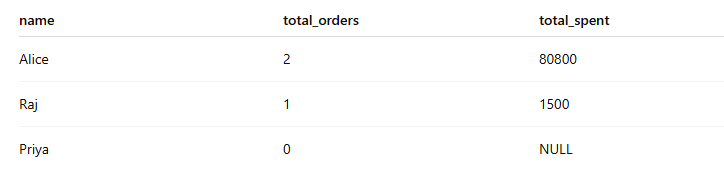
🧠 Insight: LEFT JOIN ensures even customers with zero orders appear in the results.
🧩 Conclusion — JOINs Are the Language of Relationships
Mastering JOINs is essential for turning raw data into insight.
Whether you’re building dashboards, APIs, or reports, understanding how to combine, filter, and relate data efficiently will make you a stronger database engineer.
JOINs are not just SQL syntax — they’re the bridge between your data and meaningful answers.
This is such a great resource for anyone learning SQL! Appreciate how you made complex concepts easy to visualize and apply.