

In distributed systems or microservices architecture, a single user request often flows through multiple services and logs. When an error occurs or performance issues arise, it becomes critical to trace the entire request flow. This is where Correlation IDs come in.
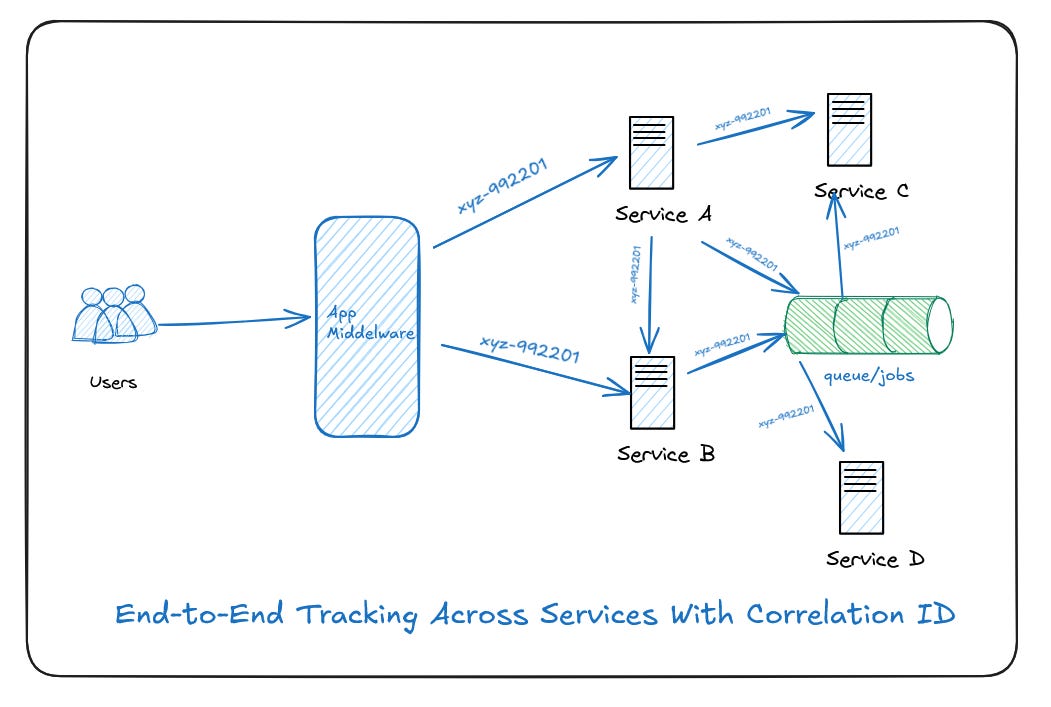
🧠 What Is a Correlation ID?
A Correlation ID is a unique identifier (usually a UUID) assigned to each incoming request. It helps trace that request across services and systems by tagging it in logs and headers.
Think of it like a request “tracking number.” You can search logs and trace the full journey of a request by this ID.
✅ Why Use Correlation IDs?
Imagine a front-end request that touches:
Frontend → Laravel API → Microservice A → Microservice B → DBWithout a correlation ID, debugging is painful. With it, you can trace:
Where the error occurred
How long each step took
What services were called
And all this with just one search term — the correlation ID.
🛠 How to Implement Correlation ID in Laravel
🧩Create Middleware
Let’s build a middleware that will:
Read
X-Correlation-IDfrom the incoming request header (if provided)Generate one if missing
Store it in the request attributes
Add it to logs and the response headers
📄 app/Http/Middleware/CorrelationIdMiddleware.php
<?php

namespace App\Http\Middleware;

use Closure;
use Illuminate\Http\Request;
use Illuminate\Support\Str;
use Illuminate\Support\Facades\Log;

class CorrelationIdMiddleware
{
    public function handle(Request $request, Closure $next)
    {
        $correlationId = $request->header('X-Correlation-ID') ?? (string) Str::uuid();

        // Set the correlation ID in the request for future use
        $request->attributes->set('correlationId', $correlationId);

        // Attach correlation ID to the logging context
        Log::withContext([
            'correlationId' => $correlationId,
        ]);

        $response = $next($request);

        // Add correlation ID to response headers
        $response->headers->set('X-Correlation-ID', $correlationId);

        return $response;
    }
}
🧩Register the Middleware
Register it globally in your app so it runs on every request.
📄 app/Http/Kernel.php
protected $middleware = [
    // ...
    \App\Http\Middleware\CorrelationIdMiddleware::class,
];
🧩Logging With Correlation ID
Now, anywhere in your Laravel app — controller, service, model — you can simply use:
Log::info('Processing payment');You don't need to manually pass the correlationId. It’s already part of the global logging context thanks to Log::withContext().
Example:
OrderController.php
<?php

namespace App\Http\Controllers;

use Illuminate\Http\Request;
use App\Services\OrderService;

class OrderController extends Controller
{
    protected $orderService;

    public function __construct(OrderService $orderService)
    {
        $this->orderService = $orderService;
    }

    public function create(Request $request)
    {
        $correlationId = $request->attributes->get('correlationId');

        $order = $this->orderService->createOrder($request->all());

        return response()->json([
            'message' => 'Order created successfully',
            'order' => $order,
            'correlationId' => $correlationId
        ]);
    }
}
PaymentController.php
<?php

namespace App\Http\Controllers;

use Illuminate\Http\Request;
use App\Services\PaymentService;

class PaymentController extends Controller
{
    protected $paymentService;

    public function __construct(PaymentService $paymentService)
    {
        $this->paymentService = $paymentService;
    }

    public function process(Request $request)
    {
        $correlationId = $request->attributes->get('correlationId');

        $payment = $this->paymentService->processPayment($request->all());

        return response()->json([
            'message' => 'Payment processed successfully',
            'payment' => $payment,
            'correlationId' => $correlationId
        ]);
    }
}
OrderService.php
<?php

namespace App\Services;

use Illuminate\Support\Facades\Log;

class OrderService
{
    public function createOrder(array $data)
    {
        Log::info("Creating new order");

        // Simulate order creation
        $order = [
            'id' => rand(1000, 9999),
            'items' => $data['items'] ?? [],
            'total' => $data['total'] ?? 0
        ];

        Log::info("Order created successfully", ['orderId' => $order['id']]);

        return $order;
    }
}
PaymentService.php
<?php

namespace App\Services;

use Illuminate\Support\Facades\Log;

class PaymentService
{
    public function processPayment(array $data)
    {
        Log::info("Processing payment");

        // Simulate payment processing
        $payment = [
            'payment_id' => rand(10000, 99999),
            'order_id' => $data['order_id'] ?? null,
            'amount' => $data['amount'] ?? 0,
            'status' => 'success'
        ];

        Log::info("Payment processed successfully", [
            'paymentId' => $payment['payment_id'],
            'orderId' => $payment['order_id'],

        ]);

        return $payment;
    }
}
routes/api.php
use App\Http\Controllers\OrderController;
use App\Http\Controllers\PaymentController;

Route::post('/order', [OrderController::class, 'create'])->middleware('correlation');
Route::post('/payment', [PaymentController::class, 'process'])->middleware('correlation');
Logs:
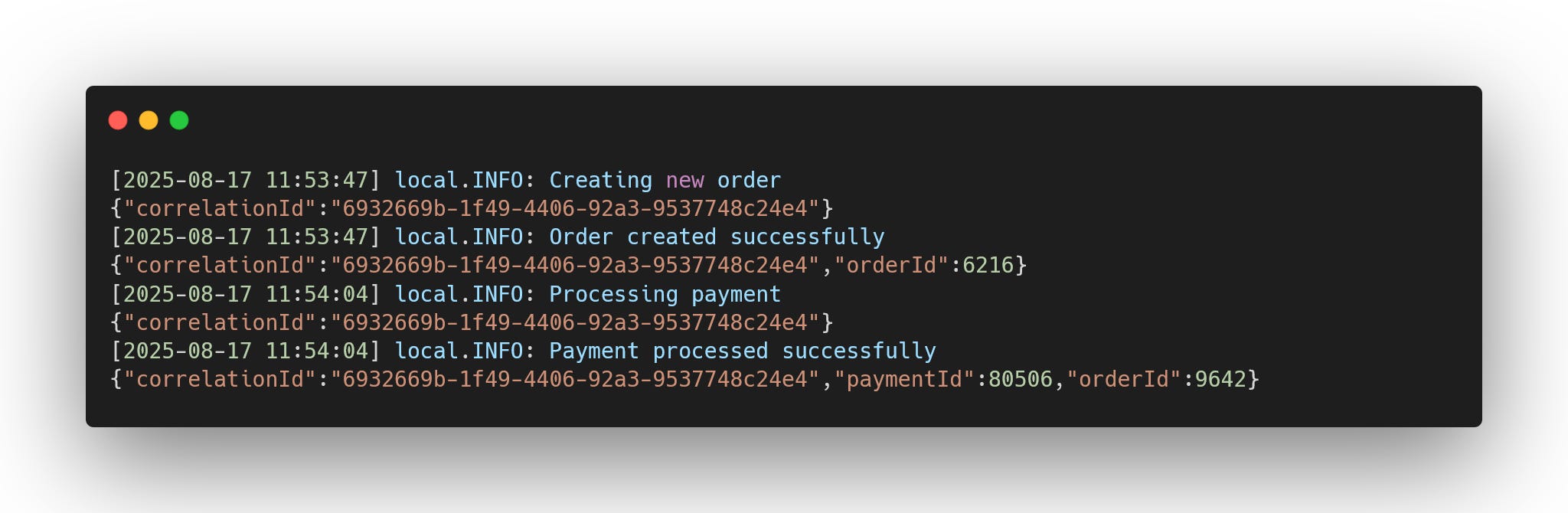
✅ Now both Order and Payment logs are tied with the same correlationId.
This helps you trace the entire request lifecycle across services.
🔁 Passing Correlation ID to External Services
If your Laravel app calls other services, be sure to forward the correlation ID:
use Illuminate\Support\Facades\Http;

$response = Http::withHeaders([
    'X-Correlation-ID' => request()->attributes->get('correlationId')
])->get('http://api.internal/payment');
👉 “But What About Queued Jobs?”
So far, correlation IDs have been flowing smoothly across requests and services. But what happens when you dispatch a job to the queue?
Surprise: your correlationId doesn’t automatically follow along. Why? Because jobs run in a completely separate process from the web request. That means our precious correlationId is left behind… unless we explicitly carry it forward.
Laravel queues don’t automatically carry the correlation ID. If you need it in jobs, pass it manually:
// Dispatch job with correlationId
dispatch(new MyJob($data, correlation_id()));

// In the Job
public function handle()
{
    Log::withContext(['correlationId' => $this->correlationId]);
    Log::info("Processing payment inside job...");
}
And store it in the job to set the log context again when the job runs.
📦 Bonus: Helper Function (Optional)
Add this to a global helpers file:
if (!function_exists('correlation_id')) {
    function correlation_id(): ?string {
        return request()?->attributes->get('correlationId');
    }
}
Now you can use correlation_id() anywhere in your app.
✨ Final Thoughts
Implementing a Correlation ID strategy in Laravel improves:
Debugging across services
Consistency in logs
Traceability in production environments
This is especially useful in microservice systems, APIs, and any complex application where logs are your best source of truth.
With just one middleware and a few config changes, you gain powerful observability into your Laravel app. Start small, and you’ll thank yourself the next time you’re debugging a production issue!